Alert icon Keyboard navigation enabled.
Alert icon TAB or Shift+TAB to navigate across. Down ↓ to open menu. ESC to close menu.
Alert icon Down ↓ to select section. Right → to activate. Up ↑ / Down ↓ / Tab to traverse all. ESC to exit.
BeyondTrust
Skip to content Use space or enter to skip.

What can we help you find today?

Instant Results
  • Website Results
  • Technical Documentation

Filter Options

Focus your search

Filtering by

Your recent searches:

Contact Us Chat with Sales Get Support
  • English
  • Deutsch
  • français
  • español
  • 한국어
  • português
  • Home
  • Resources
  • Blog
  • “Evil VM”: How Attackers Escalate from Guest Access to Entra Admin In 9 Easy Steps current page
Link copied

“Evil VM”: From Guest Compromise To Entra Admin In 9 Easy Steps

Jul 17, 2025

This blog reveals a novel attack path in Microsoft Entra ID (formerly Azure AD) that leverages a little-known Azure VM feature to escalate privileges from guest access to full Entra admin. By combining device identity abuse with phishing techniques to steal Primary Refresh Tokens (PRTs), attackers can bypass traditional security controls and perform stealthy lateral movement. Building on our previous Restless Guests research, we unpack each stage of the “Evil VM” attack chain and provide practical guidance for defenders to detect and mitigate these risks.

Authors:
Simon Maxwell Stewart Headshot 2024
Simon Maxwell-Stewart
Staff Security Researcher
400x400 Linkedin X Profile
Phantom Labs™
BeyondTrust
Evil VM
“Evil VM”: From Guest Compromise To Entra Admin In 9 Easy Steps
Simon Maxwell Stewart Headshot 2024
Simon Maxwell-Stewart
Staff Security Researcher
400x400 Linkedin X Profile
Phantom Labs™
BeyondTrust

How Device Identity Abuse and Device Code Phishing Lead to PRT Theft

White chain icon to symbolize the ability to copy a link
Link copied
Check mark to visually show text has been copied

In this blog, we explore how a niche Azure VM feature can be leveraged to bypass controls that typically prevent users from joining devices to Entra ID. We will then demonstrate how to combine this abuse with known primary refresh token (PRT) theft techniques and show how these techniques amplify the risk for defenders. Finally, we will cover the essential defenses to mitigate these Entra ID lateral movement techniques.

This blog builds on our previous Restless Guests research, in which we demonstrated how B2B guests in Entra ID (formerly Azure AD) can become subscription owners in your tenant without explicit authorization. We will also spend some time detailing the process of inserting a “restless guest” into a target directory.

“If I have seen further it is by standing on the shoulders of giants” - Isaac Newton

A massive thank you to Dirk-jan Mollema for publishing ROADtools, authoring the phishing attack I reference below, and for graciously helping me debug and fix my transport key decryption problems. Endless gratitude to Dr. Nestori Syynimaa for sharing AADInternals, a treasure trove of useful blogs and tools that were also essential to the attack detailed. A final thanks to my manager, Fletcher Davis, who pointed me in the right direction and pushed me not to give up.

What Device Identity Means in Entra ID Security

White chain icon to symbolize the ability to copy a link
Link copied
Check mark to visually show text has been copied

Let’s begin with the basics of devices in Entra ID. Devices are nuanced security principals. While they can authenticate against the directory, they cannot be directly assigned Directory roles or RBAC roles like users or service principals. For instance, a device cannot request an access token on its own.

Their primary purpose is to provide identities so they can be monitored, secured, and leveraged by administrators to determine access to resources. For example, a user on a trusted device may be granted more access than they would get on a machine that is not a trusted device identity. This is achieved through Conditional Access Policies, where devices are a key signal as to whether a policy will grant a user access to a resource.

Devices (endpoints) are a crucial part of Microsoft’s Zero Trust concept. Devices can be Registered, Joined, or Hybrid Joined to Azure AD. Conditional Access uses the device information as one of the decisions criteria to allow or block access to services. -- Dr Nestori Syynimaa (@DrAzureAD)

Devices gain an identity in the Entra directory either as "registered devices" (user-owned "bring-your-own-devices"), or "joined devices" (organization-owned). In both scenarios, Entra ID generates a unique device identity through a private/public certificate.

Beyond the certificate, a transport key adds an essential layer of security. This key encrypts sensitive data sent from Entra ID to the device, serving as a "proof of possession", since only the device holding the key can decrypt the content. Given their critical role in device identity and security, these certificates and keys are typically secured within a Trusted Platform Module (TPM). The TPM is a hardware security chip (or firmware module) found on Windows machines, designed specifically for the secure storage and management of cryptographic keys and secrets.

An aspect of device behavior that is especially important to attackers is how Entra ID will issue Primary Refresh Tokens to joined devices. So, let’s dive into PRTs next.

What Primary Refresh Tokens Are and Why They Matter in Entra ID

Primary Refresh Tokens (PRTs) are used for single sign-on (SSO) within Entra ID. They are issued to users logging in to Entra ID from a joined device. A PRT is initially valid for 14 days and can extend to 90 days with continuous renewal, provided the user remains active on the device. The core function of a PRT is to enable seamless SSO, allowing users to request subsequent refresh and access tokens for various Microsoft applications and services without re-authenticating. To protect these high-value tokens, it is highly recommended that you secure them using the TPM.

For a deeper dive into PRTs, I recommend the following articles:

  • https://aadinternals.com/post/prt/ 
  • https://dirkjanm.io/abusing-azure-ad-sso-with-the-primary-refresh-token/
  • https://dirkjanm.io/digging-further-into-the-primary-refresh-token/
  • https://dirkjanm.io/introducing-roadtools-token-exchange-roadtx/

How Attackers Abuse Device Identities in Entra ID

White chain icon to symbolize the ability to copy a link
Link copied
Check mark to visually show text has been copied

Given that Entra-joined devices are a crucial signal in Conditional Access Policy evaluation, we were surprised to learn that the default permission assigned to Entra users allows them to join a device to the Entra tenant. This default, however, does not apply to Entra B2B guests. Unless explicitly granted, guests have no rights to join or register devices in Entra ID.

Implementation: Within Entra ID, configure the “Users may join devices to Entra ID” setting to restrict device registration to a specified group. For example, assign onboarding teams to handle device registrations, limiting broad access.

Benefit: Only approved users can join devices, reducing the risk of unwanted devices in your environment. -- msp4msps

Figure 1: Controls that prevent users from joining devices
Figure 2: Warning message showing that Entra-joined VMs can still be created by users, even when controls are in place to restrict device joins

In the context of our previous Restless Guests research—where an Entra guest account can obtain ownership over a subscription—it appears possible to circumvent the device joining controls shown in Figure 1 and Figure 2. Virtual machines (VMs) created within this subscription can be configured without device protections, exposing key data and token material, such as device certificates, transport keys, and any PRTs that are issued to it.

Since the user can create a Windows VM, they can choose to provision it with the “Azure AD based Windows Login” extension. During deployment, this VM will be joined to Entra ID, as shown below in Figure 3. The extension’s purpose is to facilitate login to the VM using the user’s Entra ID credentials. Remote access to the VM can then be granted by assigning the user one of the following RBAC roles: “Virtual Machine User Login” or “Virtual Machine Administrator Login”.

Figure 3: The LuckyVM Virtual Machine showing that it’s joined to Entra ID

Why the Evil VM Attack Path Creates Entra ID Privilege Escalation Risk

White chain icon to symbolize the ability to copy a link
Link copied
Check mark to visually show text has been copied

When a device is joined to Entra ID, Conditional Access Policies are configured with the expectation that these devices are owned by the organization.

Recalling our prior Restless Guest research, by default, a guest with the appropriate billing role in their home directory can obtain ownership of a subscription in your directory. If a threat actor were to sign up for a simple pay-as-you-go Microsoft Account, they would become the billing owner of the account, granting them the privilege to create subscriptions. Another default is that any user/guest can invite other guests into the directory. Therefore, if a threat actor compromises any user or guest in your directory, they could invite their newly created Microsoft Account owner into your tenant and create a rogue subscription within.

Subscription owners have the privilege to create any infrastructure within their subscriptions. This allows an attacker to provision a Windows VM with the Azure AD login extension, which will then automatically join as a device. This remains true even if no users are allowed to join devices, as the process can leverage a managed identity. What makes these “evil VMs” particularly dangerous is that the attacker can choose whether this Windows VM has TPM enabled. This is accomplished by selecting “Gen 1” type images and “Standard” security type, which results in no TPM protections.

In summary:

A threat actor who is in control of any starting guest/user, with default settings, can laterally move to gain local admin rights to a VM joined device that doesn’t have TPM protections!

The absence of TPM protections means any PRT issued to the VM will be easy to harvest with a red-team tool such as Mimikatz. The remainder of this article will detail how to escalate privileges further by outlining how a known phishing attack, “device code phishing”, could operate in this context.

How Device Code Phishing Enables PRT Theft

White chain icon to symbolize the ability to copy a link
Link copied
Check mark to visually show text has been copied

This attack, first detailed by Dirk-Jan Mollema, exploits our ability to upgrade a refresh token, specifically for the Microsoft Authentication Broker application, to gain access to a full Primary Refresh Token.

The key advantage of device code phishing is that at no point is the user redirected to a bad URL; the phished users only ever interact with legitimate Entra ID URLs. We leverage the OAuth2 device code standard flow, which allows one device to start an authentication process that is completed by another, with the resulting token then sent back to the original device.

As stated in the original article, a usual limitation of the attack is the following:

Registering or joining devices could be restricted in the tenant to only specific users. In general, joining devices is restricted more often than registering them. -- Dirk-Jan Mollema

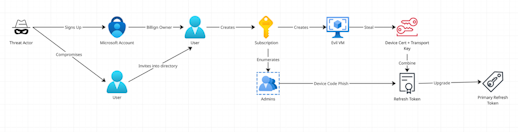
Furthermore, guests have no out-of-the-box rights to register or join devices; only members can do either. However, as we just demonstrated, we can overcome this limitation using the Entra ID login extension. The full attack path then unfolds as follows:

Figure 4: Attack path starting from compromised guest to PRT via device code phishing

Let’s go through each step in the process.

Step-by-Step: How the Evil VM Attack Reaches PRT Theft and Entra Admin

1) Compromise a Guest Account to Establish Initial Foothold in Entra ID

Let’s assume a threat actor compromises a B2B guest account within a target tenant. We’ll assume this guest has no role assignments, group memberships, or any access explicitly granted by the tenant’s administrators. Our subsequent lateral movement will rely solely on out-of-the-box privileges and default tenant controls, demonstrating a real-world Entra ID guest account takeover scenario.

It's worth pointing out that there are a few different ways we could establish a viable foothold:

  • Compromise a user account
  • Get invited into the target tenant

2) Invite a “Restless Guest” with Billing Permissions into the Target Tenant

To introduce a “restless guest” in the resource tenant we are attacking, a specific setup is required. Let’s create a user in a separate tenant that we, as the attacker, control (our home tenant). The easiest way to achieve this is to sign up for a Microsoft Account using a credit card. We’ll even get $200 worth of free credits! The account used for signing up will automatically become the billing owner, as it is directly linked to the credit card used for billing.

“By default, all users in your organization, including B2B collaboration guest users, can invite external users to B2B collaboration. If you want to limit the ability to send invitations, you can turn invitations on or off for everyone, or limit invitations to certain roles.” -- Microsoft Ignite

Next, we need to invite this billing owner into the tenant we intend to attack. Due to the permissive Entra ID invite defaults, we can use our initial compromised guest account to invite this billing owner into the target tenant. Consequently, we now have a guest user in the resource tenant we are attacking, who is also a billing account owner in their home tenant.

3) Use Guest Billing Rights to Create a Subscription in the Target Directory

While in our home tenant, we can create a subscription. By default, we are also allowed to transfer this subscription into the resource tenant where this user is a guest.

If performing this in the portal, when creating a subscription, we specify the ‘subscription directory’ dropdown under ‘Advanced’ as resource. Once this is done, our guest is now the proud owner of a subscription.

Figure 5: Guest creating subscription in resource tenant

4) Provision an Evil VM Without TPM to Enable PRT Theft

Subscription owners are free to create any resources they like within their subscription, giving us full privileges to make an evil VM. The primary goal of this step is to gain local admin access to a VM without TPM protections. We want a VM without TPM protections to make stealing the PRT easy. We accomplish this by choosing a “Gen 1” with security type “Standard”.

Doing so in the portal looks something like this:

Figure 6: An insecure VM being created without TPM protections

5) Join the VM to Entra ID to Generate a Device Identity for Lateral Movement

We will also ensure the VM becomes an Entra ID-joined device. This configuration means the VM will have its own identity, allowing it to authenticate against the directory.

In the portal, we can achieve this during the VM creation process, by navigating to the “Management” tab, and selecting “Login with Microsoft Entra ID”.

Figure 7: Insecure VM being created with Entra ID login extension

We will also enter local admin credentials for the machine and then hit create. Once the VM is deployed, we can run “dsregcmd /status” on it to check both its TPM protection and join status.

Figure 8: Status of a guest-created VM that is an Entra ID-joined device

Interestingly, we can also join devices without necessarily installing this extension. This technique was first explored in this article. Decompiling the extension’s binary reveals that it is essentially a simple wrapper for dsregcmd.exe. We can manually attach our own Managed Identity, change some registry settings, and then call “dsregcmd.exe /AzureSecureVMJoin”.

Figure 9: Source code of Entra ID login extension

6) Extract Device Certificates and Transport Keys to Create a Persistent Backdoor

Since we have local admin access on the VM, we can steal the device certificate. This device identity will persist even if the guest account, the VM itself, or the entire subscription is deleted. Once stolen, we can authenticate as this device identity on a completely different machine. Congratulations, we are the proud owner of a device backdoor.

We can achieve this with AADInternals-Endpoints:

7) Enumerate Entra ID Admin Accounts via IAM Role Inheritance

To successfully phish users, we will need their details, such as names and emails. Thankfully, we can often obtain admin details by inspecting our newly created subscription’s IAM role assignments. Any users who have a role at the root management group will automatically inherit those permissions into our guest-created subscription. This typically happens when Global Admins toggle a setting in Entra ID that grants them basic access to all subscriptions within the tenant.

In the portal we do this by simply inspecting the “Access Control (IAM)” tab of the subscription, and then looking at the “Role Assignments”.

Figure 10: Guest enumerating admins from the tenant

8) Phish a User via Device Code Flow to Harvest a Full Primary Refresh Token (PRT)

Because we have a stolen device certificate, we can combine it with a special kind of refresh token and upgrade it to a PRT. This technique was first published by Dirk-jan Mollema. While we recommend reading the original article for a detailed understanding of the technique, at a high level, this is what we are doing:

  • Starting a device code OAuth flow, requesting a refresh token for the enrollment.manage.microsoft.com resource with the Microsoft Authentication Broker client id.
  • Phishing an admin to complete the device code flow, and gaining the resulting refresh token.
  • Upgrading the refresh token by combining it with our previously stolen device certificate (only this particular client and resource refresh token allows for a PRT upgrade).

If you want to try the phishing step, it can be implemented using ROADtools:

Attackers are using this technique in the wild, succeeding, and making news on Microsoft’s own blog. In fact, there are phishing kits for red teamers that support this flow. So, assuming we land a successful phish, we simply upgrade our refresh token to a PRT by using ROADtools again:

9) Use the Stolen PRT to Authenticate as the Phished Admin in Entra ID

We can then use this PRT to gain access to any Azure service we like:

Congratulations; you are now global admin!

Figure 11- PRT allows login to the azure portal as the phished admin

How to Defend Against Evil VM, Device Code Phishing, and PRT Theft in Entra ID

White chain icon to symbolize the ability to copy a link
Link copied
Check mark to visually show text has been copied

The above attack chain leverages default settings at each stage, so preventing attacks of this nature requires careful systems hardening. The following steps are HIGHLY recommended:

Step 1: Restrict Guest Invitations to Reduce Entra ID Privilege Escalation Risk

Allowing only specified users to invite guests into the directory drastically reduces the initial attack vector.

Figure 12: Entra ID controls that restrict who can invite guests into the directory

Step 2: Block Subscription Transfers to Stop Guest-to-Owner Escalation

Allowing only specified users to transfer subscriptions into the directory prevents any guest from utilizing their billing role permissions to become a subscription owner inside the directory.

Figure 13: Controls in Entra ID that prevent guests transferring subscriptions into the resource directory

Step 3 :Enforce TPM-Backed VM Policies to Reduce PRT Theft Risk

Block the creation of “Gen 1” VMs within any subscription attached to the directory. Gen 1 VMs lack TPM (Trusted Platform Module) protections, making it significantly easier for threat actors to extract certificates and secrets from the device.

Refer to the Azure policy for allowed VM SKUs and apply it at the root management group level.

Step 4: Detect Device Code Phishing and Suspicious Entra Device Creation

If business constraints mean guest controls in the prior steps can’t be put in place, defenders may need to resort to detections to catch restless guests that are moving laterally. This poses challenges because an attacker can evade detections by creating persistent federated access via a managed identity, as detailed by this article. After creating such a backdoor, guests can transfer the subscription ownership and evade the “Guest accounts with owner permissions on Azure Resources” displayed by Microsoft Defender for Cloud. Ironically as a subscription owner, attackers can manually silence these alerts as well.

Figure 14 - Evading Microsoft Defender for cloud alerts by silencing them

Moreover, attackers could be sneaky and give ownership of the subscription / Azure resources to real admins (gaining the principal id using the enumeration technique above). This would go a long way to make a subscription and its resources appear legitimate; the attacker only needs ‘contributor’ level RBAC permission. Even then, an attacker could relinquish all RBAC privileges once they have local admin to an Evil VM. In this case, the following detection rules provide a best effort for detecting the full range of possible attacks:

  • Guest or Managed Identities assigned an RBAC role of ‘Owner’ or ‘Contributor’ on Azure resources
  • VMs that are created without TPM protections
  • Device Identities that correspond to VMs identified by the previous rule
  • Device code authentications from the Microsoft Authentication Broker client to the enrollment resource.

Key Takeaways for Closing Entra ID Privilege Escalation Paths

White chain icon to symbolize the ability to copy a link
Link copied
Check mark to visually show text has been copied

The “Evil VM” attack path reveals how default configurations in Entra ID can be exploited to escalate privileges from guest access to full admin control through device identity abuse and Primary Refresh Token (PRT) theft. By tightening guest invitation policies, restricting subscription transfers, and enforcing secure VM configurations, organizations can significantly reduce the risk of lateral movement in Entra ID environments. Defenders must treat device identities and token-based access with the same scrutiny as user accounts to close these hidden privilege escalation pathways.

Want to understand how your Entra ID environment holds up against identity-based attack paths? Let our Identity Security Risk Assessment uncover any misconfigurations in your environment before threat actors can.

About the Author

White chain icon to symbolize the ability to copy a link
Link copied
Check mark to visually show text has been copied
Simon Maxwell Stewart Headshot 2024
Simon Maxwell-Stewart
Staff Security Researcher

Simon Maxwell-Stewart is a University of Oxford physics graduate with over a decade of experience in the big data environment. Before joining BeyondTrust, he worked as a Lead Data Scientist in healthcare, and successfully brought multiple machine learning projects into production. Now working as a "resident graph nerd" on BeyondTrust's security research team, Simon applies his expertise in graph analysis to help drive identity security innovation.

400x400 Linkedin X Profile
Phantom Labs™
BeyondTrust

BeyondTrust Phantom Labs™ believes the best way to fully understand cybersecurity threats is to work closely with our customers and partners, conducting real world research into the attacks that matter most to them. By dissecting emerging attack methods and exploitation techniques of threat actors, as well as conducting novel research, the team’s mission is to help organizations defend against identity threats. 

Learn More

White chain icon to symbolize the ability to copy a link
Link copied
Check mark to visually show text has been copied
Blog
Pwning AI Code Interpreters in AWS Bedrock AgentCore
Blog
Restless Guests: The True Entra B2B Guest Threat Model
Blog
How to Detect Session Hijacking Before It’s Too Late: A Data Science & Behavioral Modeling Approach
Blog
A Guide to Using Longitudinal Data Analysis for Improved Identity Threat Detection
Latest Posts
  • 14 Password Management Best Practices
    May 28, 2026 14 Password Management Best Practices
    Blog
    12m
  • A Security Researcher’s Guide to Understanding Copilot Studio AI Agents
    May 26, 2026 A Security Researcher’s Guide to Understanding Copilot Studio AI Agents
    Blog
    3m
  • How to Secure Cloud-Native Infrastructure at Scale and Speed: A Conversation with Madhu Adireddi
    May 21, 2026 How to Secure Cloud-Native Infrastructure at Scale and Speed: A Conversation with Madhu Adireddi
    Blog
    5m
  • Cybersecurity as a Boardroom Priority for Major African TelCos
    May 12, 2026 Cybersecurity as a Boardroom Priority for Major African TelCos
    Blog
    8m
  • Geopolitics and Cybersecurity: Why Attackers Go After Identities and Privileged Access First
    May 11, 2026 Geopolitics and Cybersecurity: Why Attackers Go After Identities and Privileged Access First
    Blog
    4m
Related
  • Protecting the Government Workforce of the Future with Secure Remote Access
    Jan 14, 2021 Protecting the Government Workforce of the Future with Secure Remote Access
    Blog
    1m
  • Using Application Control & Allow / Deny Listing to Protect against Malware, Threat Actors, & LotL Exploits
    Mar 31, 2021 Using Application Control & Allow / Deny Listing to Protect against Malware, Threat Actors, & LotL Exploits
    Blog
    1m
Share this Article
  • Link
Tags
  • Azure VM
  • BeyondTrust Phantom Labs
  • BeyondTrust Research Team
  • Device Identity Abuse
  • Entra ID Threat
  • Microsoft Entra ID
  • Novel Threat
  • Paths To Privilege
  • Phantom Labs
  • Phishing Attack
Stay up to Date
Get the latest news, ideas, and tactics from BeyondTrust. You may unsubscribe at any time.

Keep up with BeyondTrust

Customer Support Get Started
  • LinkedIn
  • X
  • Facebook
  • Instagram
  • Add BeyondTrust as a preferred source on Google
  • Privacy
  • Security
  • Manage Cookies
  • Do Not Sell My Data
  • WEEE Compliance

Copyright © 2003 — 2026 BeyondTrust Corporation. All rights reserved. Other trademarks identified on this page are owned by their respective owners. BeyondTrust Corporation is not a chartered bank or trust company, or depository institution. It is not authorized to accept deposits or trust accounts and is not licensed or regulated by any state or federal banking authority.

Prefers reduced motion setting detected. Animations will now be reduced as a result.
MS Vulns Report 2026 orange background 1

New: 2026 Microsoft Vulnerabilities Report

Access the report for expert analysis of Microsoft's vulnerability and security landscape, breaking down key trends, security shifts, emerging risks—and what it all means for you.

Get the Report

New: 2026 Microsoft Vulnerabilities Report: Access the report for expert analysis of Microsoft's vulnerability and security landscape, breaking down key trends, security shifts, emerging risks—and what it all means for you.

Get the Report