

Restless Guests: The True Entra B2B Guest Threat Model


Restless Guests: The True Entra B2B Guest Threat Model
BeyondTrust researchers discovered that Entra guest users with the right billing roles can create subscriptions and become Owners—without any explicit permissions in the target tenant. This blog unpacks how attackers could abuse this by-design behavior to pivot, persist, and potentially escalate privilege inside Microsoft Entra environments. Learn what’s at stake, how this technique works, and what defenders should do next.
The Entra Access Flaw Hiding in Plain Sight
Inviting external guest users is a common and useful practice for collaboration with external partners. These guest accounts are typically assigned limited privileges to reduce risk in the event they become compromised, but they exist outside of your organization's controls. This guest behavior may surprise Azure administrators because typical threat models and best practices don’t account for an unprivileged guest creating their own subscription within your tenant.
In this blog, we’ll break down how little-known Microsoft Billing permissions can be misused by Entra guest users to create subscriptions in external tenants where they hold no direct privileges. You’ll learn how attackers can exploit this unexpected access to achieve unauthorized reconnaissance and persistence in the defender’s Entra ID. We also detail how some of these methods could lead to further privilege escalation in certain scenarios. We’ll walk through real-world abuse paths, explore why this gap in access control is so dangerous, and outline what defenders need to know now.
In other words, the guest you invited could quickly overstay their welcome.
Azure & Entra ID Basics
The basics of Entra and Azure permissions are well documented. Entra ID is an Identity Provider (IdP) within Azure. It allows identities to be assigned directory roles, like Global Administrator, which allow administration of different aspects of the directory.
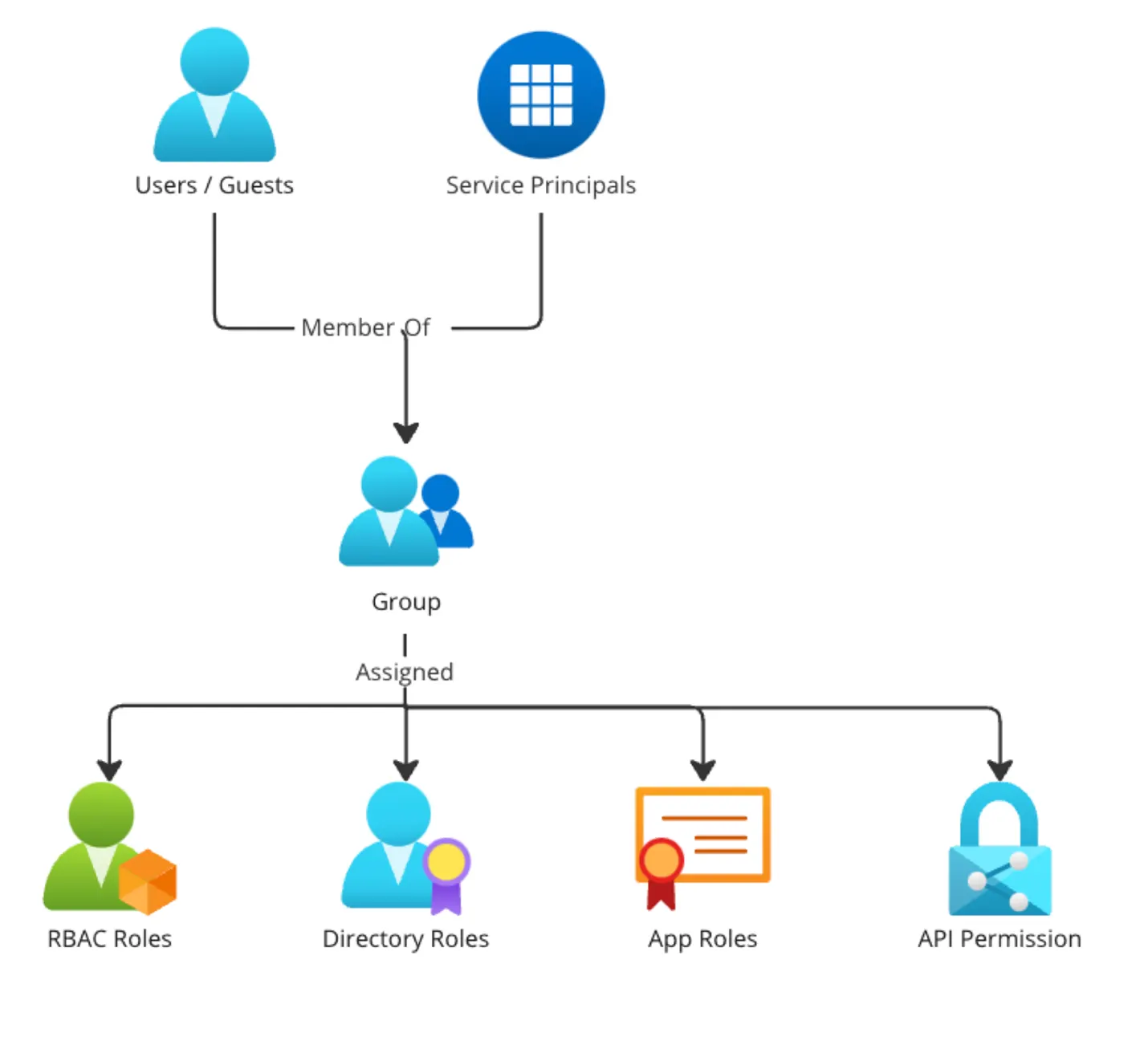
Azure resources are logically isolated into subscriptions, and users inside Entra can also be assigned RBAC roles that allow them to administer the resources inside a particular subscription.
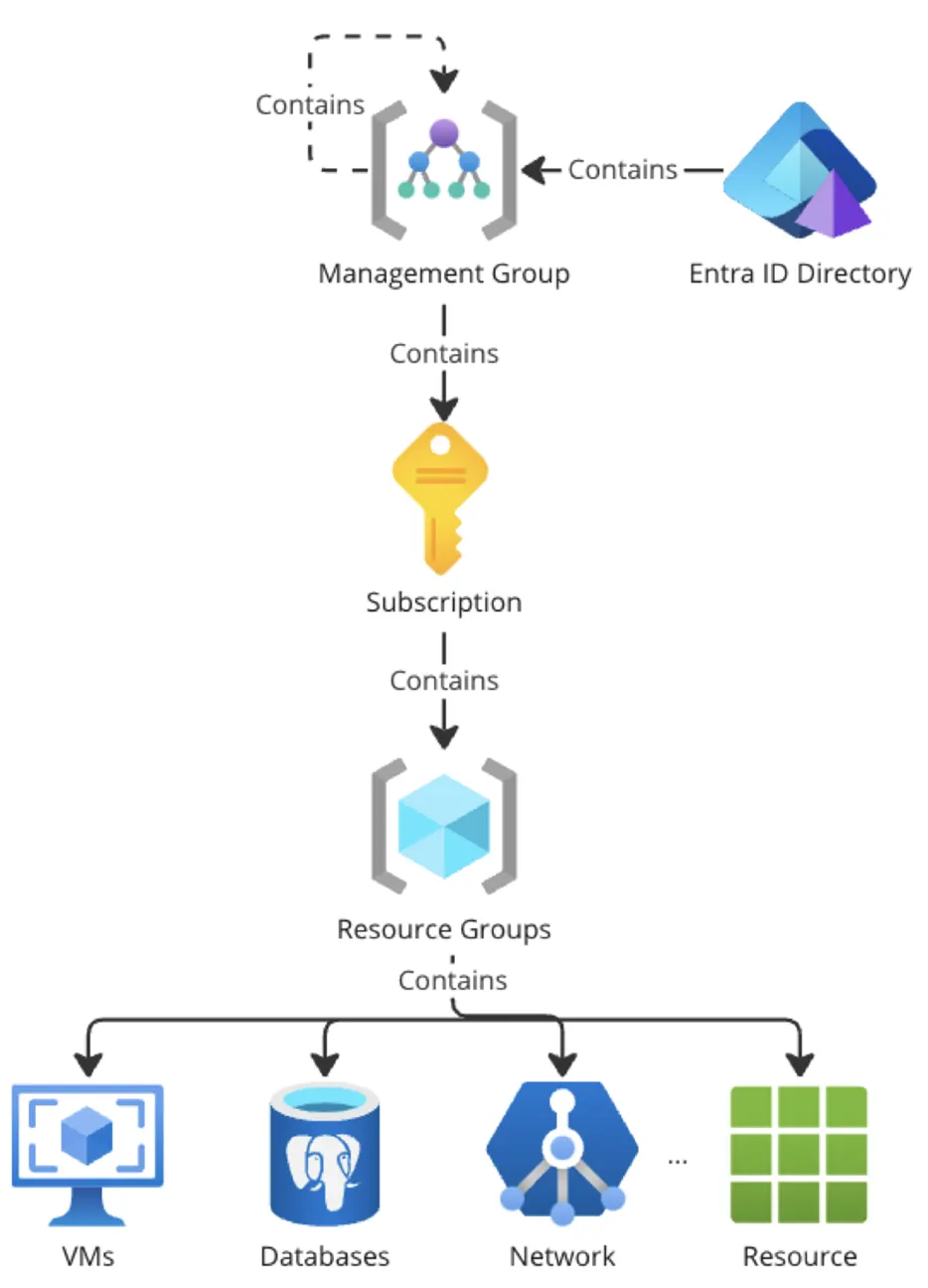
However, there’s an entirely parallel set of lesser-known permissions that relate to billing management and subscription creation. When considering best practices for locking down Entra ID or performing an Azure threat model, the focus is generally on administrative permissions, not billing permissions. This is especially true when thinking about restricting external guest accounts.
Billing Agreements
Microsoft offers many ways to pay for an Azure subscription, but we are going to focus on two: Enterprise Agreements (EA) and Microsoft Customer Agreements (MCA).
Enterprise Agreements are three-year agreements for commercial organizations to purchase Microsoft products and services, now considered legacy. Microsoft Customer Agreements are a transactional, volume-based licensing agreement that can cover multiple licensing agreements all under one account. Both allow you to create Microsoft infrastructure, like Azure subscriptions, and govern how that gets billed.
Critically, pay-as-you-go licensing also falls under an ad-hoc MCA. This means the typical tenant and subscription an individual might create with a credit card falls under an MCA and in our case, can be used to abuse the misconfigurations we’ll be discussing.
Enterprise Agreements
EAs are comprised of three different components. The enrollment is at the top of the hierarchy and represents the agreement you have with Microsoft. The enrollment can optionally be sub-divided into different departments. These departments can then contain accounts, which is what subscriptions will be ultimately billed against.
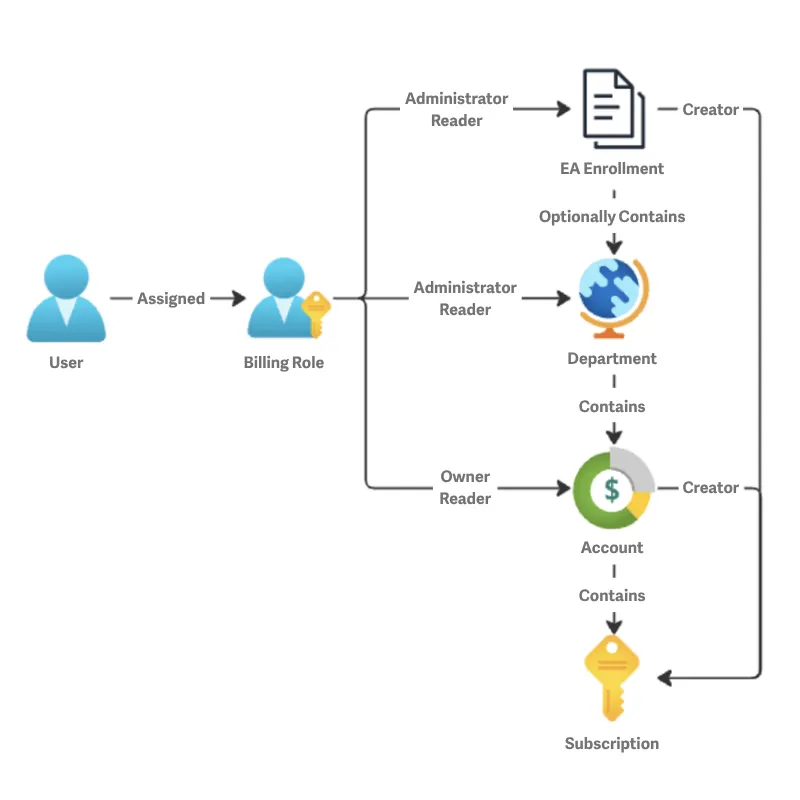
The available Azure Enterprise Agreement roles are as follows. EA billing roles can only be assigned to individual user accounts. A large percentage of the billing roles can create subscriptions, shown below:
Billing Role | Summary | Ability to Create Subscription |
|---|---|---|
Enterprise Administrator | View and manage all aspects of the EA | Yes |
EA Purchaser | Can purchase Azure services, but aren't allowed to manage accounts | No |
Department Administrator | View and manage all aspects of the department, and add account owners | Not directly, but added account owners can |
Account Owner | Create, view and manage subscriptions | Yes |
Microsoft Customer Agreement
MCAs work differently than EAs. The account represents the agreement you have with Microsoft and is at the top of the hierarchy. The account can contain many billing profiles, where credit cards can be associated to different profiles. These profiles can then be organized using invoice sections, which map to different subscriptions that will be billed to these invoice sections.
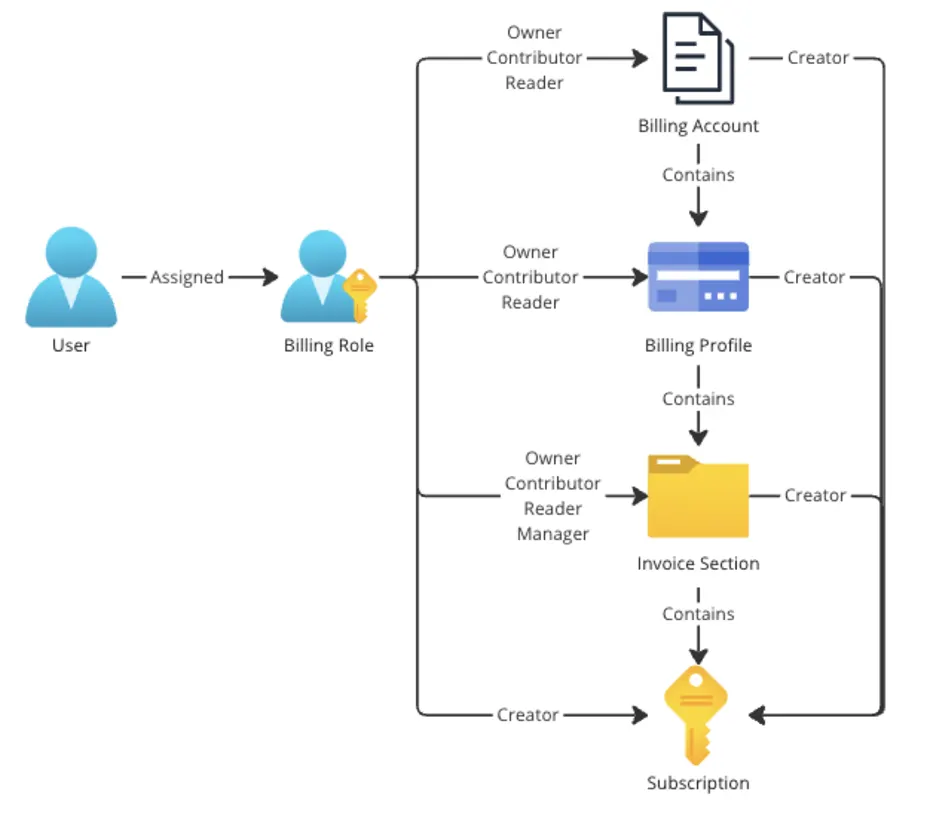
The available Azure Microsoft Customer Agreement roles are as follows. A larger percentage of the billing roles can create subscriptions, shown below:
Billing Role | Summary | Ability to Create Subscription |
|---|---|---|
Billing account owner | Manage everything for billing account | Yes |
Billing account contributor | Manage everything except permissions on the billing account | Yes |
Billing account reader | Read-only view of everything on billing account | No |
Billing profile owner | Manage everything for billing profile | Yes |
Billing profile contributor | Manage everything except permissions on the billing profile | Yes |
Billing profile reader | Read-only view of everything on billing profile | No |
Invoice Manager | View and pay invoices for billing profile | No |
Invoice Section owner | Manage everything on invoice section | Yes |
Invoice Section contributor | Manage everything except permissions on the invoice section | Yes |
Invoice Section reader | Read-only view of everything on the invoice section | No |
Azure Subscription Creator | Create Azure subscriptions | Yes |
Why Do Billing Permissions Matter?
An initial assumption is that these permissions are limited to the guest user’s home tenant. Overlapping permission models mean their effects can reach far beyond that scope. A user with one of these billing roles can create/move a subscription to ANY tenant they are a part of, including tenants they are merely a guest in. There are controls that prevent this behavior, but they are not the default settings.
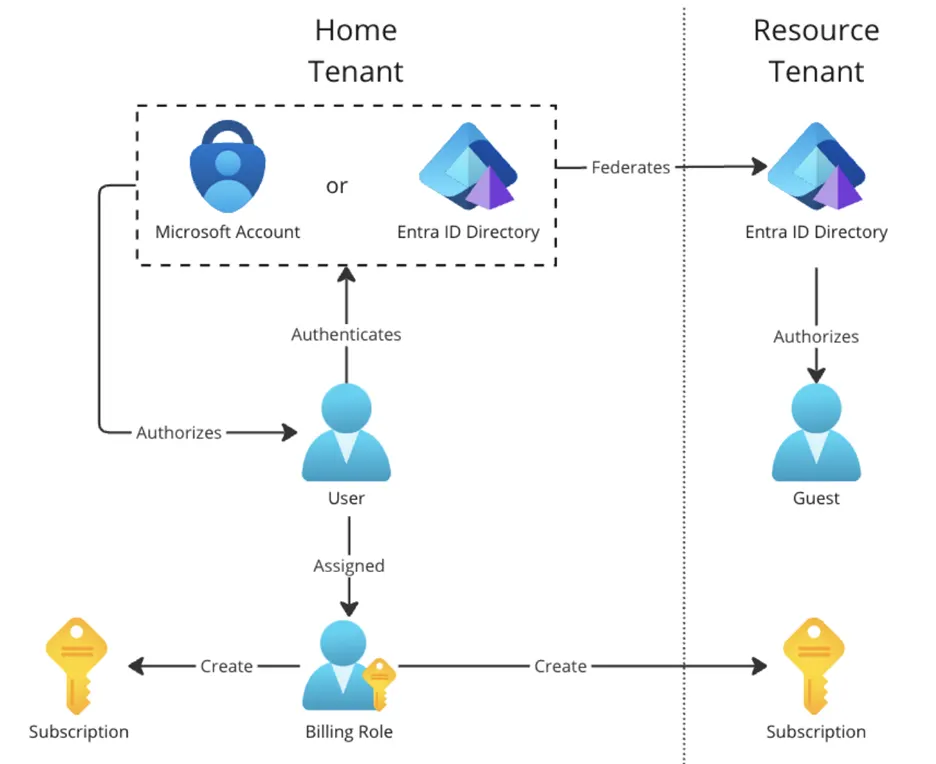
The EA/MCA billing roles are assigned at the billing account level, which exists separately from the Entra directory. Because billing roles permit subscription creation, they also allow the user to create and transfer subscriptions into a tenant where they are merely a guest. This becomes particularly problematic when the two tenants are not controlled by the same organization, which is the most common use case for B2B guest accounts.
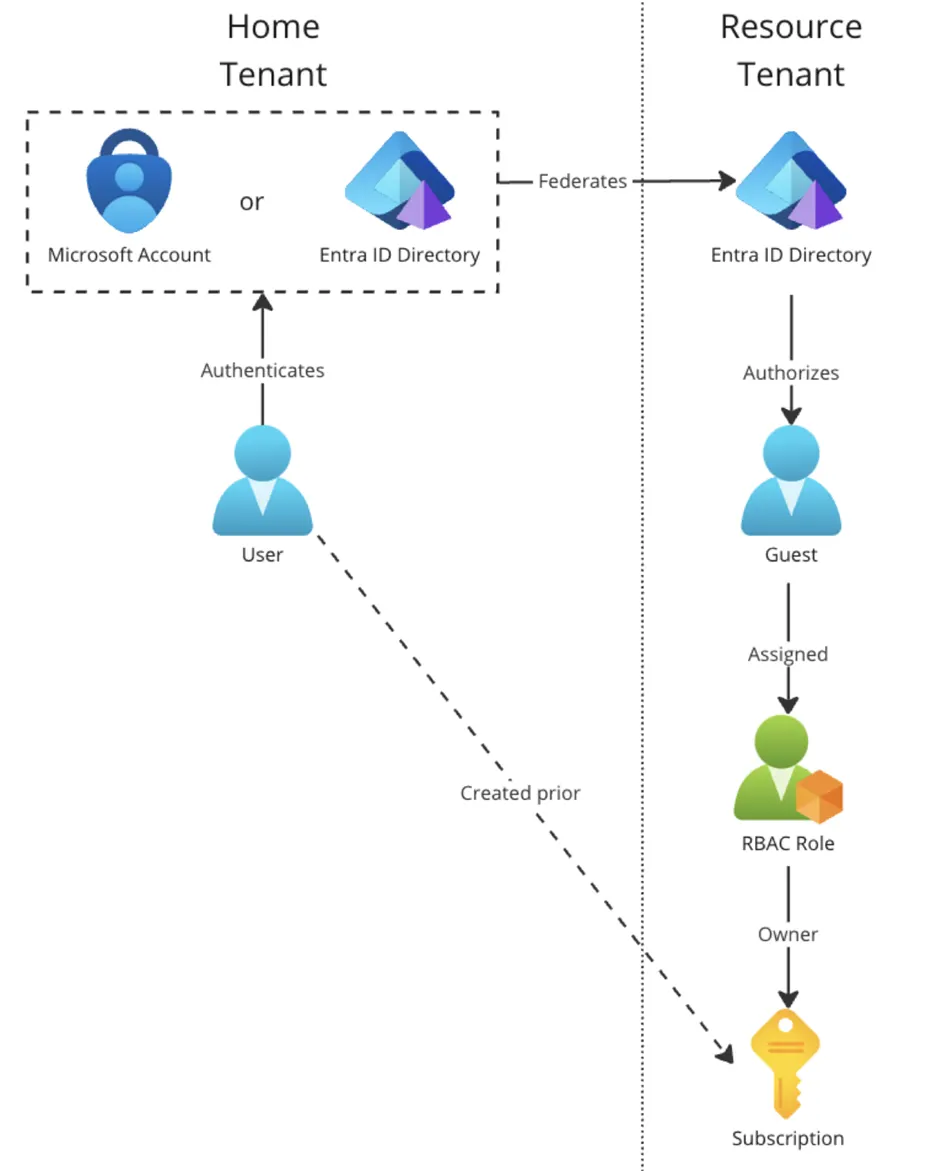
BeyondTrust researchers also validated that the Owner assignment over a subscription allows a guest to transfer these subscriptions into the tenant they are invited into, while retaining ownership over the subscription.
To recap, if you invite an external guest account into your organization’s Entra tenant, and that account holds an EA or MCA billing role or owns a subscription their home tenant, they can transfer subscriptions into your tenant, all while retaining ownership over them. This is true for external guest users who exist in pay-as-you-go Azure tenants that an attacker could spin up in just a few minutes.
Microsoft’s Response
When we first brought this issue to Microsoft’s attention on 2024/10/31, they confirmed this is the expected behavior. They explained that that this was a requested feature to allow guest accounts to create subscriptions in other Entra tenants; everything was working as intended. They directed BeyondTrust to policies that prevent subscription transfers and have provided some documentation on how these controls work. Microsoft pointed out that guests are billed for any resources they create, not allowing for cost offloading. They also stated that subscriptions act as a security boundary so in theory their ability to impact the rest of your tenant should be limited.
Inside the Attack: How Restless Guests Exploit Entra Access
We will now demonstrate how this attack works from the Azure portal.
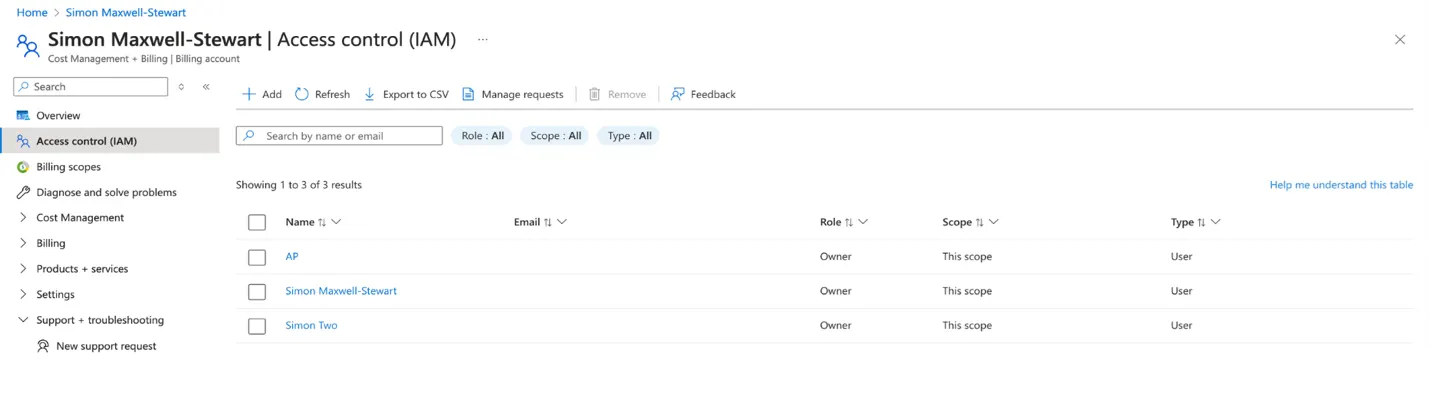
We begin with an Entra tenant that the attacker has created and controls using a free Azure trial. Within this tenant, we’ve assigned the ”Simon” identity the Account Owner billing role under the ‘Cost Management + Billing’ section.
Now, let’s invite our “attacker” account into our “defender” Entra tenant as a guest user. While in this case we are using an attacker-created tenant, this could also occur if a third-party tenant with guest accounts in your environment were compromised.
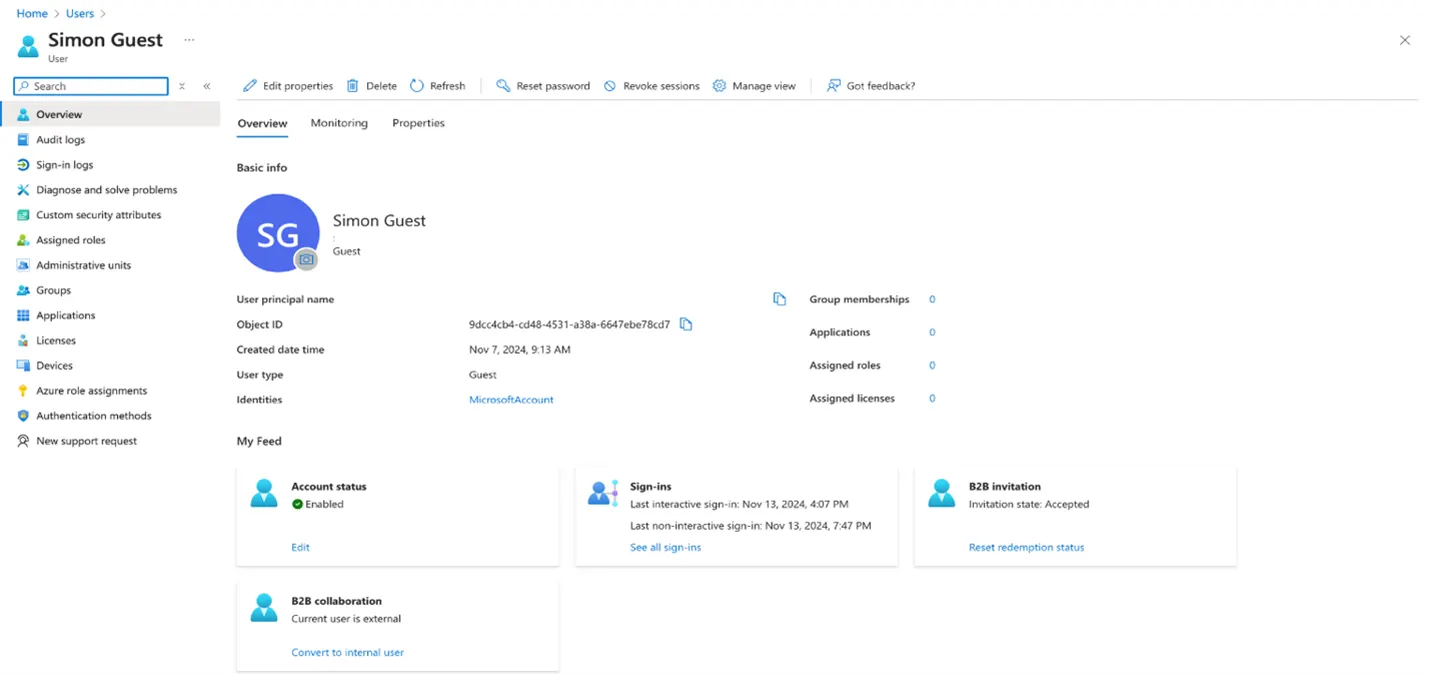
"Simon” is invited as a B2B guest user by our separate “defender” tenant, which represents a separate organization outside of the attacker’s control. You can see that our Simon external guest account has no group memberships, roles, or applications assigned to it.
It is also important to point out that the value of the identities field is “MicrosoftAccount”, which means the user is federating into this guest tenant from an existing Microsoft account. The same attack works when the value of the identities field is “ExternalAzureAD”, which means the guest user is federating from another AzureAD tenant.
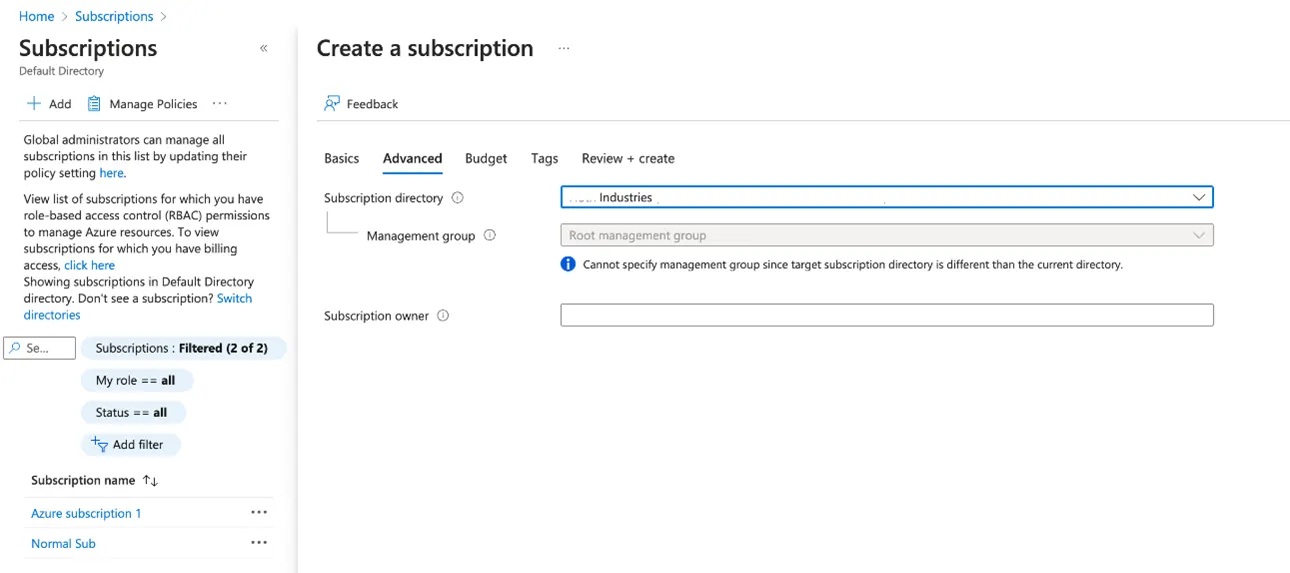
Because “Simon” is a Billing Owner of the billing account associated with their home tenant, the attacker can create subscriptions in the tenant they’re a guest in using the standard Azure Portal UI. When creating a subscription for their home directory, under the advanced settings, they have the option to choose any tenant they are a part of.
We can now see the new, attacker-controlled subscription created, and that the attacker has the Owner role in this subscription.
Subscription Creation Exploit Summary: Step-by-Step
In summary, here are the key steps an attacker can take to reproduce the behavior and gain elevated access using an unprivileged Entra guest account:
Attacker gets control of a user with a billing role that can create subscriptions / owner of a subscription in a tenant, either by:
Creating their own Entra tenant using an Azure free trial (the user they signed up with will be a Billing Account owner)
Or, by compromising an existing user in a tenant who already has a privileged billing role / subscription ownership
Attacker gets an invite to become a guest user in their target Entra tenant.
Attacker logs into the Azure Portal, goes into their own home directory – which they control completely.
Attacker navigates to Subscriptions > Add +.
Attacker switches to the “Advanced” tab and sets the defender’s directory as the target directory.
Attacker creates subscription. No subscription will appear in the attacker tenant. Instead, the subscription appears in the defender tenant, under the root management group.
Attacker will automatically be assigned the RBAC Role of “Owner” for this subscription.
The Risks of Guest-Controlled Subscription Creation: What a Malicious Guest Can Do with a New Subscription
The feature Microsoft has created here makes sense: some organizations have many tenants, and there are use cases where users with one home directory need to create subscriptions in others they are simply a guest in. The problem lies in the default behavior: if this capability were opt-in—meaning guests were blocked from creating subscriptions by default—the risk would be significantly reduced, and this wouldn’t pose a security concern.
Proof-of-Concept Attacks: Exploring the Guest Subscription Escalation Path
To understand the real-world impact of this issue, it’s important to see how attackers can weaponize guest access to create and control subscriptions. The following proof-of-concept scenarios show how a seemingly low-privilege guest can create a subscription, become an Owner, and use that position to compromise your tenant. Through this access, the attacker can perform actions that would normally be blocked by their limited role, including:
Listing root management group administrators
Weakening the default Azure policy tied to the subscription
Creating a user-managed identity in the Entra ID directory to establish stealthy persistence
Registering Microsoft Entra-joined devices that could escalate privilege via dynamic device groups
These actions fall outside what most Azure administrators expect a guest user to be capable of, making this privilege escalation pathway both under-recognized and dangerously accessible.
Scenario 1: Listing Root Management Group Admins
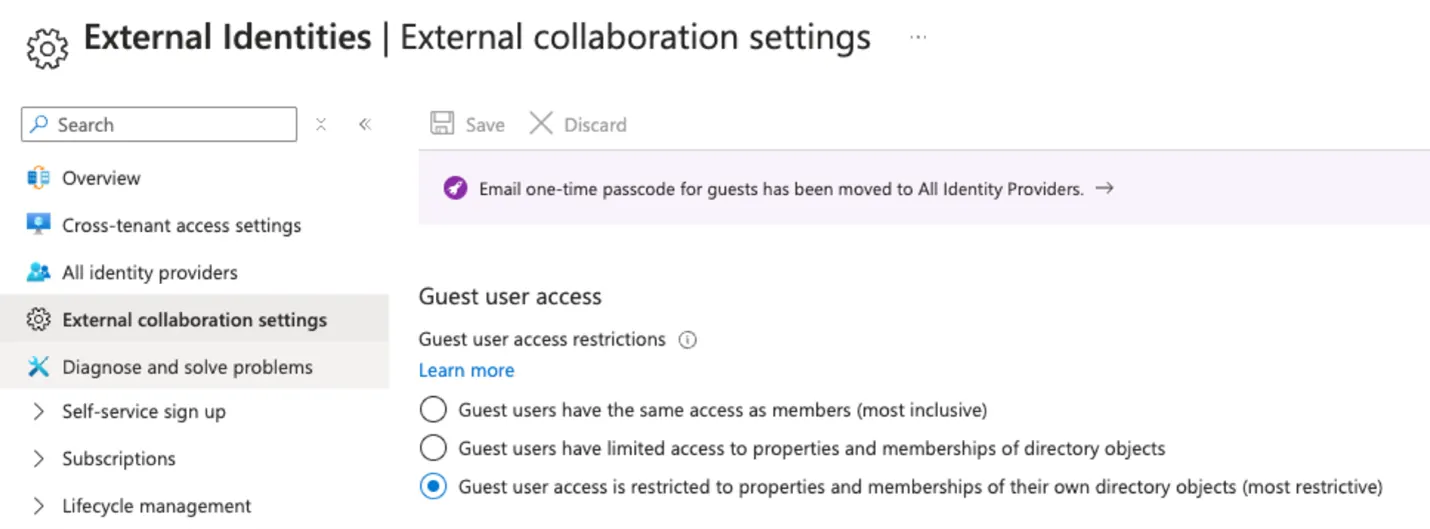
In many tenant configurations, guest users have zero permissions to list other users within a tenant. One of the initial actions an attacker can take is to view the “Access Control” (IAM) role assignments on the subscription they’ve created. Any administrators assigned at the root management group level of the tenant will be inherited by that subscription the attacker controls and appear in the role assignments view.
In other words, a guest user can passively enumerate high-value privileged accounts simply by inspecting the IAM settings of their own subscription. The names and UPNs of these admins are now exposed, making them ideal targets for follow-on attacks and social engineering.
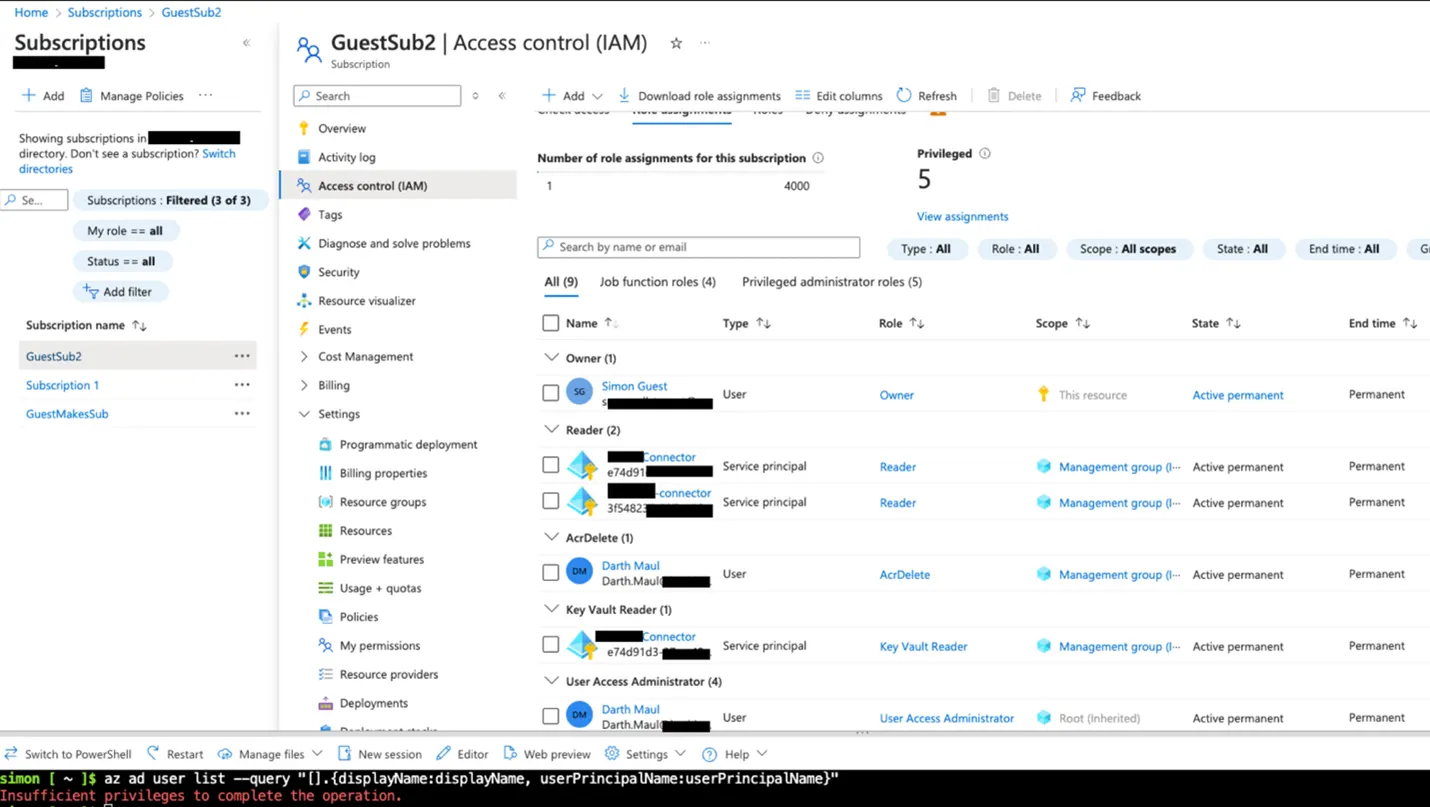
We believe that this represents an interesting reconnaissance technique. Most Azure administrators wouldn’t expect an unprivileged guest in their Entra ID directory to be able to enumerate privileged users at all. But through the subscription-creation attack, that visibility becomes possible.
Scenario 2: Weakening Azure Policy
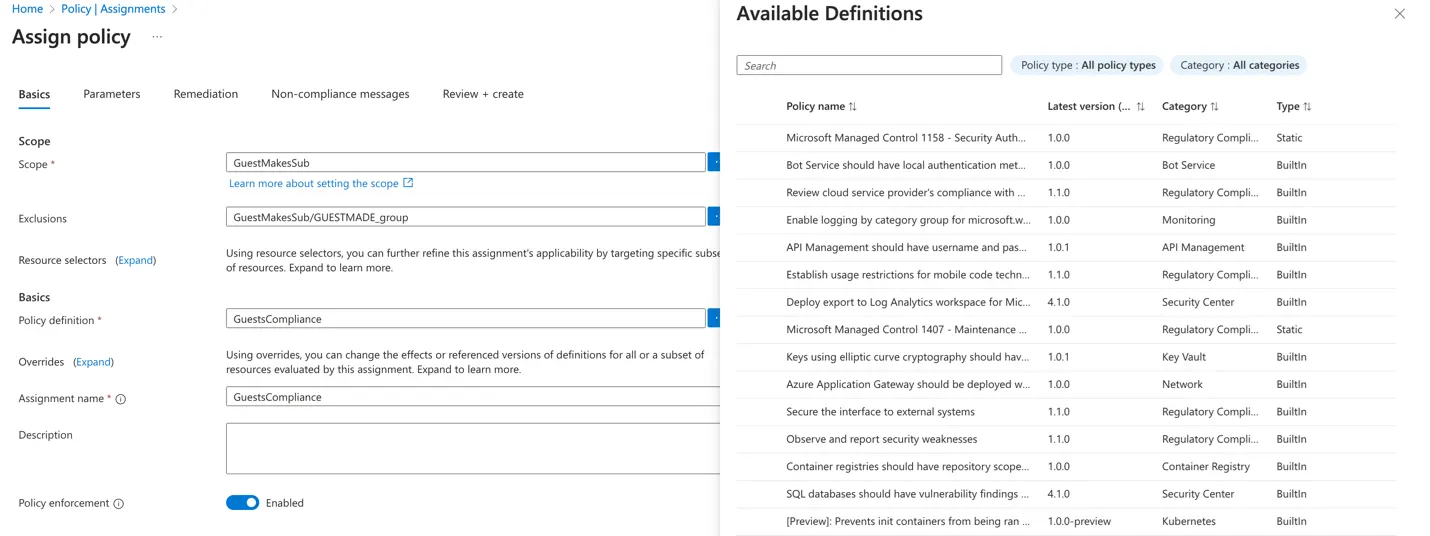
By default, all subscriptions (and their resources) are governed by Azure policies that are designed to enforce security standards and trigger alerts when violations occur. For example, policies may generate alerts when virtual machines are configured with weak security settings or run known malicious tools inside the tenant.
However, when a guest becomes a subscription Owner, they have full write permissions to all policies that apply to their subscription. This means the attacker can modify or disable the policies applied to their subscription, effectively muting security alerts that would otherwise notify defenders of suspicious or non-compliant activity.
This control gap allows the attacker to operate within a rogue subscription with reduced visibility from security monitoring tools. From this foothold, they can perform malicious activities or target external systems—all while remaining under the radar. This is very useful for some of the other techniques listed below.
Scenario 3: Creating User-Managed Identities
A guest user with subscription Owner permissions can create a User-Managed Identity within their subscription. Managed Identities are typically used to assign identities to Azure resources for service-to-service authentication, allowing them to act as security principals with assigned roles and permissions.
This becomes a powerful attack vector because creating a Managed Identity also creates a service principal identity in the shared Entra ID directory (referred to as an “enterprise application” in the UI). That means the guest user—through their subscription—has introduced a new identity into the tenant directory itself, extending their influence beyond the boundaries of the subscription.
Notably, the lifecycle of this service principal is not strictly tied to the attacker subscription. With the right permissions, it could interact with other subscriptions or the Entra directory directly.
To escalate further, the attacker can also assign this Managed Identity as the Owner of the previously made guest subscription. This means the managed identity gets to retain all privilege the guest user originally had, giving the attacker a durable foothold in the environment, independent of their guest account. This kind of identity pivoting is a common persistence technique, allowing the attacker to hide in plain sight, away from the guest account.
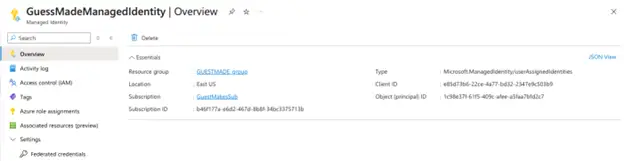
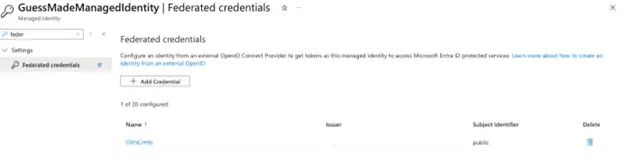
Going further, the attacker can deepen that persistence using a known attack perimeter: adding federated credentials to the Managed Identity. These credentials can allow external actors or systems to authenticate as the identity, even after the original guest account is removed.
Another reason the managed identity creation technique is so appealing to attackers is the API permission model. Service principals often require API Permissions to perform actions in the directory—but API permissions don’t benefit from the same privilege escalation protections that limit directory roles. Practically speaking, this service principal is a single misconfiguration away from obtaining a privileged directory role. One accidental API permission assignment like “RoleManagement.ReadWrite.Directory” to Microsoft Graph would be enough to grant Global Administrator-level control.
The good news for defenders: by default, service principals are locked down and have no real access unless explicitly granted. However, attackers could exploit this by launching targeted API permission phishing attacks, tricking legitimate admins into granting this managed identity elevated privileges. The service principal would appear like a legitimate Enterprise Application, and it would not be immediately apparent that a rogue guest is in control of it.
Scenario 4: Tenant-Joined Devices
Guest users with subscription Owner permissions can also create Azure resources that appear as “joined” devices in the Entra ID tenant. One technique involves creating a Virtual Machine (VM) and enabling the “Azure AD-based Windows Login” VM extension during setup.
Figure 15 shows a VM extension for Entra ID based Windows Login
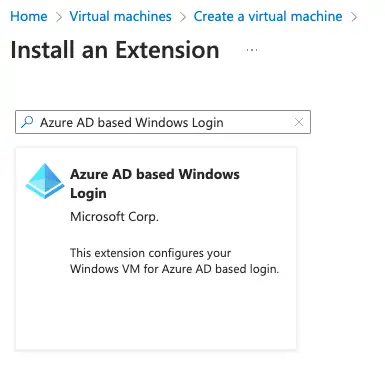
When configured this way, the VM is automatically registered as a “device principal” in Entra ID > Devices.
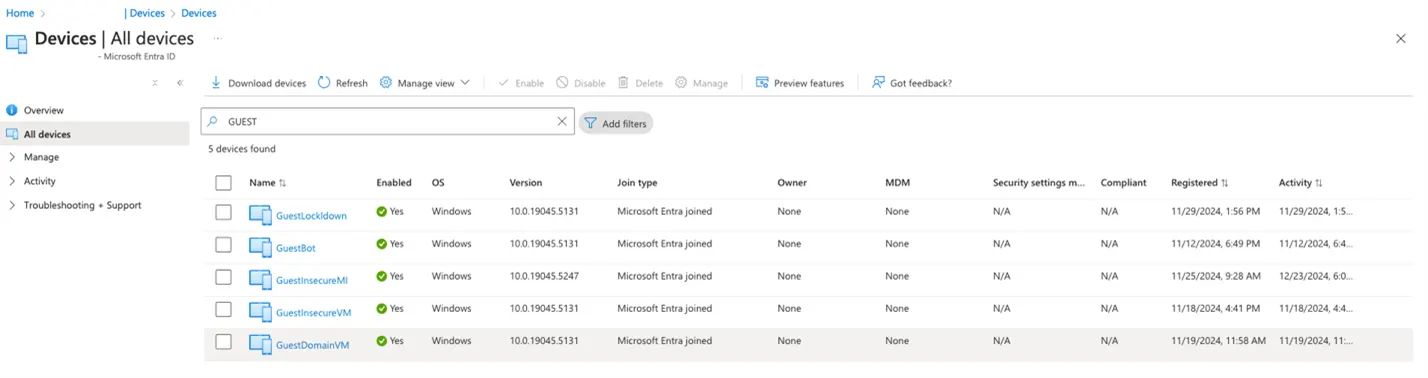
While we will demonstrate how an attacker is able to steal the private certificate of a device like this in a future blog, it’s important to note that this attack path potentially allows for the abuse of conditional access policies. As detailed by this article: Stealing and faking Azure AD device identities, attackers may be able to exfiltrate the private certificate used to authenticate the device, granting them trusted access under the guise of a legitimate machine.
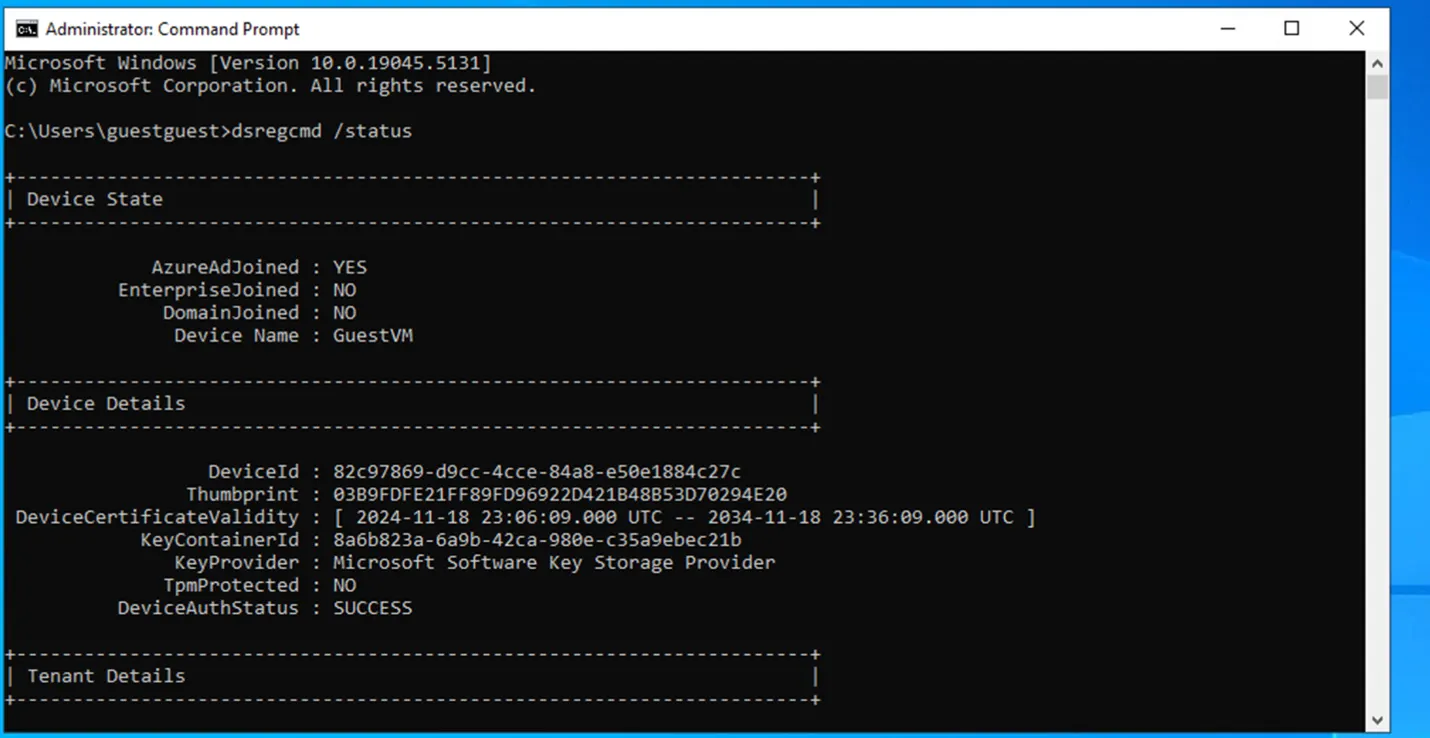
Conditional access policies often depend on device trust, which can be established by dynamic groups. For example, an organization might configure dynamic groups like “Windows Workstations” or “VPN Machines” with membership rules, such as:
(device.displayName -startsWith “WORKSTATION”) and (device.image -eq “windows 10”)
Because the attacker controls many properties of the device, like it’s display name and operating system, they can use prior knowledge or simply experiment with different VM configurations to brute force membership into trusted groups. If successful, this may allow the attacker to abuse Conditional Access Policies and gain unauthorized access to trusted assets.
This represents a device-based variant of a known dynamic group exploit previously seen in user object targeting. BeyondTrust’s Identity Security Insights® product helps to uncover many such misconfigured dynamic groups that unintentionally expose hidden Paths to Privilege™. Organizations should be careful with these kinds of setups.
Defending against Restless Guests
BeyondTrust has observed attackers actively abusing guest-based subscription creation in the wild, which makes proactive defense critical.
To mitigate this behavior, Microsoft allows organizations to configure Subscription Policies to block guests from transferring subscriptions into their tenant. This setting restricts subscription creation to explicitly permitted users only, and Microsoft has published supporting documentation for this control.
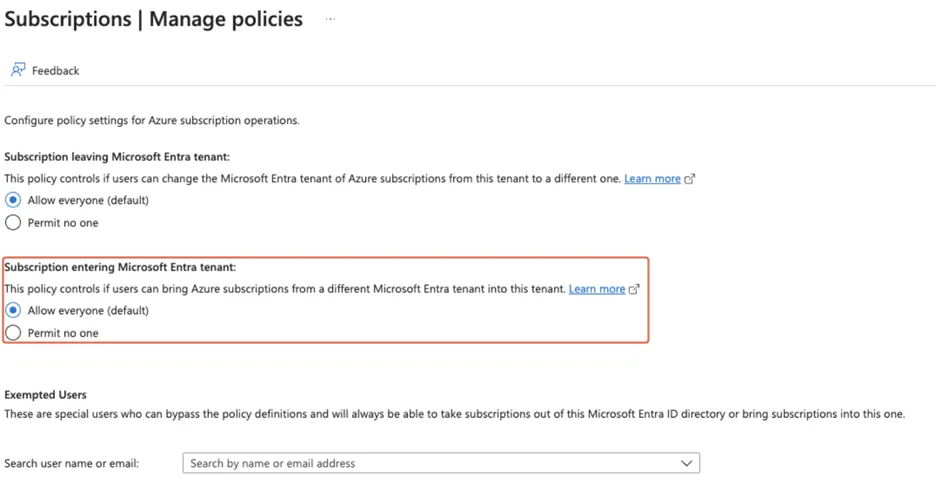
In addition to enabling this policy, we recommend the following actions:
Audit all guest accounts in your environment and remove those that are no longer required
Harden guest controls as much as possible: for instance, disable guest-to-guest invitations
Monitor all subscriptions in your tenant regularly to detect unexpected guest-created subscriptions and resources
Monitor all Security Center alerts in the Azure Portal; some may appear even if the visibility is inconsistent
Audit device access, especially if these utilize dynamic group rules.
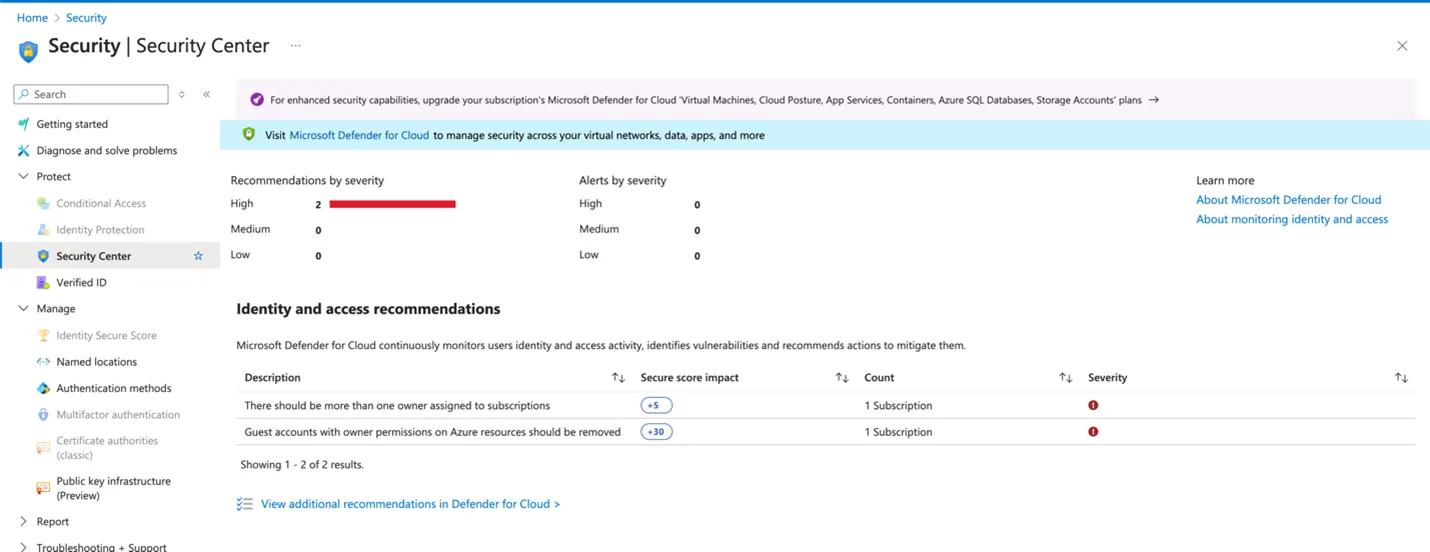
To assist defenders, BeyondTrust Identity Security Insights provides built-in detections to flag subscriptions created by guest accounts, offering automated visibility into these unusual behaviors. To gain a snapshot of potential identity-based risks in your environment, including those introduced through guest access, BeyondTrust also offers a no-cost Identity Security Risk Assessment.
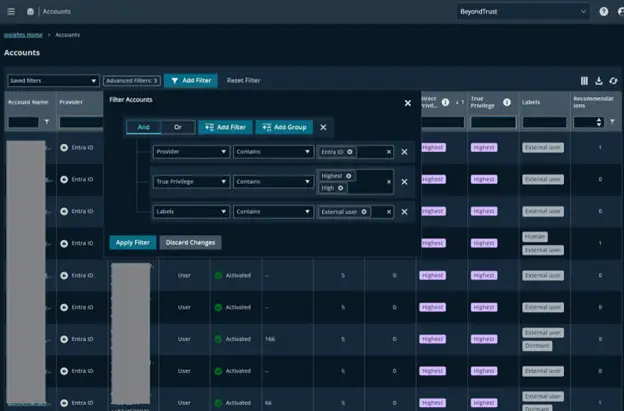
BeyondTrust Identity Security Insights customers can gain a holistic view of all identities across their entire identity fabric. This includes gaining a consolidated understanding of Entra guest accounts and their True Privilege™. We highly recommend customers of Insights regularly review Guest accounts that have high levels of true privilege.
Below is an example filter:
Conclusion
This research invites a broader re-evaluation of how organizations model threats associated with Entra ID guest accounts. In our view, the current threat model is yet to be fully understood by Entra customers.
BeyondTrust continues to research the true blast radius of device-based attacks, including how these techniques interact with other services, such as Intune, and whether multi-stage attacks could further escalate guest privileges. From a defender’s perspective, it’s critical to fully understand both the default behaviors and limitations of available controls to secure against this class of exploitation.
While more work is required to understand the true implications of this updated threat model, what we already know is concerning: any guest account federated into your tenant may be a privilege escalation pathway. The risk is not hypothetical—it is present, active, and largely under the radar.
We suspect many organizations leveraging Entra ID B2B Guest features are unaware of the possible privilege escalation paths that this feature inadvertently enables. Now is the time to re-examine your guest access policies, visibility tools, and subscription governance models—before these Restless Guests take advantage.
Sources
https://dirkjanm.io/persisting-with-federated-credentials-entra-apps-managed-identities/ -- Achieving persistence with Managed Identities and federated credentials
https://www.mnemonic.io/resources/blog/abusing-dynamic-groups-in-azure-ad-for-privilege-escalation/ - Abusing dynamic groups of users in Entra ID
https://aadinternals.com/post/devices/ - Deep dive into devices in Entra ID
https://aadinternals.com/post/deviceidentity/ - How device identities can be faked and stolen in Entra ID
About the Author
Simon Maxwell-Stewart
Simon Maxwell-Stewart is a University of Oxford physics graduate with over a decade of experience in the big data environment. Before joining BeyondTrust, he worked as a Lead Data Scientist in healthcare, and successfully brought multiple machine learning projects into production. Now working as a "resident graph nerd" on BeyondTrust's security research team, Simon applies his expertise in graph analysis to help drive identity security innovation.