

Trusted Execution and Security Boundaries in ServiceNow: How ACLs, Scopes, and Restricted Caller Access Work Together


Trusted Execution and Security Boundaries in ServiceNow: How ACLs, Scopes, and Restricted Caller Access Work Together
ServiceNow enforces security through several layered mechanisms: Access Control Lists (ACLs) determine who can perform an operation on a specific object, application scopes isolate code and data between apps, and Restricted Caller Access (RCA) controls which specific objects can invoke resources across scope boundaries. This post walks through how these layers interact, from ACL evaluation and scope isolation to cross-scope privileges and execution trust, providing a clear model of how authorization, isolation, and server-side execution fit together across the platform.
Overview: Understanding ServiceNow's Security Model
ServiceNow enforces several security boundaries throughout the platform. User access to resources is enforced through Access Control Lists (ACLs),, applications are isolated by scope, and cross-scope interactions are governed through layered security controls. Together, these mechanisms help prevent unauthorized access and privilege escalation.
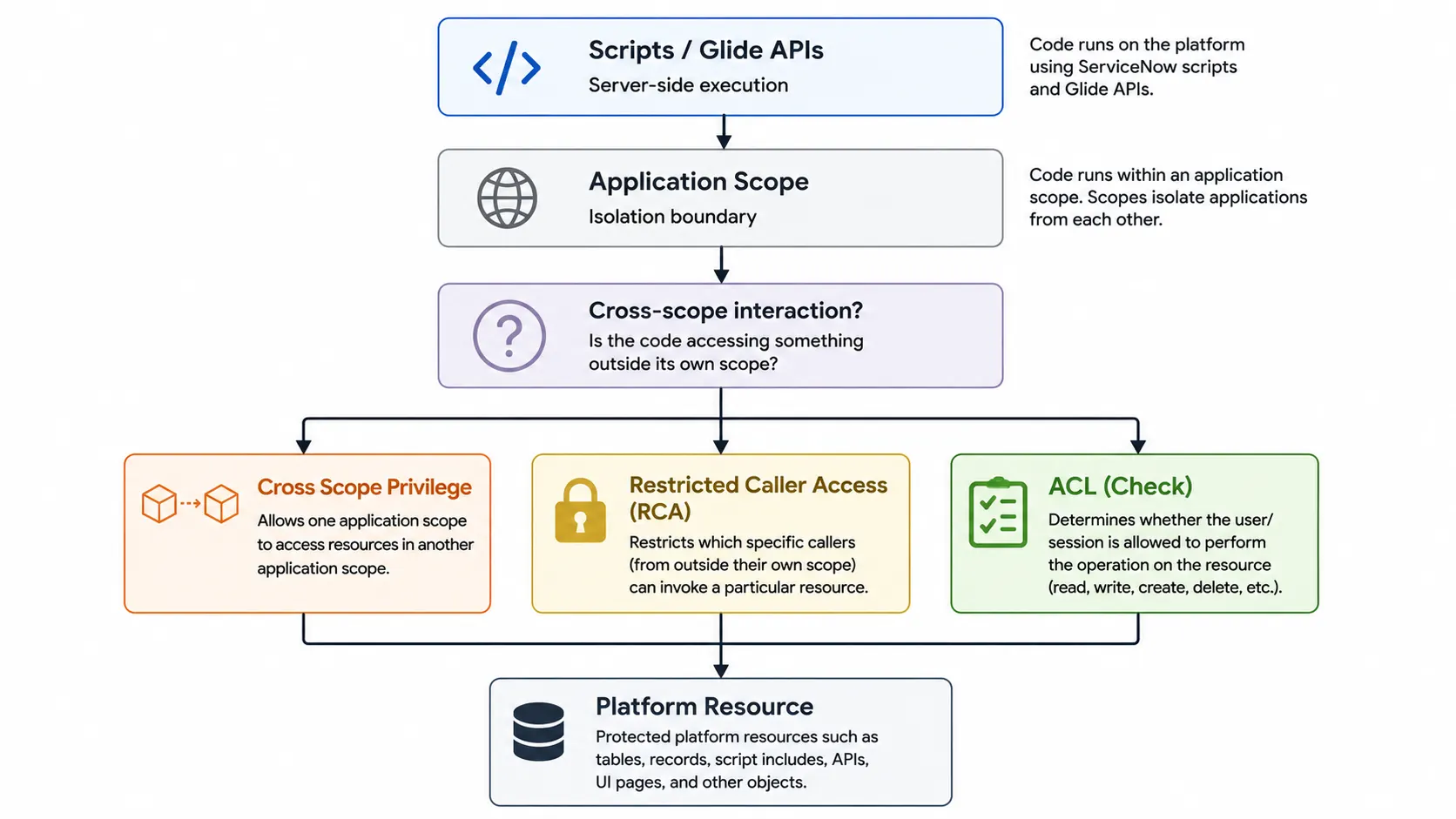
Understanding how these layers interact is important for analyzing execution context and trust within the platform. This includes ACLs, application scopes, cross-scope privileges, Restricted Caller Access (RCA), and the execution model of server-side scripting.
This post will examine the mechanisms that shape authorization, isolation, and execution trust in ServiceNow.
Core Security Control Layers
Authorization: Access Control Lists (ACLs)
ACLs are ServiceNow’s primary mechanism for enforcing granular security. They determine whether a user identity or session context is allowed to perform a specific operation against a particular object.
Historically, the ACL engine operated on a default allow model for record operations: If no matching ACLs existed, access was allowed. In practice, this was rarely encountered because ServiceNow ships with extensive default ACL protections across the platform.
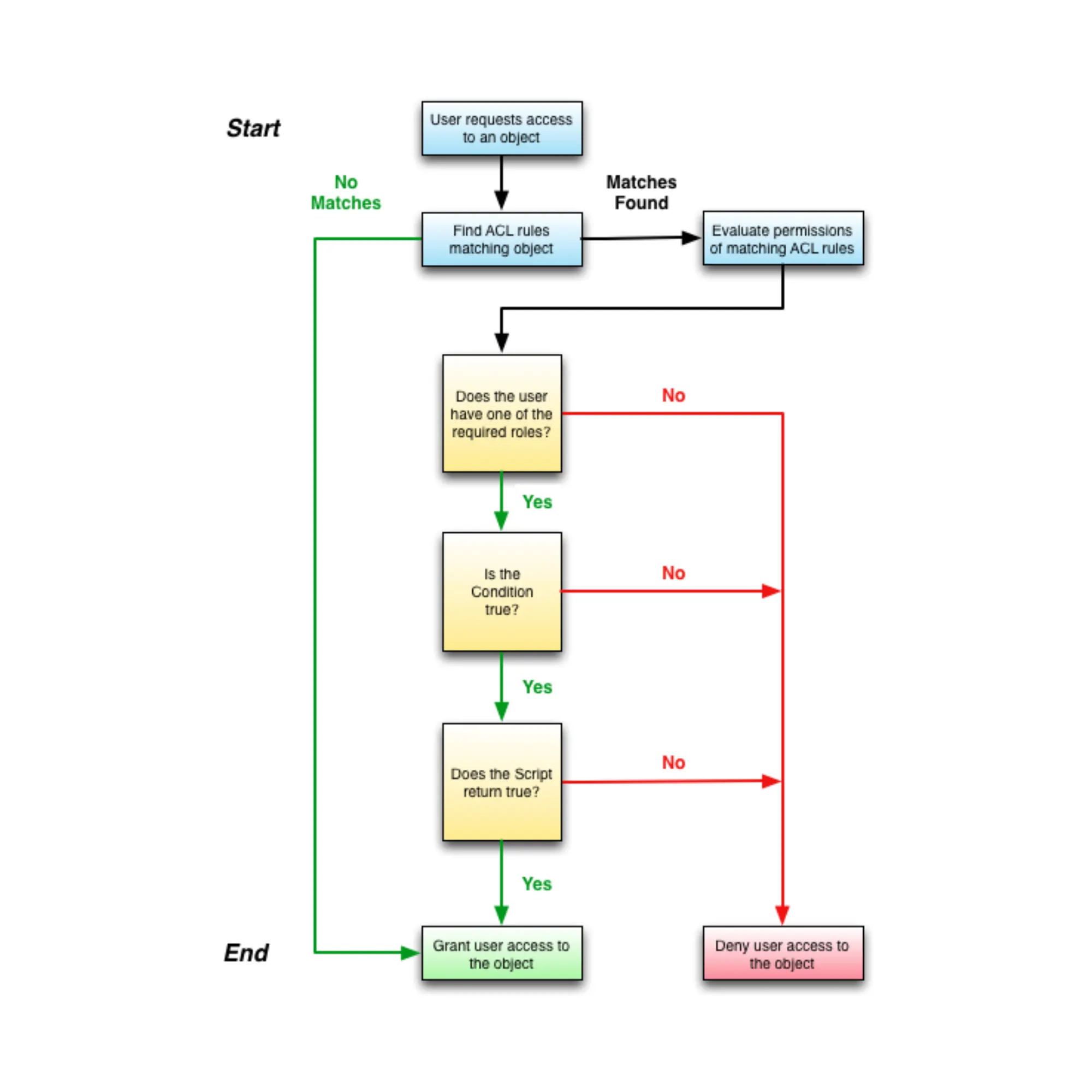
Modern ServiceNow instances ship with the High Security Plugin enabled, which sets the glide.sm.default_mode property to enforce a deny-by default model for wildcard table ACL evaluation. When set to “Deny Access”, read, write, create, and delete operations are blocked unless another ACL grants access or the user has the admin role. Older instances may retain Allow Access for backwards compatibility unless explicitly migrated.
Key components of an ACL
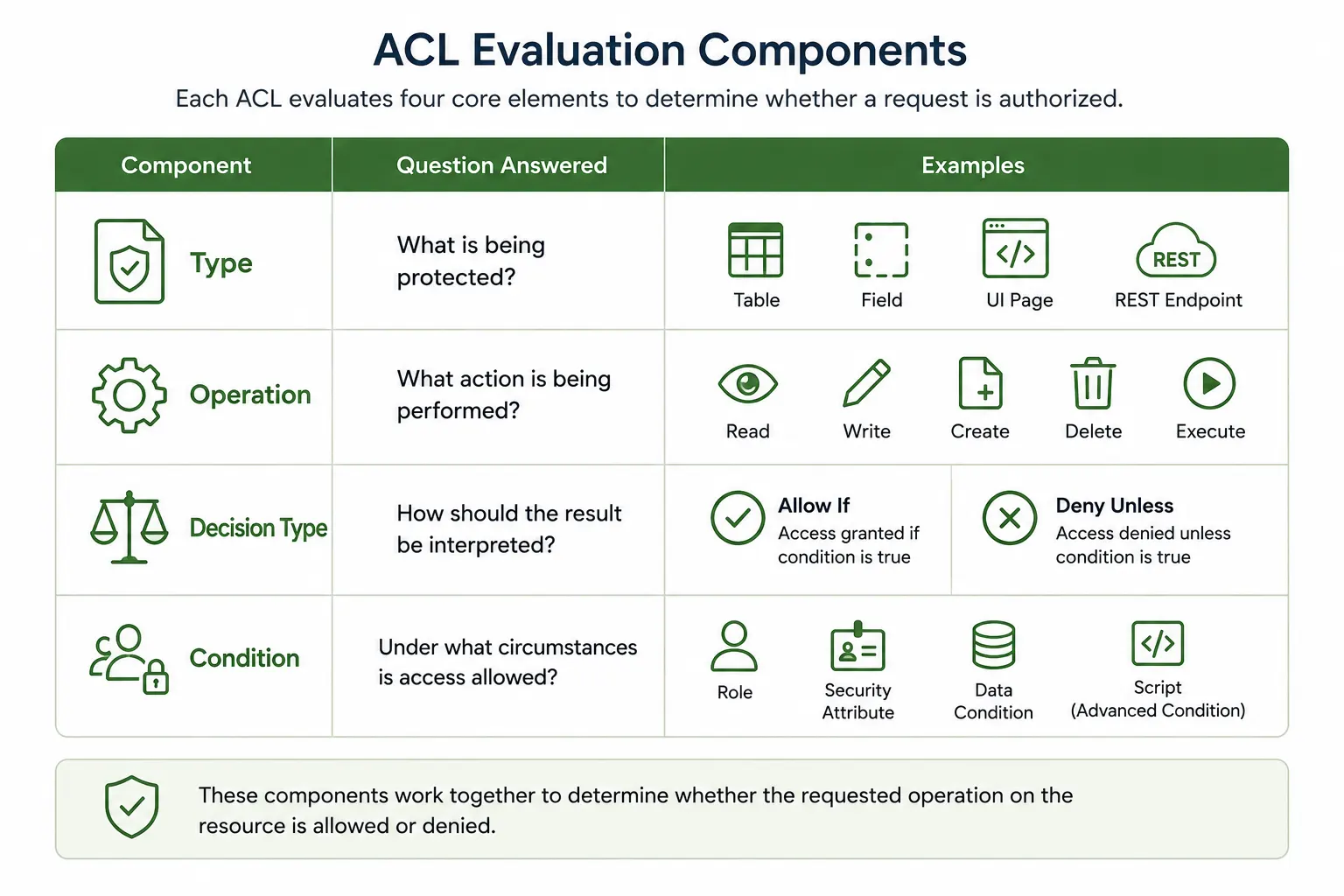
Each ACL evaluates four core elements that determine whether a requested operation is authorized. While ACLs enforce authorization decisions, they do not isolate applications from one another. That boundary is enforced through application scopes.
Isolation: Application Boundaries
Application Scopes
If ACLs determine who can access an object, application scopes determine where code comes from and what it is allowed to interact with.
Application scopes are an isolation mechanism used to separate code and data across applications. Each application runs in its own scope, which influences how it can access tables, APIs and other resources.
There are two types of scopes:
Global Scope: Provides broad access to files and data across the platform
Scoped applications: Restrict access to resources within that specific application scope
Scoped applications are isolated by default and need explicit permissions to interact with resources outside their scope. Global scope does not enforce the same boundaries between applications, allowing scripts to interact more freely (still subject to ACLs though).
Scope isolation is refined through several mechanisms. Each serves a different purpose, is owned by a different party, and is enforced under different conditions.
Application access settings
Cross-scope Privilege
Restricted Caller Access
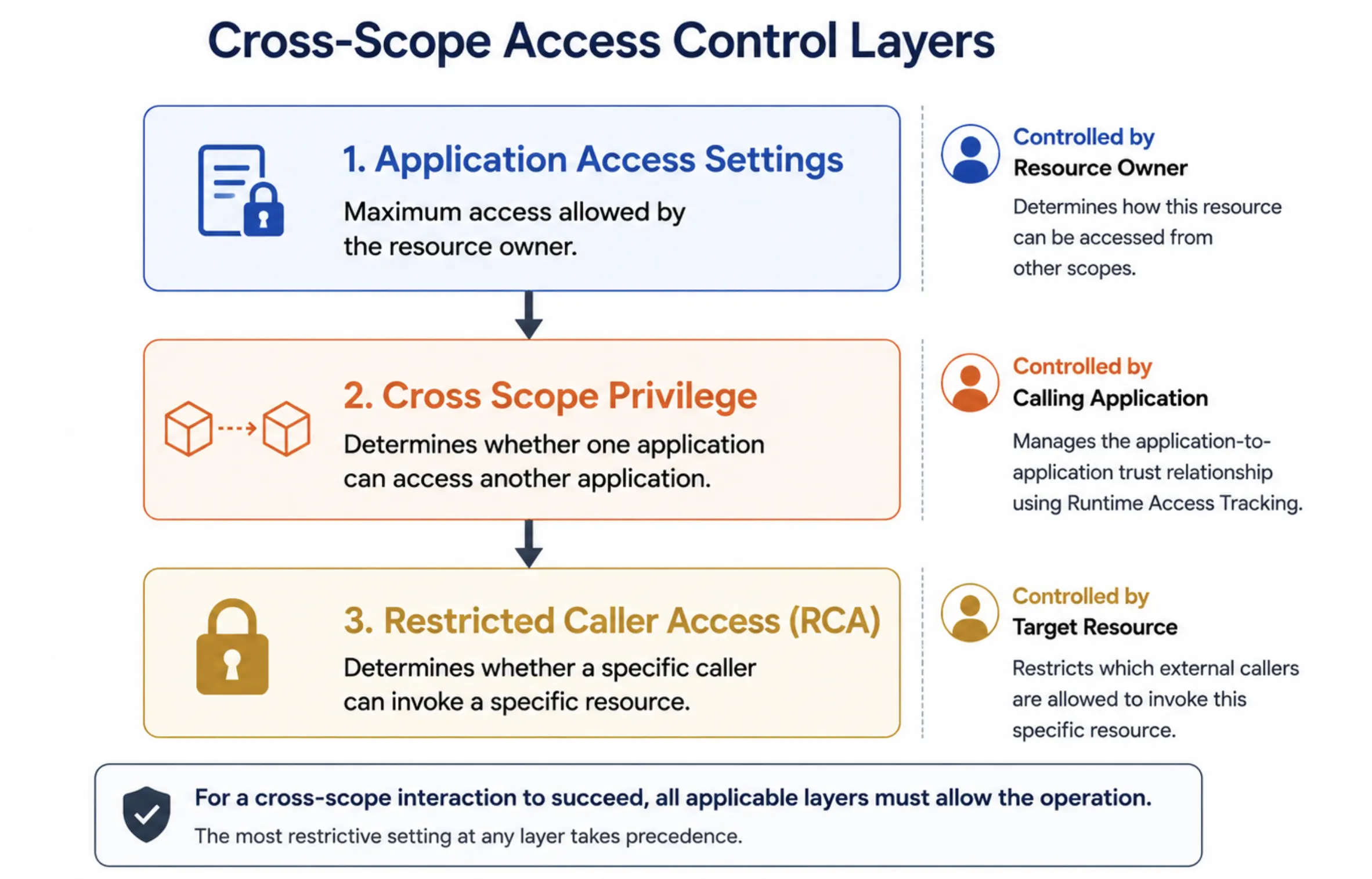
Application Access Settings
Application access settings allow a resource owner to define whether specific objects are accessible outside of their defining scope. These settings are configured at the object level and represent the maximum cross-scope access the resource owner permits.
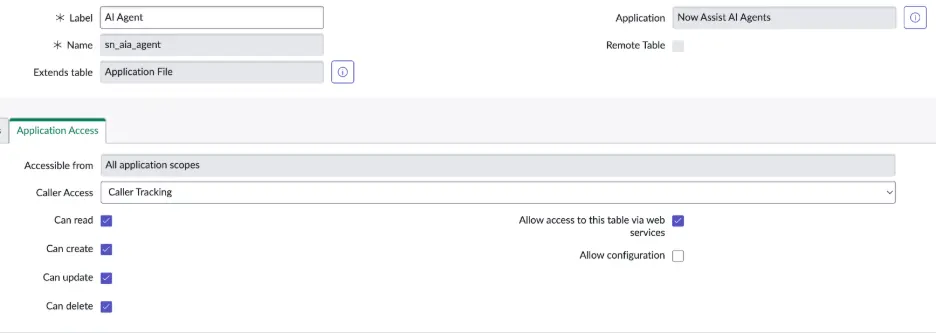
For tables, access is controlled per-operation through individual settings on the table record (sys_db_object): can read, can create, can update, and can delete. Each operation is independently enabled or disabled. A table might allow cross-scope reads but deny cross-scope writes.
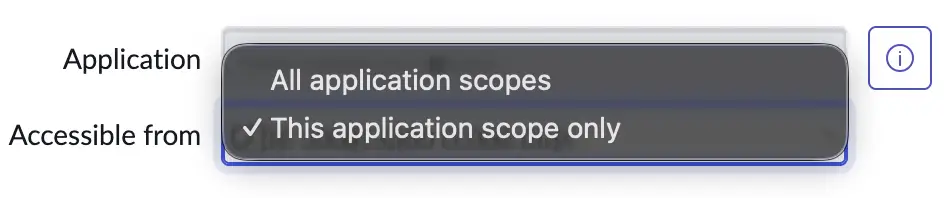
For Script Includes and other execution resources, a single “Accessible from” setting determines eligibility: All application scopes or This application scope only.

These settings act like a ceiling. No other mechanism can grant cross-scope access that exceeds what the resource owner has permitted here. If a table has “Can read” disabled, no cross-scope privilege record or other mechanism can override that restriction.
Any actual access remains subject to ACL evaluation and other applicable security mechanisms.
Cross-Scope Privileges
Application access settings define the maximum cross-scope access a resource owner permits. However, they operate too widely. The available options are limited to:
All application scopes
This application scope only
This means application access settings cannot specify which individual application scopes may access the object. A table can allow reads from all other scopes, but it cannot allow reads from App A while denying reads from App B through application access settings alone.
Cross-scope privileges give that granularity. Stored in the sys_scope_privilege table, each record specifies a source scope, a target scope, a target resource, an operation, and a status. This allows the platform to track and control which specific calling application is authorized to perform which specific operation on which specific target resource.
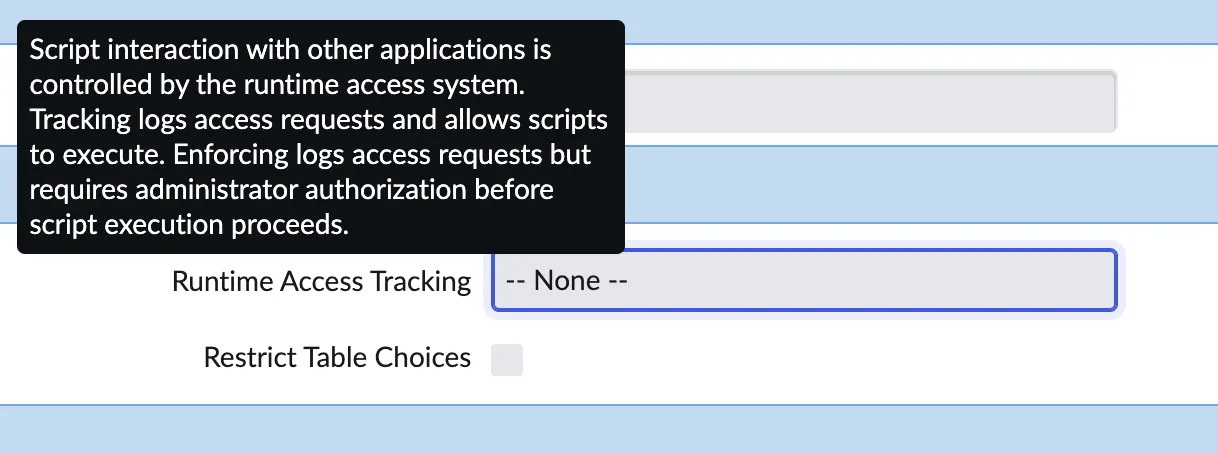
Whether cross-scope privilege records are actively enforced depends on the calling application's Runtime Access Tracking mode:
None: All cross-scope calls are automatically allowed. No privilege checks are performed.
Tracking: Cross-scope calls are allowed, and the system automatically creates privilege records with status Allowed. Interactions are logged but not blocked.
Enforcing: Cross-scope calls are blocked unless a privilege record with status Allowed exists. If no matching record exists, the call is denied and the system creates a record with status Requested for administrator review.
A cross-scope privilege record can never grant more access than the target resource's application access settings allow. For example, granting a scope privilege to delete records on a table would not be permitted if the table does not have “Can delete” enabled for other application scopes.

For example, in Figure 9, this cross-scope privilege entry specifies that the Now Assist AI Agents application is permitted to perform a read operation against the sys_scope_privilege table in the Global scope.
Restricted Caller Access
Application access settings and cross-scope privileges govern which scopes can access which resources, and which operations are permitted. However, they operate at the scope-to-resource level. They do not control which specific objects within a calling application are allowed to access a target resource.
For example, a script from Application A may be allowed to access a resource in Application B, but that does not necessarily mean every artifact in Application A should be permitted to do so. This is enforced through Restricted Caller Access (RCA), stored in the sys_restricted_caller_access table.
Where cross-scope privileges control outbound access at the scope-to-resource level, RCA adds granularity, controlling which specific objects within a calling application can access which specific resources in the target application. The Caller Access property, found on individual Script Includes and Tables, determines whether the platform tracks, restricts, or ignores inbound cross-scope access to that specific resource.
Depending on the caller access configuration of the target resource, RCA operates in:
None: No checks performed.
Tracking mode: Allowed but logged.
Restriction mode: Blocks access unless explicitly permitted.
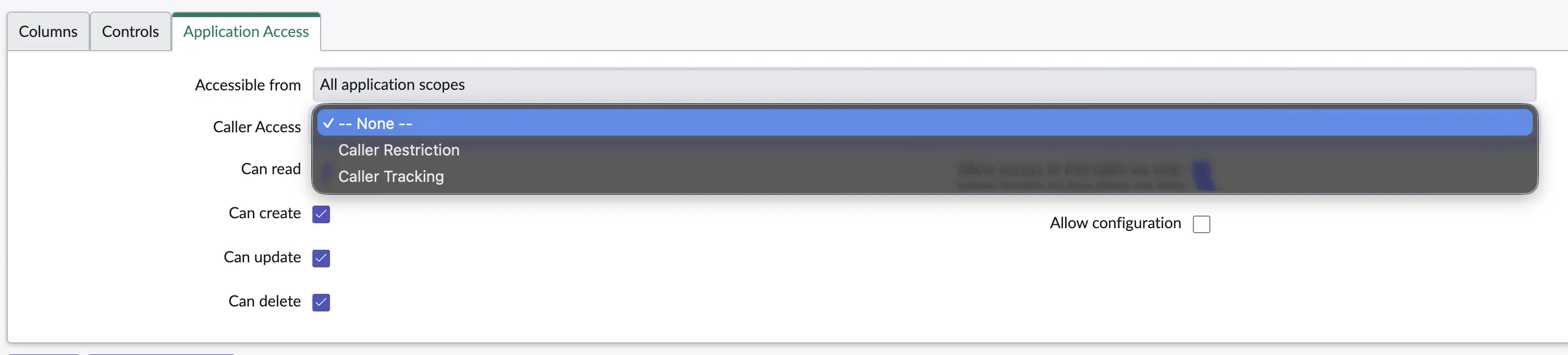
At runtime, RCA evaluates:
The calling object (for example, a Script Include or Flow Action)
The source application scope
The target resource
The operation being performed
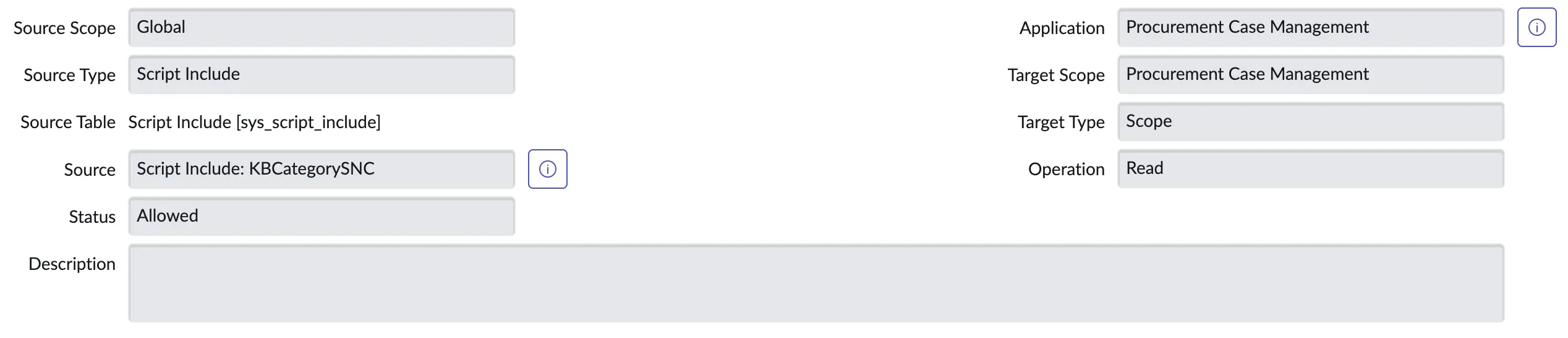
The Restricted Caller Access record in Figure 11 authorizes the Script Include KBCategorySNC from the Global scope to invoke a read operation against the Procurement Case Management application.
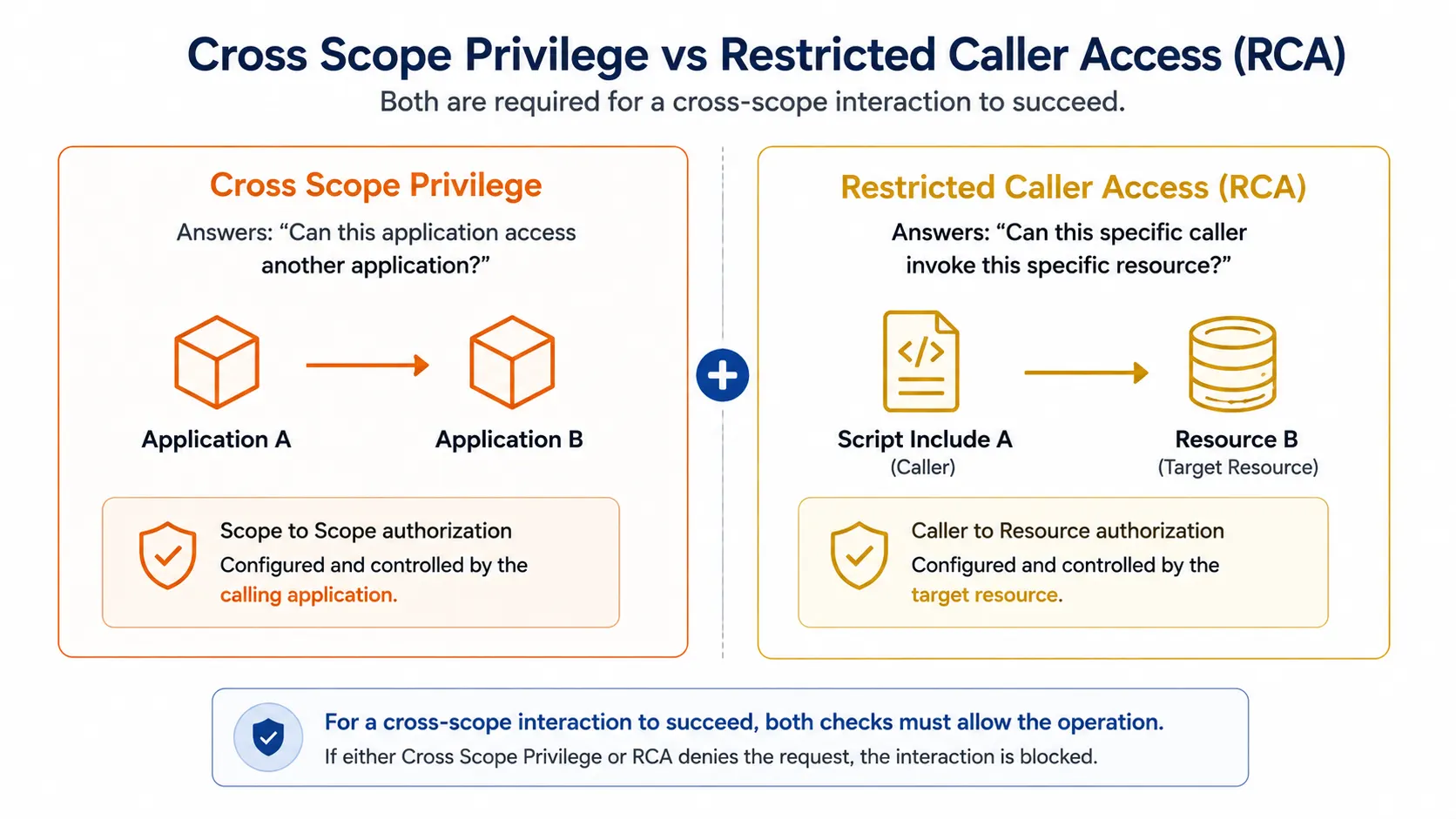
Cross-Scope Privilege vs RCA
In short, cross scope privileges are controlled by the calling application. The calling application's Runtime Access Tracking mode determines what privileges are created, and those privileges authorize interactions between application scopes
RCA is controlled by the target resource. The target object's Caller Access setting determines whether the request is allowed, and the check is performed against the specific object being accessed.
For a cross-scope call to succeed, both checks must allow the operation.
Server-Side Scripting and Execution Trust
So far, we have examined how ServiceNow controls who can access resources and how applications are isolated from one another. The next question is equally important: what happens once code is allowed to execute?
ServiceNow relies heavily on scripting to implement business logic and automation. Understanding the distinction between client-side and server-side execution, and the privileges associated with each, is essential to understanding how the platform operates.
Client-Side vs Server-Side Execution
Client-side scripting refers to JavaScript that runs in the user’s browser and controls how forms and pages behave. These scripts are used for presentation logic, such as showing or hiding fields, responding to form loads or submissions, and adjusting the user interface based on contextual factors like a user’s roles. Because client-side code runs in a user-controlled environment, it is not relied upon for security enforcement.
Server-side scripting refers to JavaScript that runs on the ServiceNow instance itself. These scripts execute in response to user actions, platform events, or administrator-defined rules. They implement business logic, interact with data, and modify system behavior. Unlike client-side scripts, server-side scripts can execute with platform authority and can directly affect ServiceNow’s state.
Glide APIs and Execution Boundaries
ServiceNow provides a set of JavaScript APIs collectively referred to as Glide. These APIs are used by both client-side and server-side scripts, but their capabilities differ significantly depending on execution context.
Client-side scripts have access to a limited subset of Glide APIs. Examples include:
GlideForm (g_form) - used to modify form behavior such as showing or hiding fields.
GlideUser (g_user) - provides information about the currently logged-in user.
GlideAjax - allows a client-side script to request execution of server-side code. Certain server-side scripts can be marked as client-callable to support this interaction.
Client-side Glide APIs cannot directly query or modify database records and instead rely on server-side execution for data operations.
Server-side scripts have access to broader Glide APIs, including:
GlideRecord - is used to query and modify database records.
GlideSystem (gs) - provides access to system-level information such as user context, logging, and date or time functions.
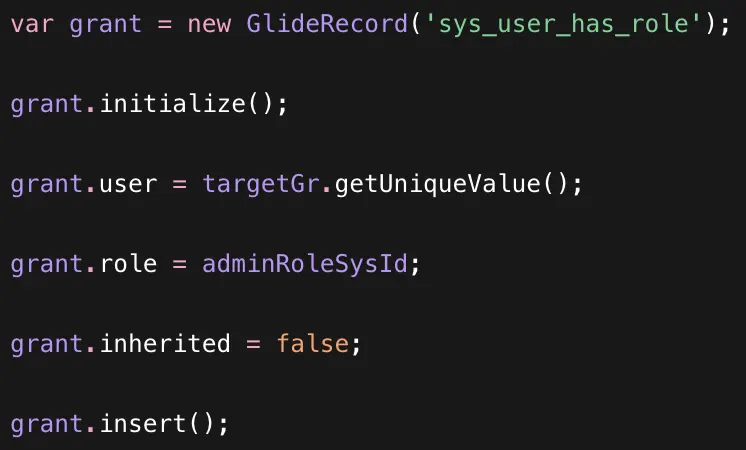
The GlideRecord API is particularly significant because it allows server-side scripts to directly interact with database tables. For example, a server-side script can use GlideRecord to insert a record into the sys_user_has_role table.
Not all Glide APIs are available in every execution context. ServiceNow enforces additional boundaries at the API level. In scoped applications, certain platform APIs are restricted or wrapped. Operations involving sensitive capabilities, such as session manipulation or impersonation, are not exposed in the same way as they are in the global scope.
As a result, whether a script can perform a given operation depends not only on the identity under which it runs, but also on the scope in which it is defined and the APIs available in that execution context.
Script Types
ServiceNow supports a variety of script types that execute either on the client or on the server. While platform documentation categorizes scripts by artifact type, from an architectural perspective the most important distinction is where the script runs and what level of authority it has.
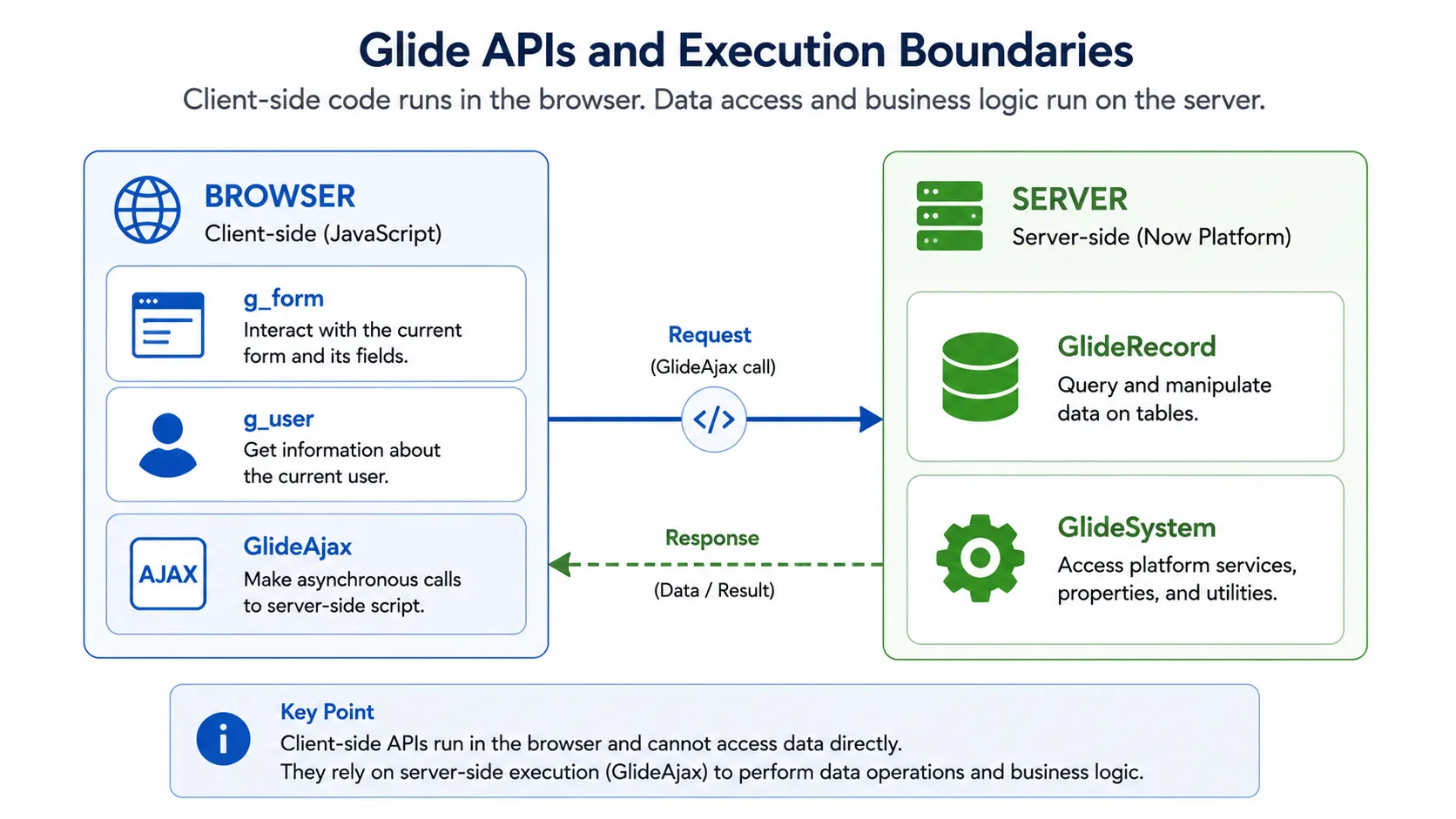
Client-side script types include Client Scripts, UI Policies, UI Scripts, UI Pages, and certain UI Action implementations. These scripts execute in the user’s browser and primarily control presentation logic and user interaction. They do not have direct access to server-side APIs or database records and therefore operate within a constrained execution boundary.
Server-side scripts execute on the ServiceNow instance and have access to server-side APIs such as GlideRecord and GlideSystem. What differentiates server-side script types is not their level of privilege, but when they execute and what triggers them.
From an execution standpoint, server-side scripts can be grouped into three categories.
User-initiated: Executed because of a user action, such as UI Actions, Scripted REST APIs, Flow Steps, Background Scripts, and Fix Scripts.
Data-triggered: Executed automatically in response to record operations, such as Business Rules.
Scheduled: Executed based on administrative configuration and time-based triggers, such as Scheduled Jobs.
Once permitted to execute, all server-side scripts operate with access to server-side APIs according to their execution context.
Secure Design Principles for ServiceNow
ServiceNow’s security model is layered by design. Authorization, scope isolation, invocation control, and execution context each address different aspects of platform security. Secure implementation depends not just on enabling these mechanisms, but on understanding how they interact.
The following principles follow directly from the architectural model described above:
Treat server-side execution as trusted code - Once code executes on the server, it operates within a trusted execution context and can access privileged platform APIs. Limit who can create, modify, or deploy server-side scripts, and review execution contexts carefully.
Prefer scoped applications over global development - Scoped applications provide meaningful isolation boundaries. Global scope does not enforce the same application-level separation and allows broader interaction across the platform. Develop in scoped applications whenever possible and reserve global scope for cases where platform-level access is explicitly required.
Design cross-scope access intentionally - Application access settings, cross-scope privileges, and Restricted Caller Access work together. Configure cross-scope privileges narrowly and review them regularly to ensure they reflect intentional design decisions.
Separate data access from execution control - ACLs govern who can access data and perform operations. Restricted Caller Access governs who can invoke execution paths. Both are required for a complete security posture. Reviewing one without the other provides an incomplete picture of risk.
Apply least privilege to automation and AI components - Scripts, flows, and automation components operate with the authority of their execution context. Ensure roles, scopes, and accessible APIs are limited to what is strictly necessary for their function.
Conclusion
Security on ServiceNow is ultimately defined by the interaction of its architectural controls rather than any individual feature. A clear understanding of these trust boundaries enables both developers and defenders to make informed security decisions as the platform continues to evolve.
Explore More Research from Phantom Labs
Phantom Labs™ researchers "think like attackers" to expose privilege escalation paths and identity attack vectors, helping defenders proactively uncover misconfigurations and detect threats in complex hybrid and cloud environments.
About the Author
Madhav Nakar
Madhav is a cybersecurity researcher with a background in mathematics, interested in AI and identity security research, particularly in understanding how these systems can be abused. He enjoys creating social media content around AI, cybersecurity and spirituality.
Phantom Labs™
BeyondTrust Phantom Labs™ believes the best way to fully understand cybersecurity threats is to work closely with our customers and partners, conducting real world research into the attacks that matter most to them. By dissecting emerging attack methods and exploitation techniques of threat actors, as well as conducting novel research, the team’s mission is to help organizations defend against identity threats.