

Entra ID App Privilege Escalations: Attacks & Defenses


Entra ID App Escalations: Attacks & Defenses
Learn what an App escalation in Entra ID is, how it can be used to gain a privileged access pathway, and what you should do about it.
How to Block Pathways to Privilege Escalation in Entra ID
Here is an interesting path many organizations are completely unaware of (or are aware of, but still struggling to tackle): app-based privilege escalation in Microsoft Entra ID.
App-based privilege escalation threats occur when an attacker leverages application permissions to gain elevated access within the Microsoft Entra ID environment. This type of attack often involves exploiting vulnerabilities in the application’s authentication and management of access tokens—used to authorize actions on behalf of users or other applications. These attacks are particularly dangerous because they bypass traditional security measures, like multi-factor authentication (MFA). Since tokens and app permissions are at the core of this attack, the traditional focus on user credentials might not be sufficient to detect or stop these threats.
While these identity posture vulnerabilities have been known for some time in environments like Microsoft Entra ID, app-based privileged escalation threats can be challenging to address due to several common factors: limited visibility, evolving attack techniques, the complexity of modern IT infrastructures, inadequate focus on app permissions, etc. Unaddressed, these threats can result in exploitable gaps that attackers can use to gain unauthorized access.
In our last Identity Security Insights® update, BeyondTrust introduced new content—rules and triggers that will alert when a threat or suspicious activity occurs and escalate to a high priority. This new content can better identify App-based privilege escalations in Microsoft Entra ID, empowering security teams to identify and block Entra ID attacks.
Read on to learn what an App escalation in Entra ID is, how it can be used to gain a privilege escalation path, and what you should do about it.
Entra ID and its significance in managing user access
To understand Apps in Entra ID, it can be helpful to understand what Entra ID is and where it came from. Formerly called Azure Active Directory, Entra ID aimed to improve upon its predecessor: on-prem Active Directory (AD). Specifically, it was designed to address the unique traits of the cloud. Cloud environments are different from on-prem environments in that they don’t provide a way for everything to be hidden behind a protected network, making integrations a little more challenging. So, Entra ID, the cloud-native version of AD, offered an improved way to manage cloud user access by integrating more easily within a cloud environment.
To understand how Entra ID operates within a typical organization, let’s consider a basic scenario: using Entra ID to identify and authenticate a user, and then allowing the user to proceed to some other third-party cloud software. A common setup is to use Entra ID as the Identity Provider (IDP) that handles the SSO login of the user and then redirects them back to the software they want to use. This means an IT team only needs to manage single accounts for users offboarding and onboarding, without having to manage individual accounts for each piece of software used by the company.
What is an Entra App?
Apps in Entra allow developers to write custom software (or applications) that integrate with Entra ID and leverage its cloud-native authentication and authorization protocols, like oauth2. This allows their applications to securely access, manage, or interact with various resources in the Microsoft cloud environment. To do this, they require the software in question to register as an Entra app within a customer's Entra ID tenant. During registration, the application must be granted the permissions it requires to operate.
This flexibility enables a wide range of use cases, from automating user management to enabling secure, single sign-on experiences and implementing custom security policies.
What makes an App a security risk?
By granting Apps the permissions they need to operate, we can introduce the risk of creating unintended access pathways. This is especially a concern when working with apps used to manage the directory itself.
An attacker typically starts by compromising a lower-privileged account (with fewer protections). They then leverage this foothold, using privilege escalation paths and executing lateral movement until they are sufficiently entitled to perform their objective.
In Entra ID, every App has a corresponding “service principal” attached to it. When a human performs actions within Entra, they do so using their user account, which represents their identity. On the other hand, when an application performs actions within Entra, it does so using a service principal account. The service principal is essentially the application's own unique identity within Entra ID. The app can use this identity to authenticate itself to Microsoft Entra ID and get permission to perform specific actions, based on the roles and permissions it has been assigned.
Two key factors make Apps and their associated service principals dangerous:
1. API Permissions
Apps commonly request API permissions to perform actions against the APIs of other apps. Some permissions can be used to do things within the Directory itself. Here are two particularly dangerous entitlements:
RoleManagement.ReadWrite.Directory- Allows the app to read and manage the role-based access control (RBAC) settings for your company's directory without a signed-in user. This includes instantiating directory roles, managing directory role membership, and reading directory role templates, directory roles, and memberships.RoleAssignmentSchedule.ReadWrite.Directory -Allows the app to read, update, and delete policies for privileged role-based access control (RBAC) assignments of your company's directory, without a signed-in user.
2. Directory Roles
Just like users, service principals can be assigned roles in Entra—and some built-in directory roles are very powerful! For instance:
Global Administrator
Privileged Authentication Administrator
Privileged Role Administrator
Partner Tier2 Support
Security Administrator
Intune Administrator
All of these directory roles have roughly the same level of privilege as the Global Administrator role, which is the highest privileged role. Roughly speaking, they have permission to do everything. If any of our App’s service principals have a role listed above, its management must be carefully protected. Anyone who can manage the app essentially has these permissions, too. This is because the human user controls the app, and, in essence, can make it do anything the service principal’s assigned role can perform.
Routing Privilege Escalation Paths Through the Service Principal
Now that we know what makes an App dangerous, let's look at the new BeyondTrust App privilege escalations in question. Broadly, all of the path variants we investigated (as shown below) follow a similar pattern: a compromised user account that is able to control a highly privileged service principal. This service principal is highly privileged because it has already been assigned a directory role, like Global Administrator, or it has an API permission to assign users to a Global Administrator role.
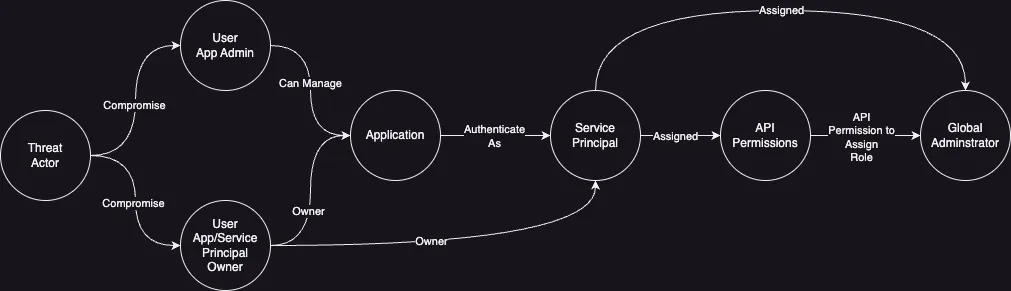
Which accounts are most vulnerable to app privilege escalation?
Throughout our research, we found that some application accounts are more vulnerable to privilege escalation threats than others. Let’s explore the pathways to escalate privileges that leverage those accounts next.
Application Administrators
This first set of privilege escalation paths uses an account that has been assigned the role ‘Application Administrator' to elevate to a ‘Global Administrator’ (GA). While Application Administrators are generally considered a highly privileged role, the below paths show why your organization should treat them as if they are effectively GAs. Unfortunately, some organizations don’t treat them that way. It’s also worth noting that ‘Cloud Application Administrators’ are vulnerable to the same kind of exploit.
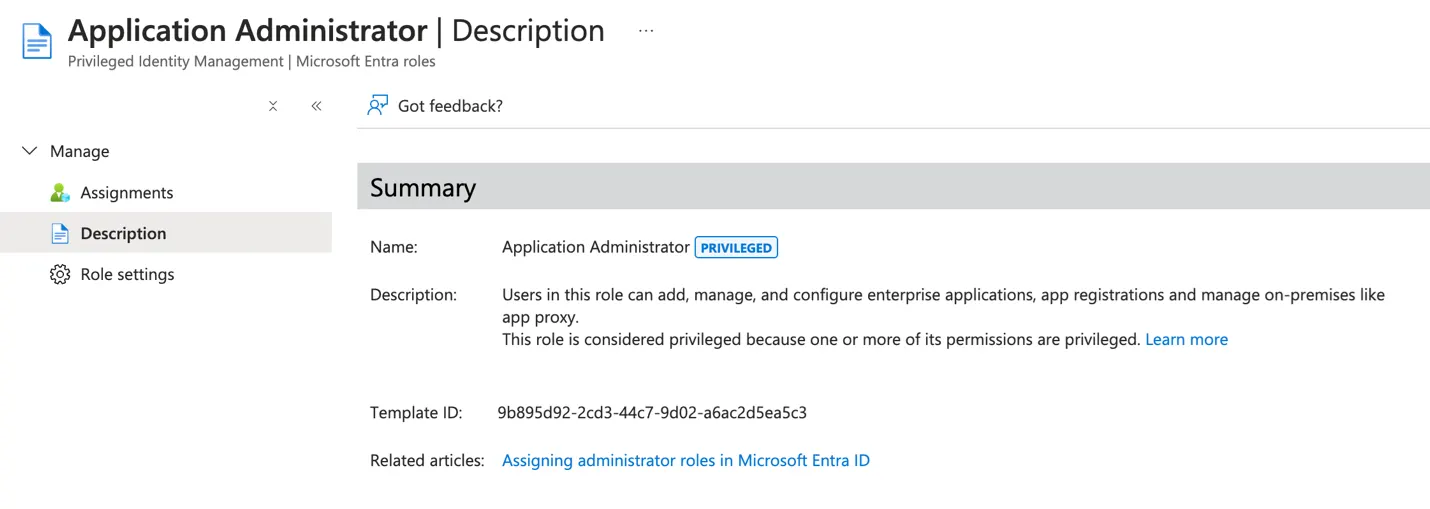
Owners
Okay—so far, the prognosis isn't great. But at least these privilege escalations are only open to accounts that are already highly privileged to begin with (even if we can technically use them to get even more privileges), right?
But wait! The same paths are open to us if the starting account is an explicit owner of one of our dangerous Apps. If they are an owner of an App, they can manage the specific service principal of their owned application, just like Application Administrators can do for any app. The rest of the paths then proceed just like above.
Demonstration
To make things even more clear, let’s take a look at how an escalation can be used Entra ID. First let’s introduce Jar Jar, a normal user in Entra. He’s not a member of any groups, or assigned any roles, so he has no special permissions…
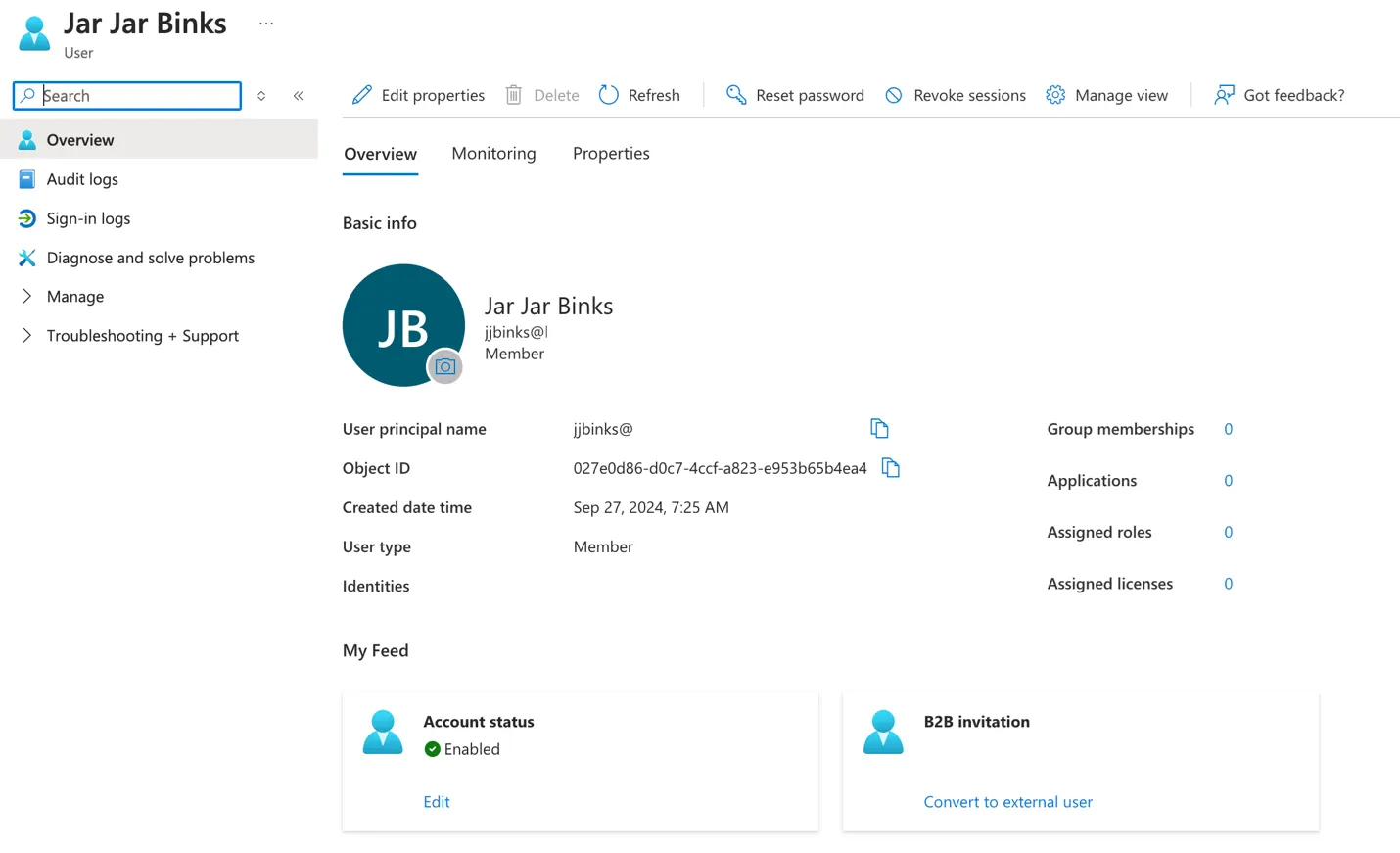
… Well, except that Jar Jar is the ‘owner’ of a highly privileged app. The App has one of the previously mentioned API permissions: RoleManagement.ReadWrite.Directory.
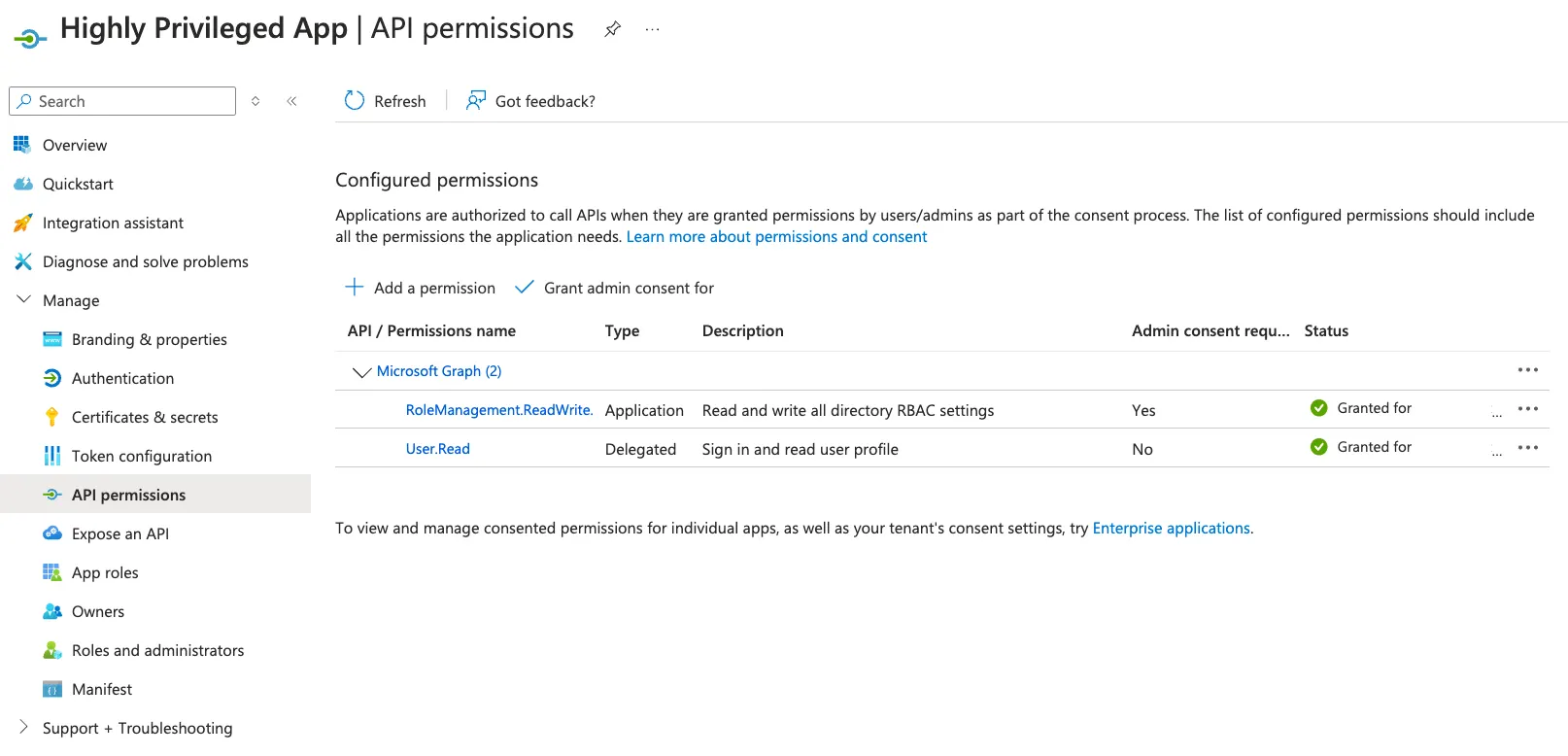
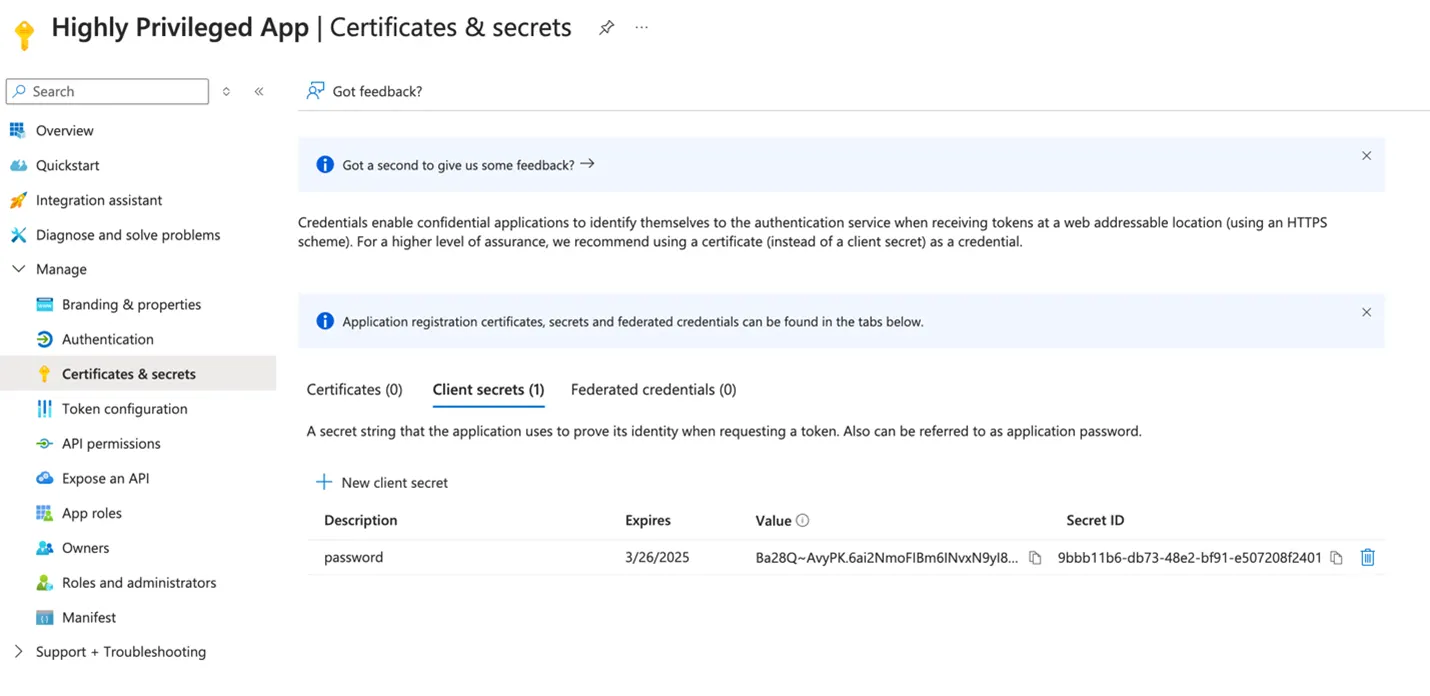
So how would a threat actor be able to leverage ownership of such an application? Well, as an owner, we can manage the credentials of our app. That means it is a simple case of creating new credentials to authenticate as the application. We can then use these credentials in our own script to grant our compromised starting account ‘Global Administrator’, thereby escalating privilege.
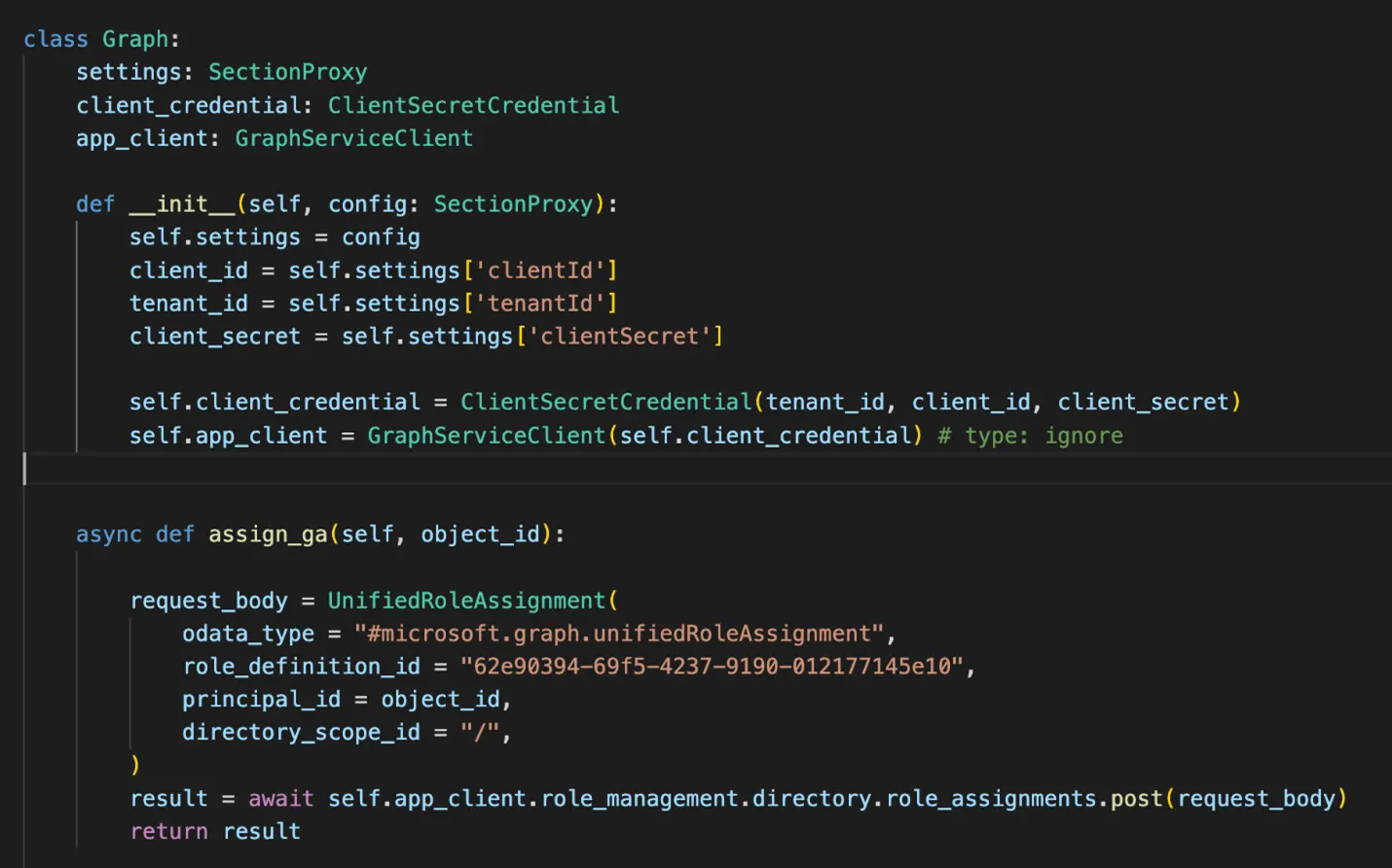
The following script is redacted for the sake of brevity, but below are the key lines that assign Global Administrator role to the object_id we pass as a principal ID.
We simply run the script and use Jar Jar’s object ID. Then, hey presto, now Jar Jar Binks is a Global Administrator!
If you wish to see this code, which includes scripts to setup and demonstrate the exploit, the code has been published to GitHub.
How to Mitigate Entra App Risks
Now that we know how Entra Apps can be dangerous, here are some steps to mitigate these risks:
Identify highly privileged Apps in your setup. Ensure processes are in place to carefully audit the management of highly privileged apps, as well as to remove any apps and/or permissions that are no longer required.
Treat Application Administrators as Global Administrators. Microsoft offers detailed guidelines for mitigating the risks associated with Microsoft Entra roles. These include recommendations such as having no more than five global admins. If you’ve created a lot of Application Administrators in your system, it’s time to rethink that.
Identify and audit the owners of dangerous apps. We must consider owners of these apps to be as highly privileged as Global Administrators. Determine if your organization is comfortable with these owners having such a high level of privilege.
Ensure proper controls (MFA, privileged access management, etc.) are in place for any account that can manage dangerous apps. It’s essential to harden access pathways to highly privileged accounts to help ensure they don’t fall into the wrong hands.
Next Steps: Improving Your Defenses Against Entra ID App Escalations
Now you know how a highly privileged application can be used by a malicious Application Owner / Administrator to escalate the attacker’s privileges to the highest possible in Entra ID.
If you want to understand if your Azure/Entra environment contains these exploitable privilege escalation paths and others, we offer a free assessment and 30-day trial that can uncover these Entra ID paths, along with many more privileged escalation pathways. Or, click here to learn more about how Identity Security Insights can help you improve your identity security posture by finding privileges and Paths to Privilege™ before an attacker does.
About the Author
Simon Maxwell-Stewart
Simon Maxwell-Stewart is a University of Oxford physics graduate with over a decade of experience in the big data environment. Before joining BeyondTrust, he worked as a Lead Data Scientist in healthcare, and successfully brought multiple machine learning projects into production. Now working as a "resident graph nerd" on BeyondTrust's security research team, Simon applies his expertise in graph analysis to help drive identity security innovation.