

How to Protect against Phishing Attacks by Overcoming Bad User Behavior


How to Protect against Phishing Attacks by Overcoming Bad User Behavior
Phishing attacks remain a prevalent identity-based threat, preying on unsuspecting users, and damaging individuals and organizations.
In this blog, we'll explore the current state of phishing attacks, how certain behaviors make users susceptible to these types of attacks, and the most effective strategies to mitigate phishing attempts and protect identities and endpoints.
By understanding the evolving tactics employed by cybercriminals and implementing proactive measures, you can safeguard yourself and your organization’s identity security posture against the dangers of phishing.
Recent Statistics Related to Phishing Attacks
Phishing attacks remain one of the most common forms of cybercrime, accounting for a significant portion of data breaches worldwide. Let’s take a look at some recent statistics around phishing:
The three primary ways in which attackers access an organization are stolen credentials, phishing, and exploitation of vulnerabilities.
Email alone makes up 98% of the attack vector for all phishing incidents.
62% of organizations cited phishing as the top cause of identity-related breaches.
Phishing accounts for 44% of Social Engineering incidents.
There were 1.62 million phishing attacks recording in Q1 2023, which was the record high quarter in historical observations.
Phishing attacks often begin in an email containing an urgent (and sometimes threatening) message. Below is an example of a Smishing (SMS-phishing) attempt targeting an everyday employee at a major tech company, by impersonating someone in their C-Suite. Since the two may not have any relationship, the goal is to trick the employee into believing the executive is really trying to reach out to them for help.
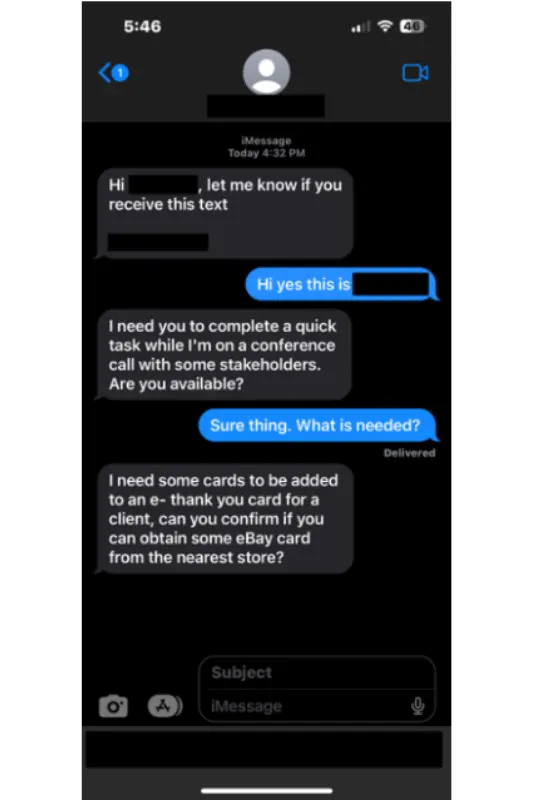
So, it goes as no surprise to see that, with the growing rise of AI/ML technologies, threat actors are co-opting more sophisticated methods to increase the success of their phishing attempts well beyond just a simple SMS phishing attack.
This can particularly be seen playing out with the increase of vishing (voice phishing) and deepfake AI (Artificial Intelligence) videos as attack vectors.
In a 2023 APWG Phishing Activity Trends Report, John Wilson, Senior Fellow, Threat Research at Forta, said: “The hybrid vishing attacks we track typically begin as an email stating that the recipient has been charged for a product or service. The message instructs the recipient to call a phone number if they wish to cancel the order and obtain a refund. PayPal was the most common brand used as a lure in these attacks, making up 38 percent of the total. This was followed by Geek Squad, McAfee, and Norton/LifeLock each with 19 percent of cases we observed.”
What happens when a curious user clicks on a phishing email?
Let’s say you receive a phishing email, and it eludes your junk email box. Below is a perfect example of one I received. There was no payload in the form of an attachment (if there is an attachment present, it’s typically malware or contains a file with an exploit).
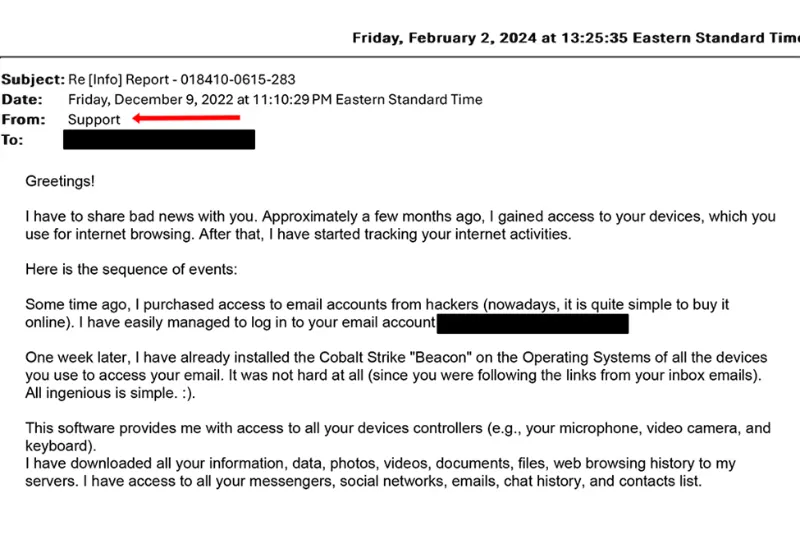
The threat actor relays a lengthy, threatening message outlining how they now have access and control of all my devices. This is nothing more than a scare tactic, and it’s employed in this fashion to make the victim pay a ransom (typically in a form cryptocurrency, like Bitcoin).
Then, after payment is received, they promise that the ‘incriminating files’ they claim to possess will not to be circulated to friends, family, and the broader Internet. This type of attack is a form of faux black mail that preys on the sense of guilt the victim may possess.
What happens after a phishing email has been opened?
In all fairness, I think every security professional has done this at least once; even for testing purposes. You have a system (probably a virtual machine) built up, fully protected with every security tool you have or stripped down to bare basics, and you execute malware (known or unknown payload) to see what happens. Unfortunately, to their surprise, their best defenses crumble, the system is compromised, and you end up pulling the network cable or hitting Power Off for the VM (Virtual Machine) because things got out of control too quickly.
Phishing emails are no different. Threat actors are constantly evolving their tactics, and this includes the email attack vectors used to gain an initial foothold in your environment. Virus Total released its yearly findings on the types of attachments used in its 2023 Malware Trends Report.
Excel (-50%), Word (-80%), and compressed formats (-27%) are becoming less popular for malicious attachments.
June 2023 saw the biggest spike of attached suspicious PDFs in 2 years. (+500%)
OneNote is the most rapidly growing format for malware delivery in 2023, followed by JavaScript (+80%) distributed along HTML.
OneNote emerged in 2023 as an alternative for attackers to use macros in Office products. AV products were initially caught off guard.
Note: the percentages of change shown above are referencing Virus Total’s year-over-year findings between 2022 and 2023.
Phishing emails to security and technology professionals rarely succeed. Leveraging a testing environment is not always containable, and the outcome is potentially devastating if not properly controlled. If an overzealous actor in the organization executes the file and you are exposed to a vulnerability, they may think nothing bad could happen, but the results can be very different.
Even the most harmless initial curiosity that prompts a user or employee to click on a suspicious email can quickly escalate into a full-blown security breach if proper precautions are not taken.
Additionally, phishing emails often serve as a gateway for more sophisticated cyber threats, such as ransomware or business email compromise (BEC) scams, which can have devastating financial and reputational implications for businesses.
Are all computers susceptible to phishing attacks?
Contrary to popular belief, every computer and mobile device is potentially susceptible to phishing attacks. While some operating systems may have built-in security features designed to mitigate certain threats, cybercriminals are adept at exploiting human vulnerabilities rather than solely relying on technical flaws. This includes everything from waterhole attacks through faux security updates. Let us explore this premise in detail for macOS.
As a specific example, remember when Apple launched a campaign that Macs do not get viruses? It’s scary that this was a very real advertising campaign. But here is the reality: 1989 saw the first widespread Mac malware called Wdef, and things have evolved for OS X just like for Windows (although not in the same quantity due to Apple market share).
This article from The Register explains a noteworthy Mac malware strain that proves the point.
A brand-new macOS malware strain from North Korean state-sponsored hackers (believed to be a finance-focused sub-group of North Korea's Lazarus offensive cyber operation) has been spotted in the wild. Dubbed "ObjCShellz" by researchers at Jamf, the malware is thought to be a later-stage payload in the multi-stage RustBucket campaign targeting organizations in the financial services sector.
For anyone who thinks their device is immune from phishing attacks and malware, remember these simple examples for macOS threats and how Apple has been proven wrong time and time again.
Employ regular training to help users recognize the signs of a phishing attack
Every phishing attack plays to the ego of the persona—from executives to hired expert contractors. Phishing emails do not discriminate, and when they employ techniques to target specific individuals (i.e. spear phishing or whaling), the results can be financially disastrous.
Not only that, but the increased sophistication of deepfake technologies is demonstrating that even the most tech-savvy and cyberattack-wary professionals still can fall victim.
Take this frightening example of a recent attack in Hong Kong, where a deepfake scammer walked off with $25.6 million, in a first-of-its kind AI (Artificial Intelligence) heist. The attack sequence started with phishing emails purporting to be from the CFO (Chief Financial Officer), targeting a victim in the finance department.
In the most audacious part of the attack, the threat actors spun up a web conferencing call with the targeted employee. On the video conferencing call, the attackers rendered a deepfake version of the company's chief financial officer (CFO), along with other employees, who appeared seated together. The victim was instructed to transfer funds (totaling $25.6 million) amongst five different Hong Kong-based accounts, which the victim subsequently executed.
If you suspect that you have received a phishing email, what should you do?
If you suspect that you have received a phishing email, it's essential to refrain from interacting with any links or attachments contained within the message, including downloading external images. Instead, report the suspicious email to your organization’s IT department or security team immediately, in line with your organization security policy.
Your IT/security team can investigate the email further, take necessary precautions to mitigate any potential risks, and alert other users within the organization to remain vigilant against similar threats.
Read on below to discover the steps to take to determine if your email is a phishing attack.
4 Steps to Determine if Your Email is a Phishing Attack
The best way to prevent the potentially damaging effects of phishing attacks is enforcing basic education – just like putting on your seat belt when driving a car. Here are four steps to take to verify whether your email is a phishing scam:
Inspect the sender's email address: Verify the authenticity of the sender's email address by checking for misspellings or slight variations that may indicate a spoofed or impersonated account. If your name is not in the To: or CC: line, or many of your colleagues are listed (dozens or even hundreds), question the source.
Examine the content of the email: Look for red flags, such as grammatical errors, generic greetings, oddly phrased subject lines, or urgent requests for personal or financial information, which are common hallmarks of phishing emails.
Hover over links before clicking: Before clicking on any links contained within the email, hover your mouse cursor over them to preview the URL. Be cautious of shortened URLs or unfamiliar domains, as they may lead to malicious websites designed to steal your information.
Verify with the sender: If you're unsure about the legitimacy of an email, verify its authenticity by contacting the sender through a separate communication channel, such as phone or in-person conversation. Avoid using contact information provided within the suspicious email, as it may be controlled by cybercriminals. Additionally, verify the links are for real domains and not questionable, like .ru (Russia) or a company/user trying to use a personal email address like from @gmail.com.
By following these steps and remaining vigilant against phishing attempts, you can protect yourself and your organization from falling victim to these malicious attacks.
Remember, when it comes to cybersecurity, awareness and proactive measures are your best defense against phishing threats.
7 Ways to Mitigate the Risks of Phishing Attacks when Human Behavior Fails
But what if the four steps above to determine an email’s authenticity go unheeded or otherwise fail?
Fortunately, some basic technologies can stop or mitigate an attack, even if the end user makes a mistake. Here are seven best practices to overcome bad user behavior and still mitigate the risks of phishing attacks:
1. Keep software and security patches up to date: Regularly updating operating systems, software applications, and security patches will address known vulnerabilities that threat actors will readily exploit. Make sure these security updates occur on a regular basis for all systems—especially for common attack vectors, like Microsoft Office, Adobe Flash, and Java.
2. Enforce least privilege via endpoint privilege management: The end user should ideally operate under the principle of least privilege (PoLP) and not be logged in as an administrator answering emails, performing routine web browsing, etc. Admin access just makes it easier for a threat actor to gain an initial foothold in an environment, execute lateral movement, own the system, and bypass other defenses.
3. Apply intelligent application control: Application control should be applied via allow lists, block lists, and gray lists to thwart the use of undesired/potentially harmful applications from being executed or installed. Additionally, Trusted Application Protection provides the capability to control child processes and mitigate tricky fileless threats, which could be part of a successful phishing attack where a user clicks on a link or downloads a malicious payload.
4. Employ phishing-resistant multi-factor authentication (MFA): Require users to authenticate their identities using multiple factors, such as passwords and biometric verification, before accessing sensitive systems or data. Unlike traditional MFA methods, which may still be vulnerable to phishing attacks if the user inadvertently provides their credentials, phishing-resistant MFA (i.e FIDO2) incorporates additional security measures or protocols to mitigate the risk of phishing attempts.
5. Disable automatic macro execution in Office: Only allow macros that are digitally signed (the sample file discussed above) to be enabled. By requiring users to manually enable macros only for trusted documents, organizations can mitigate the threat posed by macro-based attacks and enhance their overall security posture.
6. Leverage advanced email security measures: Deploy and maintain SPAM filters, next-generation firewalls, etc. to stop malicious emails before they end up in an end user’s inbox and establish command and control of the hijacked system. Advanced email filtering and/or AI-driven threat detection systems that analyze email content, sender behavior, and URLs in real-time to flag suspicious emails before they reach end-users' inboxes, can help further bolster email security.
7. Identity Threat Detection & Response (ITDR) is an emerging discipline that involves combining multiple identity security and other technologies to protect identities and identity systems. ITDR can be leveraged to detect in-progress attacks, undesirable security posture changes or risks, and more. ITDR also aims to initiate a rapid response to quickly mitigate the risk or threat. ITDR could be leveraged to help automate detection and response to phishing and other suspicious activities related to identities and accounts.
Next Steps
Identities are at the heart of phishing attacks and users are the first defense.
Regular user training and awareness programs are crucial in combating phishing attacks. By educating employees about common tactics, like spoofed email addresses, grammatical errors, and urgent calls to action, organizations empower users to recognize and immediately report suspicious emails. Simulated phishing exercises further reinforce best practices and foster a culture of caution within the organization.
Identity security controls, such as endpoint privilege management (which usually combines application control capabilities), are also powerful at protecting users by enforcing least privilege and putting guardrails around what users can do, while also limiting what can happen (i.e. attempted execution of malware) if a user does make a poor detection.
While phishing attacks are increasing in sophistication, the training and mitigating controls covered in this paper will go a long way in making your enterprise more phishing-resistant, and even able to mitigate the impact of any attacks that do land.
Want to learn how BeyondTrust's Identity Security and Privileged Access Management solutions can help provide multiple layers of effective protection against phishing attacks, and enhance protection for identities and endpoints? You can contact us today or visit us here: https://www.beyondtrust.com/