Privileged Password Management
What is Privileged Password Management?
Privileged Password Management is the secure storing, sharing, creating, and handling of privileged passwords. Other names for this discipline and technology include privileged account and session management (PASM), privileged credential management, enterprise password management, or enterprise password security. Privileged passwords are a subset of credentials that provide elevated access and permissions across accounts, applications, and systems.
Most organizations rely on some variation of a password management “solution.” It could simply (but hopefully not) be an Excel spreadsheet for simple password tracking. More ideally, teams can use an advanced enterprise password management solution, with functionality that includes:
Automated privileged account and credential discovery
Onboarding of privileged accounts and credentials
Access control and centralized protection and storage
Password rotation, secrets generations, etc.
Alerting and reporting
Oversight of all credentials across an organization that provide elevated privileged access rights
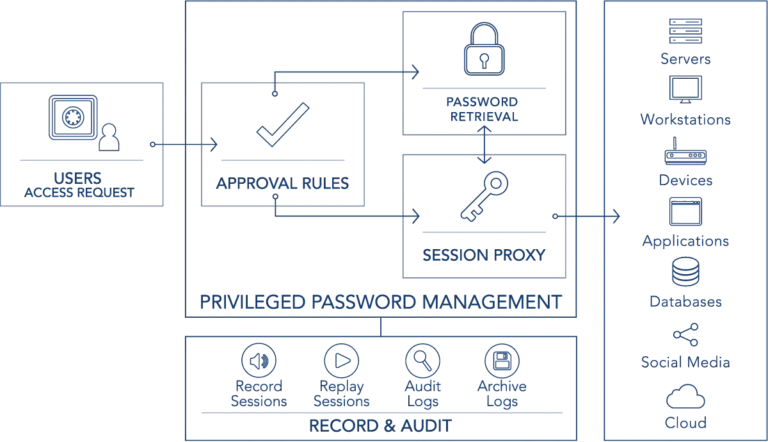
What is a Privileged Password?
Privileged passwords are a subset of credentials that provide elevated access and permissions across accounts, applications, and systems. Modern IT environments use privileged credentials for a multitude of different privileged account types within various operating systems (Windows, Unix, Linux, etc.). These account types can include root users, domain admins, sysadmins, and workstations with admin rights. Users also need privileged credentials for a variety of directory services, databases, applications, cloud instances, networking hardware, internet of things (IoT), social media, and more.
Superuser privileged account passwords can provide the authenticated user with almost unrestricted privileged access rights across an organization’s systems and data. Consequently, these types of privileged credentials are highly prized by external attackers and malevolent insiders alike. According to the IBM X-Force Threat Intelligence Index 2024, there was a 71% increase year over year in the volume of attacks using valid credentials. Additionally, Verizon’s 2025 Data Breach Investigations Report uncovered that credential abuse is the #1 most common initial attack vector in non-Error, non-Misuse breaches.
Privileged Credential Risks: Why Password Management is Needed
Privileged credentials pose serious security and compliance risks when left unmanaged. Human error, poor password hygiene, limited visibility, shared access, and hard-coded credentials all create opportunities for attackers. As organizations scale across cloud, third-party, and hybrid environments, the need for centralized, secure privileged password management becomes critical.
The most common privileged credential risks include:
Human-managed passwords: With so many (constantly changing) passwords to remember, employees are prone to forget passwords, potentially locking them out of systems. To compensate, they select easy-to-guess passwords or record passwords on paper or within electronic documents (e.g., a spreadsheet). Some employees use the same passwords for multiple accounts. Reused passwords present risk because attackers could use known email addresses and usernames to correlate the password from one compromised account to other services or accounts using the same password.
Lack of visibility and awareness: Monitoring all the privileged accounts and credentials across an enterprise poses a considerable challenge. Different teams may be separately managing—if managing at all—their own set of credentials. This makes it difficult to track all the passwords, let alone who has access to them and who uses them. An admin may have access to 100+ systems, possibly disposing them to take shortcuts in maintaining the credentials. Plus, some types of credentials (embedded in applications for instance) may be virtually impossible to find, let alone bring under management, without third-party tools.
Lack of privileged credential oversight and auditability: IT teams commonly share root, Windows Administrator, and many other privileged passwords (e.g., DevOps secrets). This can make it impossible to trace actions performed with an account to a single individual, complicating auditing and accountability. For both compliance and security reasons, IT needs visibility into the activities performed during the privileged session (the period of time during which elevated privileges are granted to an account, service, or process).
Hard-coded/embedded credentials: Privileged credentials are needed to facilitate authentication for app-to-app (A2A) and application-to-database (A2D) communications and access. Applications, systems, and IoT devices are commonly shipped, and often deployed, with embedded, default credentials. These default credentials are easily guessable and pose a substantial risk until they are brought under management.
SSH keys: SSH key sprawl presents an oft-overlooked risk for many teams. Organizations can have upwards of a million SSH keys—many long dormant and forgotten, but still viable backdoors for attackers to infiltrate critical servers. As with other privileged credentials, SSH keys are not necessarily tied to a single user. Multiple people may share the private key and passphrase to a server, which holds the public key.
Privileged credentials and the cloud: Cloud and virtualization administrator consoles (as with AWS, Office 365, etc.) provide vast superuser capabilities. These capabilities enable users to rapidly provision, configure, and delete servers at a massive scale. Within these consoles, users can spin up and manage thousands of virtual machines with just a few clicks. Additionally, each virtual machine has its own set of privileges and privileged accounts that need to be brought under management.
Third-party vendor accounts/remote access solutions: How do you ensure that the authorization provided via remote access or to a third-party is appropriately used? How do you ensure that the third-party organization is not sharing credentials, or otherwise exercising poor password hygiene?
Defending Against Password Attacks
Password attacks come from all angles. Some programs can crack complex passwords, while Pass-the-Hash (PtH) toolkits can be lethal without even cracking the password.
Organizations can implement a number of important security controls to thwart password reuse attacks such as PtH, Pass-the-Ticket (PtT), Golden Ticket attacks, and others. A few of these practices include:
Rotating privileged account passwords after every use.
Enforcing least privilege. This can include separating different types of privileged and non-privileged accounts and removing admin rights from endpoints.
Increasing password length and using nonsensical characters to thwart brute force attacks and dictionary attacks.
Privileged Password Management Best Practices & Benefits
For holistic privileged password management of accounts and credentials, consider best practices such as:
Discovering all sensitive and privileged credentials
Bringing privileged accounts and credentials under centralized management
Implementing password rotation
Bringing application passwords under management
Bringing SSH keys under management
Implementing privileged session management
Leveraging threat analytics
Automating workflow management
Now we will take a more in-depth look at each of these best practices:
1. Discover all sensitive and privileged credentials.
Examples include credentials used for shared admin, user, application, cloud, and service accounts. The discovery process should also include SSH keys, database accounts, and social media accounts. Include those used by third parties/vendors across your on-premises and cloud infrastructure. Discovery should include every platform (Windows, Unix, Linux, Cloud, on-prem, etc.), directory, hardware device, application, service/daemon, firewall, router, etc.
It should illuminate where and how privileged passwords are used, and reveal security blind spots and malpractice, such as:
Long-forgotten, orphan accounts that could provide an attacker with a backdoor to your critical infrastructure
Passwords with no expiration date
Inappropriate use of privileged passwords, such as using the same Admin account across multiple service accounts
SSH keys reused across multiple servers
Since new systems and enterprise applications can sprout up at any time, perform periodic discoveries to ensure every privileged credential is secure, centralized, and under management.
2. Bring privileged accounts and credentials under centralized management.
Optimally, the onboarding process happens at the time of password creation, or otherwise, shortly thereafter during a routine discovery scan. All privileged credentials should be centrally secured, controlled, and stored.
3. Implement password rotation.
Password rotation should be implemented across every account, system, networked hardware, and IoT device, application, service, etc. Passwords should be unique, complex, and never reused or repeated. They should also be randomized on a scheduled basis, upon check-in, or in response to a specific threat or vulnerability. The higher the security importance of the password, the more frequently it should be rotated. For instance, you may want to rotate superuser account (e.g., root, domain admin, etc.) and other highly privileged passwords after each use—known as one-time-passwords, or (OTPs).
4. Bring application passwords under management.
Securing embedded passwords requires separating the password from the code. When it’s not in use, it should be securely stored in a centralized password safe, as opposed to being constantly exposed as when in plain text. This process requires a third-party application password management or privileged password management solution. This type of management solution forces applications and scripts to call (or request) use of the password from a centralized password safe. By implementing API calls, you can wrest control over scripts, files, code, and embedded keys, eliminating hard-coded and embedded credentials. Once this is accomplished, you can automate the rotation of the password as often as policy dictates.
5. Bring SSH keys under management.
Approach SSH keys as just another password, albeit accompanied by a key pair that must also be managed. Regularly rotate private keys and passphrases, and ensure each system has a unique key pair. Automated, third-party privileged password and SSH key management solutions substantially simplify the process of creating and rotating SSH keys. This eliminates SSH key sprawl, ensuring SSH keys enable productivity without compromising security.
6. Implement privileged session management.
Privileged session management refers to the monitoring, recording, and control over privileged sessions. IT needs to be able to audit privileged activity to meet security best practices and adhere to regulations from SOX, HIPAA, GLBA, PCI-DSS, FDCC, FISMA, and more. Auditing activities can also include capturing keystrokes and screens (allowing for live view and playback). Some third-party solutions can provide automated workflows that give IT granular control over privileged sessions. Some of these granular controls could include pinpointing an anomalous session and pausing, locking, or terminating it until the organization determines that the activity is appropriate.
7. Leverage threat analytics.
Continuously analyze privileged password, user, and account behavior to detect anomalies and potential threats. The more integrated and centralized your password management, the more easily you will be able to generate reports on accounts, keys, and systems exposed to risk. A higher degree of automation can accelerate your awareness and orchestrate a response to threats. For instance, it could enable you to immediately lock an account or session or change a password upon indication of an attack, such as several incorrect passwords attempts to gain access to a sensitive asset.
8. Automate workflow management.
While you can certainly build your own internal rule sets to trigger alerts, and apply some policies around password management, third-party solutions provide robust capabilities that can streamline and optimize the entire password management lifecycle.
How to Implement Privileged Password Management
Without end-to-end automation, enforcement of privileged password security best practices will likely be an inordinately time-consuming and virtually impossible endeavor. Enterprise password management solutions can streamline and automate the entire privileged credential lifecycle, ensuring password best practices are always enforced.