

Root Security in Linux: Understanding the Three Maturity Levels


Root Security in Linux: Understanding the Three Maturity Levels
Whether you're looking to reduce standing privileges, enforce least privilege, or implement Just-in-Time access, understanding where you stand on the Linux security maturity curve is the first step toward securing your critical systems and reducing your attack surfaces.
Following the path to maturity in Linux privilege management
Ask any Linux server administrator how they accomplish tasks requiring admin or root privileges and the answer will invariably be, “with sudo.” Sudo is a widely used Unix/Linux command that allows a permitted user to execute a command as another user, typically with elevated privileges. However, if you ask data center security teams whether they’ve done the substantial work to ensure that their use of sudo meets corporate security and governance requirements such as auditing, centralized control, or multi-person approval processes, the answer is likely no.
Sudo on Linux exemplifies persistent access to privileges, enabling users to temporarily elevate their permissions for a specific command. By simply adding “sudo” to a command and entering a password, users gain admin privileges for that action, reverting to standard user permissions afterward. Unfortunately, its ease of use and lack of strict governance often leads systems administrators to rely on sudo for routine tasks—bypassing corporate policies, security protocols, and compliance requirements. This widespread use has resulted in admins having access to passwords and IT privileges far exceeding what their roles actually require.
Linux security often hinges on how well organizations manage root access and privileges. Unchecked root access creates high-risk privilege escalation pathways, making Linux environments prime targets for privilege escalation attacks, insider threats, and misconfigurations. To close these security gaps, organizations must mature their Linux privilege management.
This blog explores the three maturity levels of Linux privilege management. Whether you're looking to reduce standing privileges, enforce least privilege, or implement just-in-time (JIT) access, understanding where you stand on the Linux security maturity curve is the first step toward securing your critical systems and reducing your attack surfaces.
What are the three maturity levels for Linux/root security?
In our conversations with Linux administrators, we’ve found that companies typically fall into one of the three levels of maturity (shown in Figure 1) in their management of Linux root security:
Level One: Simplistic - Restricted access to Linux servers using tools like SSH with keys or IP allow listing, and rely solely on sudo after access is granted.
Level Two: Intermediate - Administrators are allowed to define which commands a sudo user can execute with elevated privileges.
Level Three: Mature - All policies are created, stored, and managed from a central policy server, and all elevation requests are logged in a central log server to allow greater control of policy implementation across all endpoints.
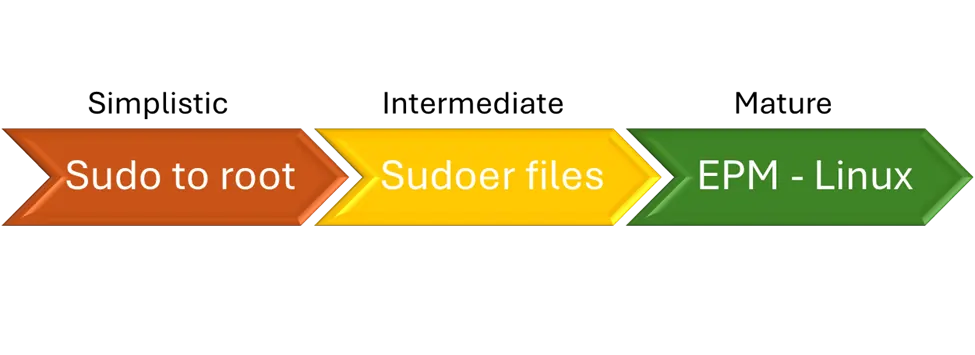
Each maturity level progressively aims to balance the local administrator’s autonomy with the corporate security team’s imperative to mitigate organizational security risks.
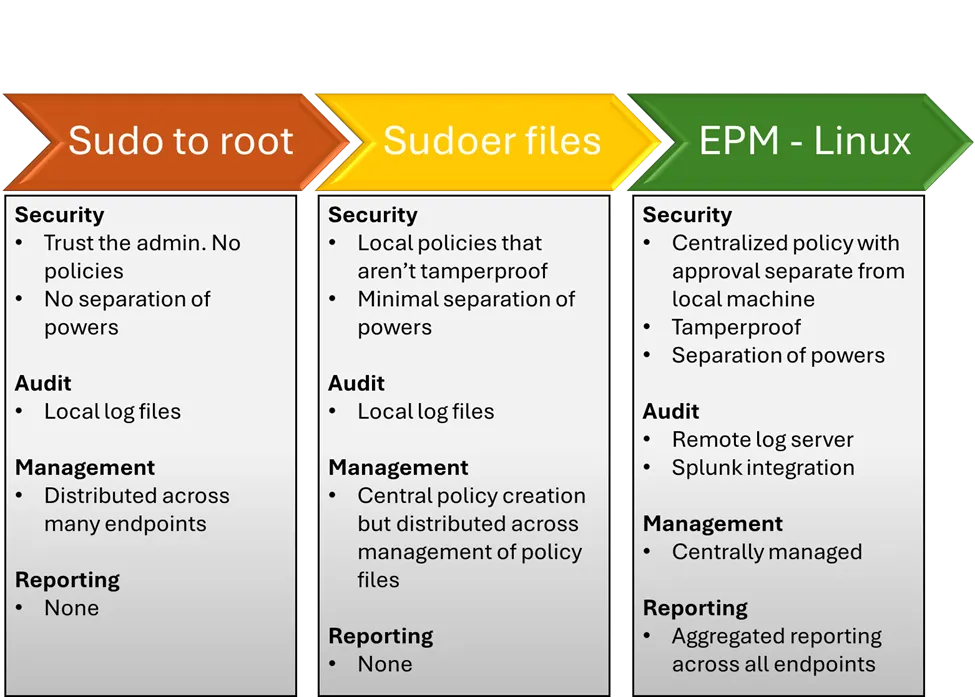
Let’s look at more detailed examples of each, as outlined in Figure 2.
Level One: Sudo only (Simplistic)
Although these companies restrict access to Linux servers using tools like SSH with keys or IP allow listing, those relying solely on sudo after access is granted are still exposing themselves to unnecessary risk. Sudo, while convenient, has inherent weaknesses that can enable elevation-of-privilege attacks. Without approval oversight or robust auditing capabilities, organizations are essentially entrusting Linux admins with unrestricted access to all resources. While restricting machine access can deter external attacks, it does little to guard against insider threats or attackers leveraging stolen credentials. Once inside, these “trusted parties” can operate unchecked, posing significant security risks. (For an example of this, watch this webinar.)
Level Two: Sudoer files (Intermediate)
Sudo includes a feature called a “sudoer file,” allowing administrators to define which commands a sudo user can execute with elevated privileges. For instance, a sudoer file could grant user Rick the ability to execute all commands with root privileges, while restricting user Bob to execute only the restart command. While this approach helps limit unnecessary privilege escalation, it does not fully address the inherent risks. If an attacker gains access to the root password, sudo’s protections can be bypassed entirely, rendering these safeguards ineffective.
Sudoer files lack both scalability and centralized management, posing significant challenges for large organizations managing extensive Linux environments. Each sudoer file resides on the individual system it governs, meaning thousands of machines could have thousands of variations, with no centralized oversight or auditing. Furthermore, these files are simple text documents that can be altered by anyone with sufficient access to the machine, which undermines their reliability. Additionally, sudo’s execution logs are stored locally, leaving them vulnerable to tampering or deletion by attackers, further eroding their effectiveness as a secure tool.
Level Three: Endpoint Privilege Management for Linux (Mature)
BeyondTrust’s Endpoint Privilege Management for Linux (EPM-L) represents the ultimate level in the path to maturity for Linux privilege management. With Endpoint Privilege Management, all policies are created, stored, and managed from a central policy server, and all elevation requests are logged in a central log server—both of which reside separately from the local endpoint.
This centralization brings significant benefits to security and governance teams:
Increased control – By centrally managing policies on Endpoint Privilege Management, security teams can more easily exercise greater control when implementing policy across thousands of endpoints.
Increased security – Separating the request from the approval of that request improves security by ensuring that no individual can act as both requester and approver. While some customers define policies without requiring explicit approval, others add rules that require second-party approval before any privilege elevation request is granted.
Improved auditing and forensics – Because all requests are centrally logged, teams only need to query a single source for compliance audits or forensic investigations. And because the log servers are separate from the endpoint, they are tamper-proof and can be easily delivered to other security stakeholders (such as SOC teams).
Beyond the benefits of centralized policy management, BeyondTrust Endpoint Privilege Management introduces unique features that enhance security and flexibility. Advanced Control and Audit enables organizations to restrict root logins from performing specific functions, such as editing critical files (e.g., the hosts file), which adds an extra layer of protection. Role-based policies further enhance control by allowing policy restrictions to be set based on the requester, specific machines, the time of day, etc. This limits the conditions under which privilege elevation can be permitted.
BeyondTrust Endpoint Privilege Management also simplifies the transition from sudo with included scripts that alias its privilege escalation capabilities, enabling customers to move seamlessly to the next level of privilege management maturity. This feature accelerates deployment, reduces complexity, and delivers rapid ROI, making Endpoint Privilege Management an efficient and scalable solution for Linux environments.
Conclusion: Advancing Your Linux Maturity
As cyber threats grow more sophisticated, it’s essential for organizations to evolve toward a more mature Linux security model. Open-source tools like sudo can only provide limited progress toward comprehensive privilege management maturity. By progressing through the three maturity levels of Linux privilege management and replacing sudo with centralized policy management, organizations can:
Enforce least privilege to minimize risk.
Reduce standing privileges and implement JIT access to minimize threat windows
Improve forensic and audit capabilities.
Significantly reduce their attack surface—especially against insider threats and credential theft.
This holistic approach positions organizations to better manage security risks, ensure compliance, and close hidden privilege pathways before attackers can exploit them.
Take action now: Learn more about how BeyondTrust Endpoint Privilege Management can help eliminate Paths to Privilege™ and strengthen your Linux security, or take the first step in upgrading the maturity of all your Linux machines by requesting a demo today.
About the Author
Neal Goldman
Neal Goldman is Principal Product Manager for BeyondTrust’s Endpoint Privilege Management for Linux. His background encompasses 30 years of product management, marketing, and business development experience at a variety of technology companies, including Google, Black Duck, EMC, and Symantec. Neal was an industry analyst at the Yankee Group where he was a frequent author and speaker.