

Elevate Visibility, Not Privileges: How To Gain Complete Control Over All Your Privileged Credentials and Secrets


Elevate Visibility, Not Privileges: How To Gain Complete Control Over All Your Privileged Credentials and Secrets
You know that sinking feeling you get when you realize you’ve left your keys in your car? Why does that bother us? It’s because we have reduced (or eliminated) the barriers to a bad outcome. Without the keys, even with unlocked doors, the car is safer. Keys create opportunities for bad actors—both in car theft and in identity security.
Privileged accounts are a bit like cars that have been left in a busy parking lot with the keys in the ignition. Even if the car is locked, there is little more than an easily breakable piece of glass to stop a bad actor from driving away with your car—along with your belongings, the GPS coordinates to your house, your garage door opener, and probably even the key to your front door (basically lateral movement on wheels).
Privileged accounts have long been prime targets for hackers. A staggering 61% of data breaches originate from the abuse of privileged credentials. This alarming statistic underscores the critical importance of safeguarding privileged accounts within organizations—particularly when you consider the power they have over critical IT resources.
The inherent power of privileged accounts amplifies the risks associated with their compromise. Privileged accounts provide the keys to your organization’s entire ecosystem, granting unfettered access to sensitive data, systems, and networks. Any misuse or compromise of these accounts can have devastating consequences. With just one instance of abuse, malicious actors can infiltrate networks, exfiltrate sensitive information, or sabotage critical systems. The fallout from such breaches extends far beyond financial losses, encompassing damage to reputation, regulatory penalties, and legal liabilities.
In today's rapidly evolving threat landscape, organizations must prioritize the protection of privileged accounts as a foundational pillar of their cybersecurity strategy. This entails implementing robust security measures such as multifactor authentication, least privilege access controls, and continuous monitoring to detect and mitigate unauthorized activities. It also means gaining complete visibility and control over privileged credentials and secrets.
In this blog post, I introduce BeyondTrust Password Safe 24.1. This latest release introduces brand-new features and capabilities, like disable-at-rest functionality, to help you secure privileged credentials and secrets utilized by both human and non-human users. Click here to access the release notes, or read on to learn how the newest iteration of Password Safe can help provide you with the foundations of privileged account security.
How Password Safe provides visibility and control over privileged credentials and secrets
BeyondTrust Password Safe (PS) is a comprehensive solution that grants organizations complete visibility and control over privileged credentials and secrets utilized by both human and non-human users. This robust platform offers an array of functionalities designed to enhance security, compliance, and operational efficiency. With Password Safe at your disposal, you gain the ability to safeguard privileged accounts, applications, SSH keys, cloud admin accounts, DevOps secrets, Application Passwords (via Workforce Passwords) and more:
Proactive credential management - Password Safe facilitates the automated onboarding of assets by scanning, identifying, and profiling all resources within your environment. This meticulous process ensures that no credentials are overlooked or left unmanaged, minimizing the risk of unauthorized access.
Real-time session monitoring and recording - Password Safe empowers organizations to actively monitor and record live sessions in real-time. Suspicious activities can be swiftly identified, allowing administrators to intervene by pausing or terminating sessions to prevent potential security breaches.
Searchable audit trail - The platform ensures that sensitive information remains protected through a searchable audit trail, facilitating compliance adherence and forensic analysis.
Integrated secrets management - Password Safe also includes (as in no extra licensing required) Secrets Safe, which streamlines the development and deployment of cloud solutions within DevOps environments. By providing teams with secure access to critical resources, Secrets Safe fosters confidence and agility in the deployment process.
Workforce password management - Password Safe also offers Workforce Passwords, a solution designed to elevate enterprise-level visibility, security, audit support, and ease-of-use of business application password management. This feature enhances operational efficiency while ensuring that password-related activities adhere to established security protocols.
What’s new in Password Safe 24.1?
Here’s a breakdown of the new features that are changing the way we view and protect privileged accounts, credentials, and secrets.
Disable-at-Rest
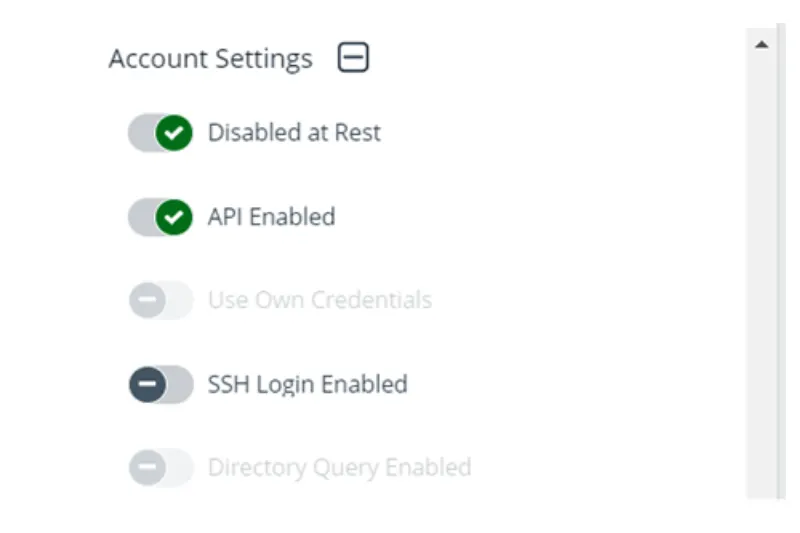
Turning back to the above car analogy, what if, instead of simply securing the keys to the car, you could make the entire car invisible except when you, the authenticated owner, need it? BeyondTrust Password Safe 24.1 builds on Password Safe’s Just-in-Time (JIT) capabilities to introduce Disable-at-Rest functionality.
Disable-at-Rest is what makes the car disappear. Now, instead of privileged accounts being always active, both to you and to threat actors, Active Directory and Azure Active Directory (now Entra ID) privileged accounts are disabled when vaulted and enabled when checked out. This automation reduces the likelihood of human error, and in-general, dramatically improves the business’s security posture.
Workforce Passwords Import
Workforce Passwords Import
BeyondTrust introduced Workforce Passwords in Password Safe’s 23.2 release. Workforce Passwords revolutionizes how organizations secure business user application passwords. This innovative addition serves as a powerful tool in reducing the attack surface, effectively minimizing the potential attack vectors and opportunities for lateral movement available to malicious actors.
Beyond enhancing security measures, the integration of Workforce Passwords with Password Safe offers a host of benefits. By bolstering security protocols and streamlining password management processes, organizations can not only fortify their defenses but also enhance user productivity. Moreover, this comprehensive solution simplifies compliance efforts, ensuring adherence to regulatory standards and industry best practices with ease.
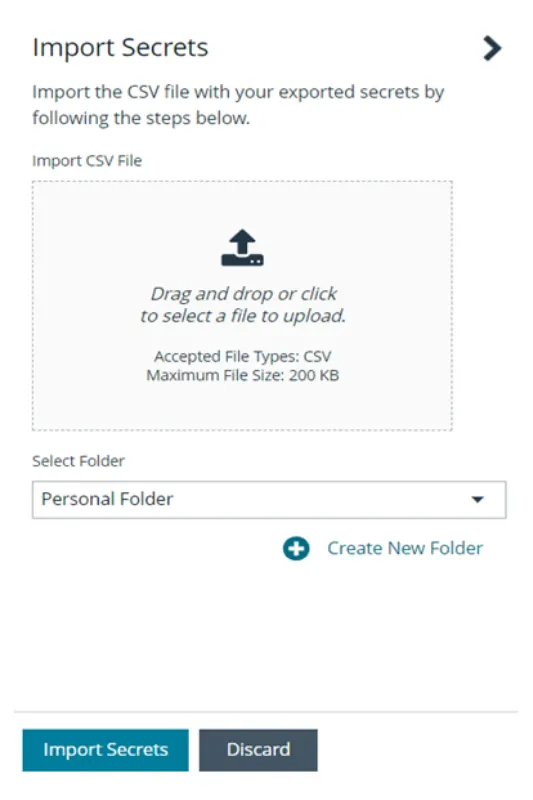
Now, in Password Safe 24.1, instead of having to manually re-create credentials stored in another vault (often a less than enterprise-grade password manager), users can, with a single click and a few quick steps, import their credential list into Workforce Passwords. Not only does this centralize the use of privileged credentials in environments, but it also brings these application passwords into the same audit and compliance structure as the rest of your environment. By simplifying the process to import credentials, we’ve improved the likelihood that IT operations teams will complete this important step, further improving your overall security.
Message Notification Center
One final example of our continuous drive to improve the functionality and user experience of Password Safe for our customers is the new “Message Notification Center” in Password Safe 24.1. Today, event notifications can be a little aggressive in their volume and persistence. Now, successful event notifications will automatically dismiss after 8 seconds, and non-successful notifications will collapse into the Notifications Center where they can be reviewed.
Conclusion: advance your credential and secrets security with Password Safe 24.1
There are a number of elements in Password Safe 24.1 that build on previously released functionality. Disable-at-Rest advances Password Safe’s JIT story, Workforce Passwords Import builds on last year’s release of the Workforce Passwords capability, and Message Notification Center improves the notification experience. We are always listening to our customers and working to improve the solution’s ability to simultaneously provide our customers with an ever-increasing security posture and a solution that’s progressively easier to use.
Next Steps
If you are interested in learning more about Password Safe, visit our website, or see Password Safe for yourself by accessing our guided tour or requesting a demo.
For existing Password Safe customers, you can learn more about the newest features and enhancements in Password Safe 24.1 by reviewing the “What’s New” document or the 24.1 release notes. Click here for more information how to update to version 24.1.