

BeyondTrust Privileged Remote Access 25.2: Innovation That Moves Security Forward



BeyondTrust Privileged Remote Access 25.2: Innovation That Moves Security Forward
BeyondTrust Privileged Remote Access 25.2 introduces new capabilities and enhancements that strengthen secure access, streamline credential management, and expand automation, helping IT and OT teams move faster without sacrificing control.
What’s New in Privileged Remote Access 25.2?
Modern IT and security teams are tasked with securing a constantly expanding and fragmenting landscape. From managing critical cloud infrastructure and enabling third-party vendor access to protecting isolated OT environments, the challenge is to grant necessary access without creating security gaps or slowing down the business. The core problem is balancing speed with control. How do you empower your teams to work efficiently across diverse systems while ensuring every privileged session is secure, compliant, and monitored?
Privileged Remote Access 25.2 continues our commitment to secure access that adapts to the way modern teams work. This release addresses the secure access challenge head-on, delivering practical innovations focused on automation, cloud visibility, and session flexibility. Whether you're managing cloud infrastructure, securing OT environments, or enabling third-party vendors, these updates are designed to help you move faster and strengthen your security posture, whether you're managing access to a factory floor or rotating credentials in the cloud.
Read on to explore the highlights of this release, or click here to view the full release notes for detailed technical updates.
7 New Features & Enhancements in Privileged Remote Access 25.2 That Elevate Automation, Access, and Cloud Visibility
1) Vault Discovery with BeyondTrust Password Safe and AWS
This feature simplifies credential management by connecting directly with your existing systems. Instead of manually creating and managing credentials in multiple places, you can now automatically discover managed accounts and systems from BeyondTrust Password Safe and secrets from Amazon Web Services (AWS). Once these assets are imported, PRA's robust access policies take over, ensuring you can extend secure access using credentials your organization already trusts and manages.
2) More Powerful Endpoint Automation
This release adds a new orchestration API to Endpoint Automation, making it easier to trigger automation tasks from external systems. Users also get clearer, more secure access boundaries, with permissions tied to their assigned Jump Groups and tasks. The overall interface has been improved for a smoother experience.
3) Better Visibility into Jump Clients
In large-scale deployments, managing thousands of Jump Clients can lead to confusion from duplicate entries. This release provides administrators with a clearer view by helping to reduce actual and perceived duplicates. The result is improved hygiene and a more accurate inventory of your endpoints.
4) Seamless Shared Jump Client Session Transfers
When the primary user in a Jump Client session needs to leave—due to a shift change or an issue escalation—they can now transfer the session to another authorized user without ending it. This keeps sessions active and uninterrupted, which is essential for maintaining productivity.
5) Auto-Start Sessions for Jump Items
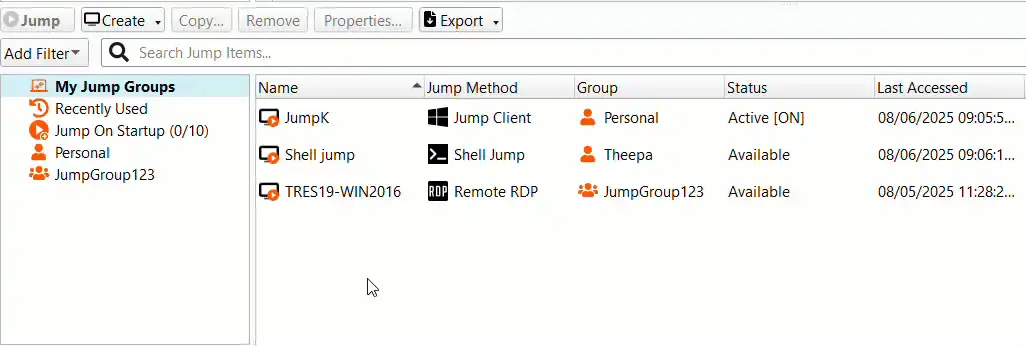
Users can now set up the console to automatically launch sessions with a selected group of systems. It’s a faster way to connect to everything you need, right when you log in. This is a significant time-saver for teams managing repeatable workloads.
6) Multi-Layer Jumpoint Proxies
You can now configure Jumpoints to route traffic across multiple layers of proxy connections. This is especially useful for OT environments or any network with strict isolation requirements. It provides more flexibility to establish secure access pathways into highly segmented networks without compromising security boundaries.
7) Jumpoint Status Alerts
Admins can now receive automatic email or HTML alerts if a Jumpoint goes offline or changes status. It’s a simple way to stay ahead of potential disruptions and keep critical access pathways monitored.
Three Ways to Strengthen Your Privileged Access Security using PRA 25.2
Even the strongest tools benefit from smart configuration. Use these best practices to maximize the protection and control offered in Privileged Remote Access 25.2:
1) Patch Smart & Stay Current
Always stay protected with the latest features and security updates delivered automatically, keeping your environment current without the extra effort.
Prefer more control? Easily opt out or set a maintenance window that fits your business needs.
2) Lock Down Credentials
Use the built-in BeyondTrust Vault for secure credential discovery, rotation, and injection.
Prioritize using SAML or other external identity providers.
Regularly audit admin accounts, disable any unused accounts, and rotate passwords proactively.
3) Apply Least Privilege with Precision
Set strict session and group policies to limit access to only what’s required.
Test policy configurations with the Session Policy Simulator before rollout.
The PRA 25.2 Difference
The updates in PRA 25.2 are a direct reflection of customer needs: more powerful automation, greater flexibility in remote access workflows, and better integration with the cloud. These improvements are designed to reduce friction and strengthen control across all your environments.
Already a customer? Upgrading ensures you are on the most secure and stable version available. Upgrade now to benefit from the latest security and performance advancements.
Exploring BeyondTrust Privileged Remote Access for the first time? Click here to see Privileged Remote Access in action.
Support and Resources
Need help with your upgrade or have technical questions?
About the Author
Gayatri Karthy
Gayatri is a Product Marketing Manager at BeyondTrust for Privileged Remote Access. Prior to joining BeyondTrust, she worked across marketing functions, including channel marketing, customer marketing, and product marketing across large multinational corporations and smaller, agile companies. Gayatri currently lives in SF and enjoys traveling, practicing yoga, and watching horror movies in her free time.
Tal Guest
Tal Guest is a VP of Product Management with over 20 years of industry experience. He leads a group of product managers, responsible for expanding privileged access management core capabilities in the areas of remote access and the service desk. Tal also helps establish long-term business strategies based on current/future market conditions and problems faced in the privileged access management area of cybersecurity.