

AD CS 101: Introduction to Active Directory Certificate Services & How to Detect and Mitigate ESC1 Attacks



AD CS 101: Introduction to Active Directory Certificate Services & How to Detect and Mitigate ESC1 Attacks
The Threat of ESC1 Attacks in AD CS
Active Directory admins may feel they understand the privileged accounts that exist in their environment and have adequately protected them. However, in many environments, Active Directory Certificate Services (AD CS) misconfigurations effectively give any user access to domain admin, regardless of what their account privilege is. This can undermine efforts to secure accounts and leave organizations vulnerable to widespread compromise as attackers escalate privilege and pivot across domains.
These misconfigurations are easy to make due to the complex nature of AD CS configuration—we regularly find at least one AD CS issue in customer engagements. In the last few years, attackers have become more aware of these issues, making it more critical for admins to understand all the privilege escalation pathways in their domains and how to detect their active exploitation, to improve Active Directory security.
The exploitation of AD CS misconfigurations become a key concern when, in 2021 researchers at Spectre Ops called attention to the problem in a presentation titled, “Certified Pre-Owned.” In the first two blogs of our AD CS Attack series, we are going to focus on two of the attack methods they highlighted that have been growing in prevalence and severity in recent attacks:
ESC1 (Enterprise CA Security Configuration) Attacks – In blog one, we’ll explore ESC1 attacks, which abuse misconfigured certificate templates to allow unauthorized certificate requests that grant attackers higher privileges, facilitating lateral movement and persistence within the network.
ESC4 Enterprise CA Security Configuration with Key Escrow) Attacks – In our second blog, we’ll examine ESC4 attacks, which take advantage of Key Escrow configurations to enable attackers to retrieve private keys stored in the CA database allowing them to decrypt sensitive communications and gain unauthorized access to encrypted data.
Because AD CS is used for authentication, these attacks pose a significant threat with severe consequences for organizations—including the potential for full domain compromise—making them a prime target for threat actors. Before we explore these two commonly seen escalation paths from the perspective of a threat actor and how those threats can be avoided, let’s take a look at AD CS and how it works.
Note: There are a lot of terms, topics and research around AD CS we don’t have time to dive into in this blog. We have included references and some relevant key terms at the end for further information.
What are Active Directory Certificate Services (AD CS)?
Active Directory Certificate Services (AD CS) is a crucial Windows server role, managing PKI (Public Key Infrastructure) on a network. It allows organizations to encrypt data, digitally sign files, and authenticate the identity of a user of a device using certificates. It is the latter “authentication of users” aspect we will be focusing on in this blog.
How Does AD CS Work?
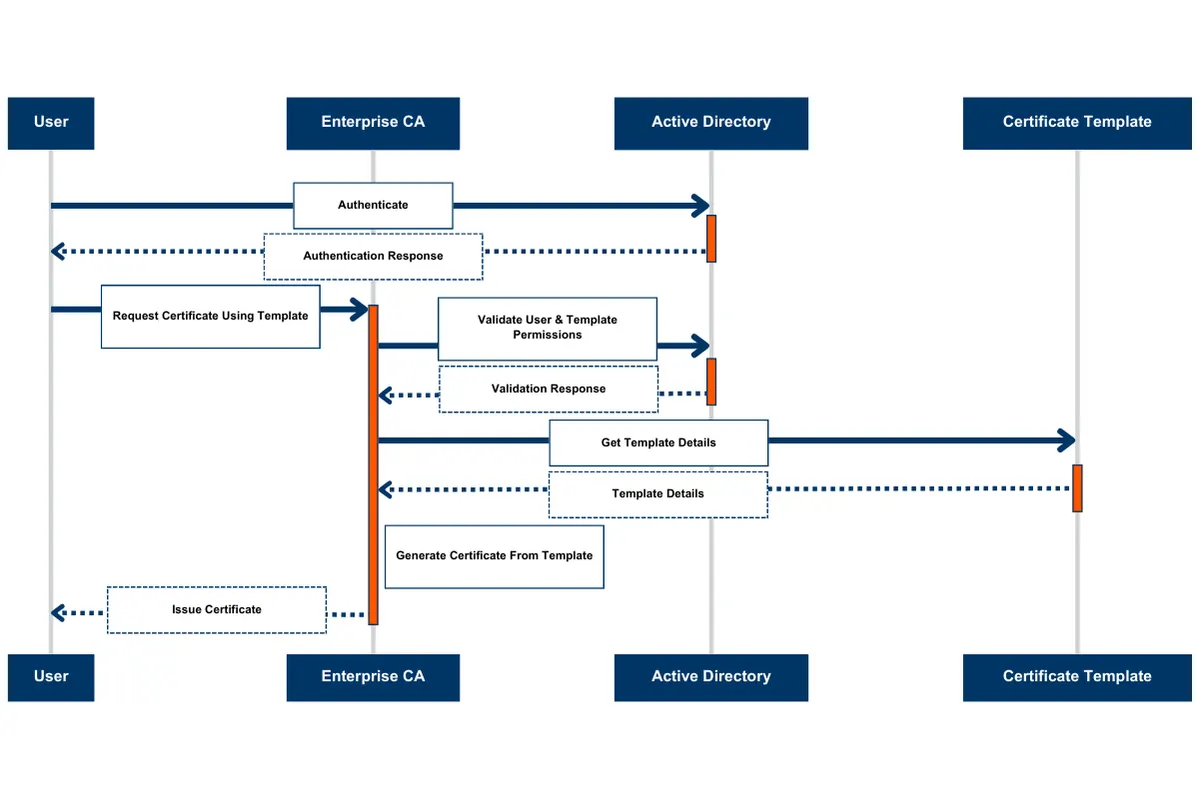
The two key components we will be focusing on in this blog are the Enterprise Certificate Authority (CA) and the certificate templates. As we can see in the diagram above, the user requests a certificate from the CA, which issues and manages certificates. In turn, the CA uses certificate templates, which are effectively a set of rules that define what certificates the CA can distribute for what purposes.
Key functions of AD CS
Integration with Active Directory: AD CS integrates with Microsoft’s PKI implementation within Active Directory to facilitate the issuance of certificates for X.509-formatted documents, encryption, message signing, and authentication.
Certificate Authority (CA): Certificates are issued by Certificate Authority (CA). CAs bind an identity to a public/private key pair, which is then utilized by applications to verify user identity.
Private/Public Key Generation: The client generates a private key pair. The public key is included in a Certificate Signing Request (CSR) along with details like subject and template name.
Certificate Signing Request (CSR): The CSR, which includes the public key and other details necessary for certificate generation, is sent to the Enterprise CA server.
Verification by CA Server: The Enterprise CA server verifies the client’s permissions and template settings. It ensures the client is permitted to request the certificate based on the provided template settings.
Certificate Generation: If the client’s request is permitted, the CA generates a certificate based on the template settings. The certificate is signed with the CA’s private key.
Certificate Issuance: The signed certificate is returned to the client, who can now use the certificate for secure communications, authentication, and other cryptographic operations.
How Do Certificate Templates Work?
AD CS Enterprise Certificate Authority (CA) issues certificates according to settings specified by AD objects called certificate templates. These templates use enrollment policies and predefined certificate configurations to dictate the validity period, usage purposes, subject specifications, requester permissions, and various other parameters of a certificate request.
The PKI Extended Key Usage (EKU) attribute on an Active Directory certificate template object contains a list of object identifiers (OIDs) determining the permissible uses for the template. These EKU OIDs dictate the certificate’s functionalities.
PKI Solutions provides a comprehensive list of the EKU OIDs offered by Microsoft.
Below is an example of object identifiers (OIDs) that configure the usage of a certificate:
Description | Object Identifier (OID) |
|---|---|
Client Authentication | 1.3.6.1.5.5.7.3.2 |
Smart Card Logon | 1.3.6.1.4.1.311.20.2.2 |
PKINIT Client Authentication | 1.3.6.1.5.2.3.4 |
Any Purpose | 2.5.29.37.0 |
SubCA | No EKUs |
Because the issued certificates can be used for domain authentication, certificates can be mapped to Active Directory accounts. This mapping is specified in an extension attribute known as the Subject Alternative Name (SAN).
The Subject Alternative Name (SAN) and Its Implications for AD Security
The SAN allows for other identities to be attached to a certificate. As an example, consider a multinational corporation with subsidiaries in different regions. Each subsidiary might have its own domain name or User Principal Name (UPN) suffix. By including SAN in the certificate templates for domain controllers or authentication services, the certificates can accommodate authentication requests from users across various domains or UPN suffixes within the Active Directory forest. This ensures smooth authentication and access to resources for users, regardless of their specific business subsidiary domain or UPN suffix.
Although including the Subject Alternative Name (SAN) fields in certificate templates within an Active Directory setup might appear like a convenient solution to cater to various authentication requirements, it’s crucial to consider the security implications. If a template is misconfigured, an attacker could arbitrarily define the SAN and request a certificate that would allow them to authenticate as a different user in the domain, including domain admins or other privileged users.
The real threat is that attackers can exploit the flexibility offered by the SAN to breach one service or domain where they could exploit a misconfigured certificate to access resources across other domains or services within the Active Directory. This potential for domain escalation significantly widens the attack surface, posing a notable security threat. It essentially provides attackers with an easier path to pivot laterally and elevate their privileges within the network.
Exploiting AD CS
AD CS can be implemented securely, but misconfigurations on certificate templates are very common. These misconfigurations can allow users with low privileges in a domain to elevate their privileges by authenticating as another account, with the two most commonly seen escalation paths being ESC1 (covered in this blog) and ESC4 (covered in our next blog).
Domain Escalation – ESC1
ESC1 is the first domain escalation path to compromise an Active Directory environment via ADCS abuse. ESC1 is the label for a category of misconfigurations that allows attackers to trick AD CS into issuing them certificates that they can use to authenticate as privileged users. Below are the requirements for this domain escalation path, as well as a walkthrough of how abuse is performed.
Requirements for ESC1 Escalation Path
Manager approval not required
Enrollment rights are granted to low-privileged users by the Enterprise CA
No Signatures required
Security descriptors on certificate templates are overly permissive, allowing low-privileged users to obtain enrollment rights.
Certificate templates are configured to define EKUs that facilitate authentication
Client Authentication (OID 1.3.6.1.5.5.7.3.2)
PKINIT Client Authentication (1.3.6.1.5.2.3.4)
Smart Card Logon (OID 1.3.6.1.4.1.311.20.2.2)
Any Purpose (OID 2.5.29.37.0)
No EKU (SubCA)
Requester has the ability to specify subjectAltName (SAN) in the CSR
Steps to ESC1 - Domain Escalation
To abuse ESC1, a threat actor must identify a vulnerable certificate template that meets all the requirements stated above. In our scenario below, we obtain an ESC1 escalation path using the Certipy offensive security tool designed to uncover and exploit AD CS misconfigurations. We can see below in the screenshot that:
Our template is enabled on the Enterprise CA (FC-CA01).
The certificate Name Flag attribute contains ‘ENROLLEE_SUPPLIES_SUBJECT’.
The EKU contains ‘ClientAuthentication (OID 1.3.6.1.5.5.7.3.2)', which gives us the ability to authenticate with the template we will be requesting.
‘AuthenticatedUsers’ have the ability to enroll into the 'TestVulnerableCertificate' template.
No authorized signatures are required.
No manager approval is required.
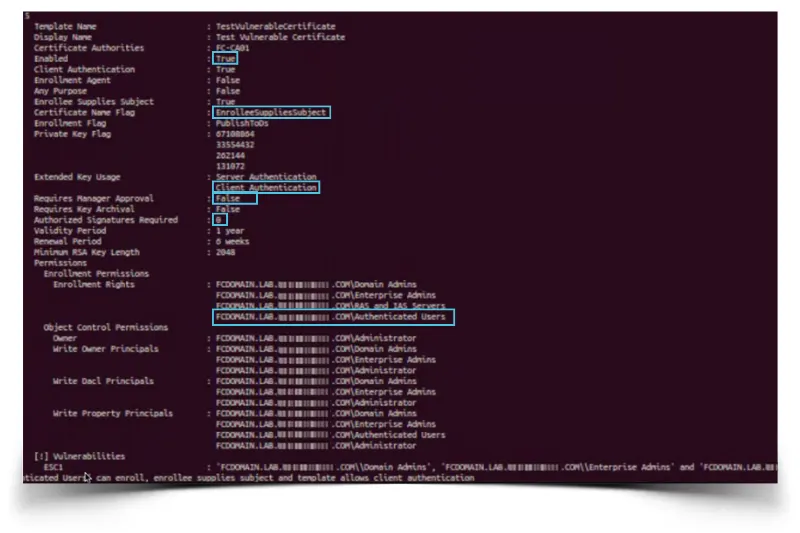
Now that we’ve met our above requirements, we can perform a request via Certipy to have the CA issue us a certificate to authenticate as the user we provide in the 'subjectAltName'. Below, we start from any compromised or created user to authenticate to the domain controller. This allows us to take a low privileged user account and obtain a certificate that can be used to authenticate as another higher-privileged user. In this case we obtain a certificate for the ‘EnterpriseAdmin’ account.
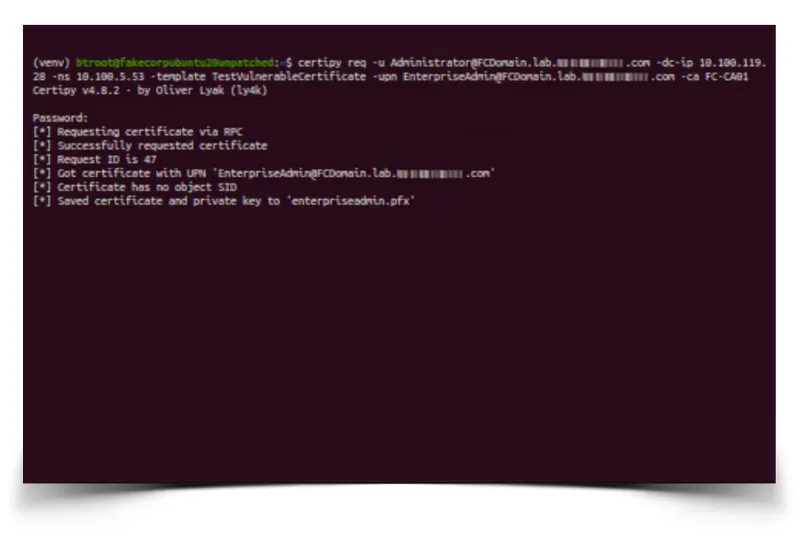
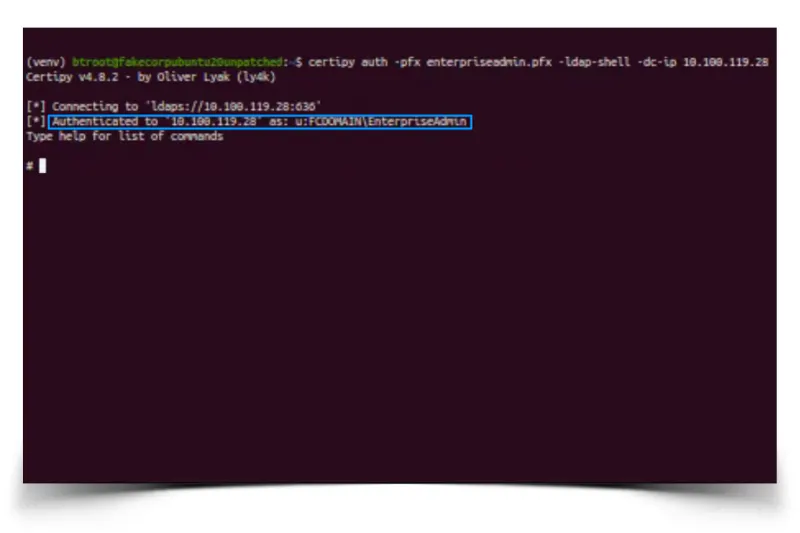
Upon obtaining the 'enterpriseadmin.pfx' certificate, we can then complete our attack and authenticate as the higher privileged 'EnterpriseAdmin' account (using Certipy or other tools) to the LDAPS protocol via the Schannel security package, as seen in our lab below.
Summary of ESC1
In this example, we have shown how a common template misconfiguration can be used by an attacker with a foothold in the domain to request a certificate that can be used to authenticate as another higher-privileged user. This allows an attacker to pivot from any account with valid domain credentials, providing vectors for domain escalation, lateral movement, and persistence.
How to Detect AD CS Abuse
In this section, we will be focusing on detection opportunities for ESC1 escalation techniques. Although it may be difficult to detect these techniques due to logging limitations in the AD CS infrastructure, we are going to provide several detection recommendations that will help identify potentially malicious behavior.
Logging
As a precursor to detections, in this section we’ll demonstrate how to enable logging around AD CS. To start, we will be focusing on Event IDs 4886 and 4887, but along the way we will enable other logs, as well as supplementary logs, that will be leveraged in later blog posts.
Step 1: In order to investigate or monitor logs around certificate services, we will need to access the 'Group Policy Management Editor'. We can access this by opening 'Group Policy Management' and right-clicking 'Default Domain Policy' under the 'Group Policy Objects' of your domain, as shown below in our example.
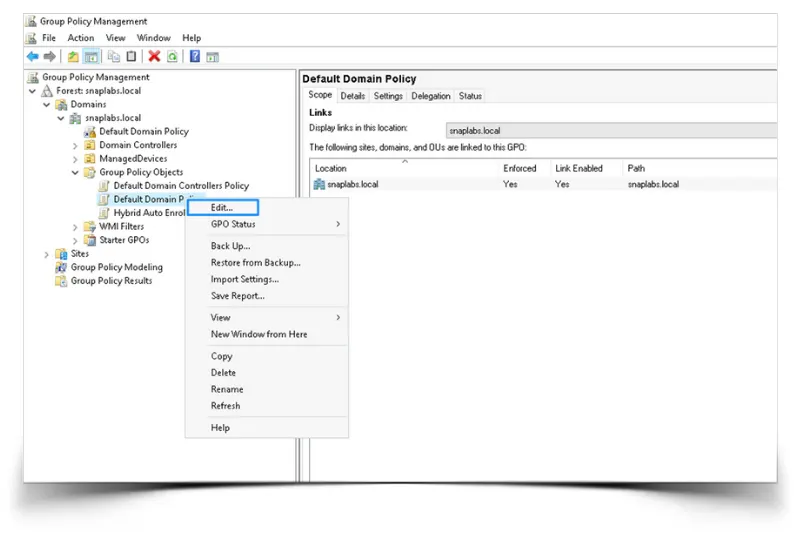
Step 2: To enable ‘Audit Certification Services’ within the ‘Group Policy Management Editor’, we will browse to this section of the editor: Computer Configuration > Policies > Windows Settings > Security Settings > Advanced Audit Policy Configuration > Audit Policies > Object Access > Audit Certification Services.
We will right-click on 'Audit Certification Services' and access properties. Next, we will enable both 'Success' and 'Failure' events, as seen in our screenshot below.
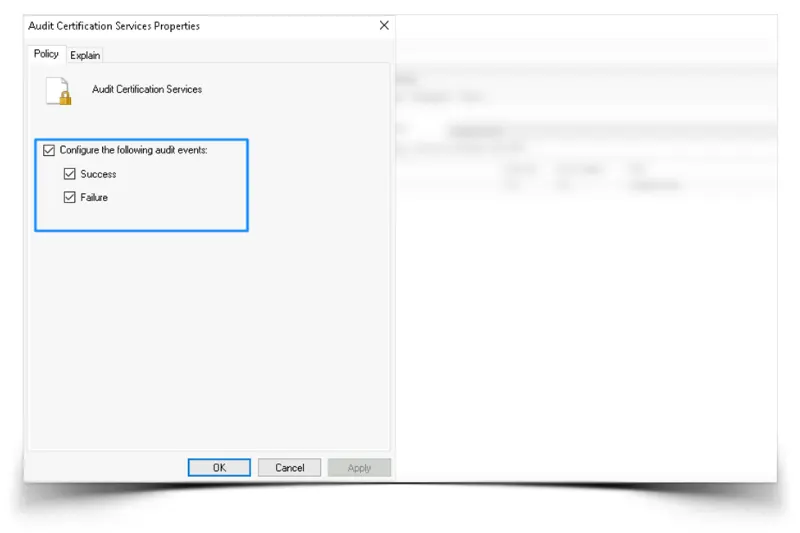
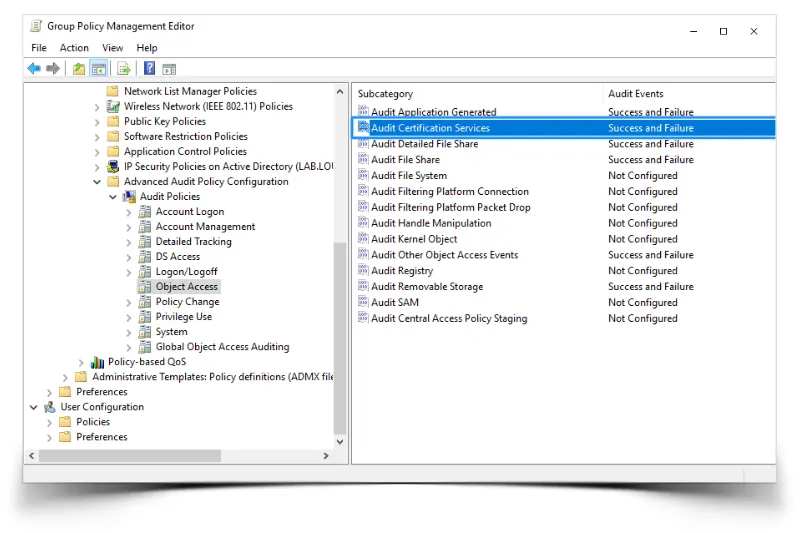
Step 3: We need to verify settings have been enabled. As shown in the screenshot below, 'Success and Failure' should be reflected for the 'Audit Certificate Services' logs.
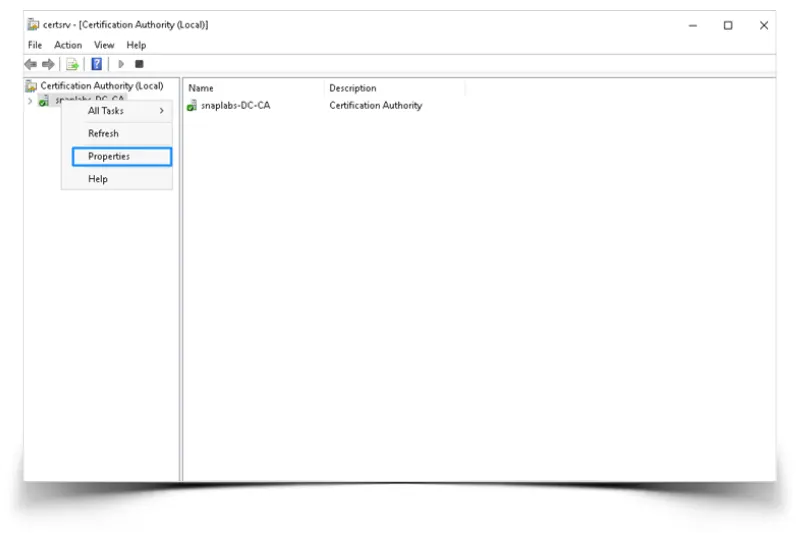
Step 4: We will now access the 'Certification Authority' snap-in and enable auditing for the Certificate Authority properties. As shown in the following screenshots, open the 'Certification Authority' snap-in:
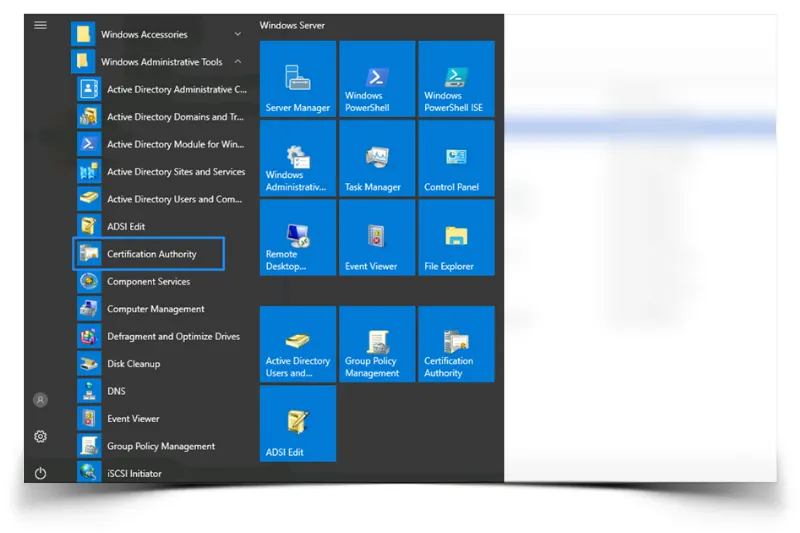
Right-click the CA for which you want to enable auditing and click 'Properties' in the drop-down menu:
Navigate to the 'Auditing' tab and enable the following events to audit:
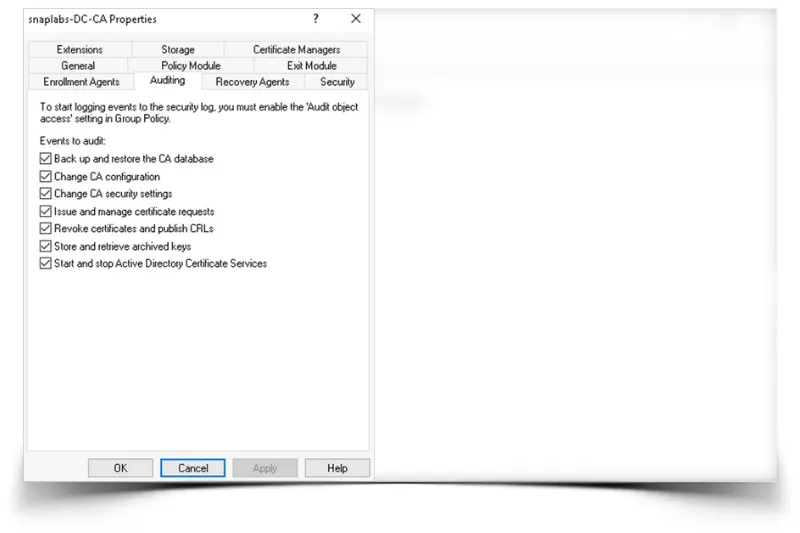
Enabling these logs will now give you the ability to create various baseline detections around ADCS.
In our upcoming blogs, we will revisit logging to enable other Event IDs, which can be leveraged to identify other detections around domain escalation paths we will discuss.
Detecting Abuse of ESC1
As discussed above, we will be assuming that we have full visibility into logs around the Certificate Authority, specifically focusing on Event IDs 4886 and 4887. To dig into these events, we must have some basic understanding of what each Event ID is doing.
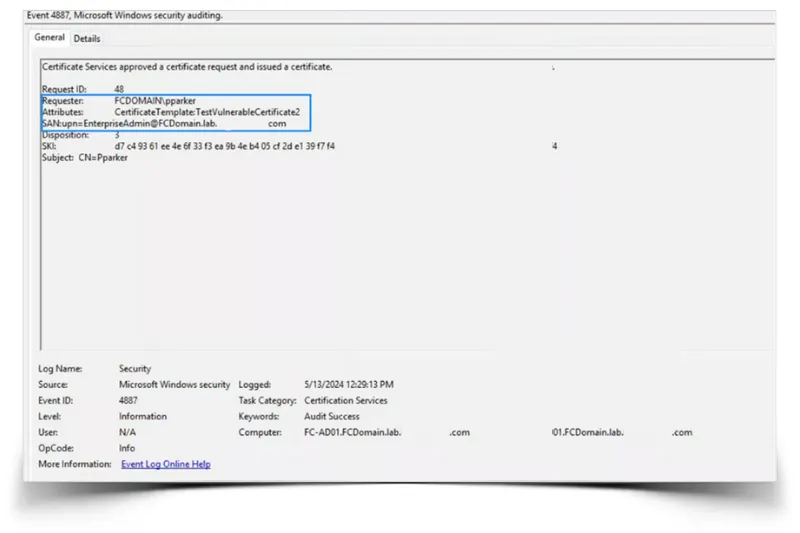
EventID 4886 is logged when Active Directory Certificate Services receives a certificate request. It is an indicator that a request has been processed or is potentially pending. The difference between Event IDs 4887 and 4886 is that Event ID 4887 indicates AD CS has approved the request and issued the certificate.
To understand how we can create detections around these event logs, we provide an example below of the data we can see for a generated 4887 Event ID. Looking at this event, we can create a detection where the Requester (in our case, 'pparker') does not match the 'SubjectAltName' (in our previous example EnterpriseAdmin), and we could also check if the 'SubjectAltName' is from a privileged group, resulting in a fairly high-fidelity detection.
To follow up and verify that this indeed may be malicious activity, we could also use the Certify tool to identify templates that are vulnerable to ESC1. In our case, we identify that our certificate template is indeed misconfigured and meets all the requirements for ESC1 domain escalation listed earlier in this blog.
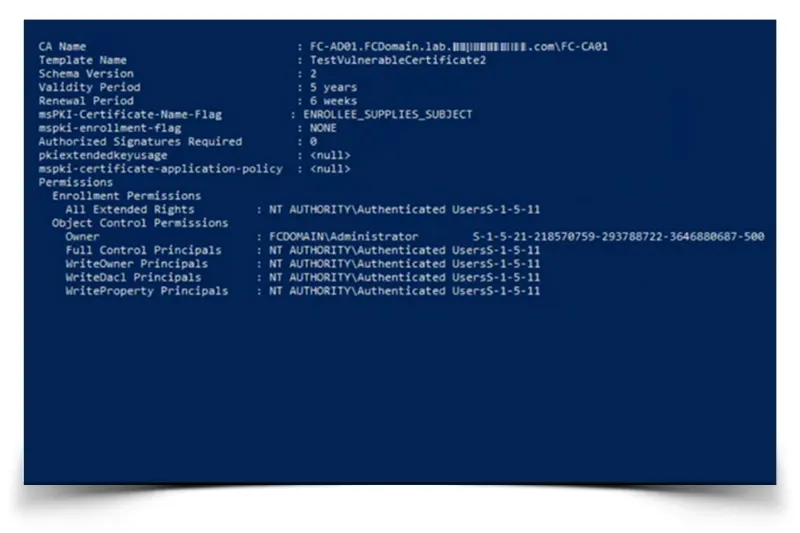
To recap, during our detection of an ESC1 attack, we would compare the Requester to the SAN and verify that the template is vulnerable to the ESC1 path and meets all the requirements.
Mitigating ESC1 Abuse
Harden Template Settings in Certificate Authority
To harden templates that are vulnerable to ESC1, we can use various tools, such as Certipy or Certify, to display potential templates that could result in ESC1 domain escalation:
Certipy: certipy find -u '[email protected]' -p 'password123' -target-ip '127.0.0.1' -vulnerable -stdout
Certify: Certify.exe find /vulnerable
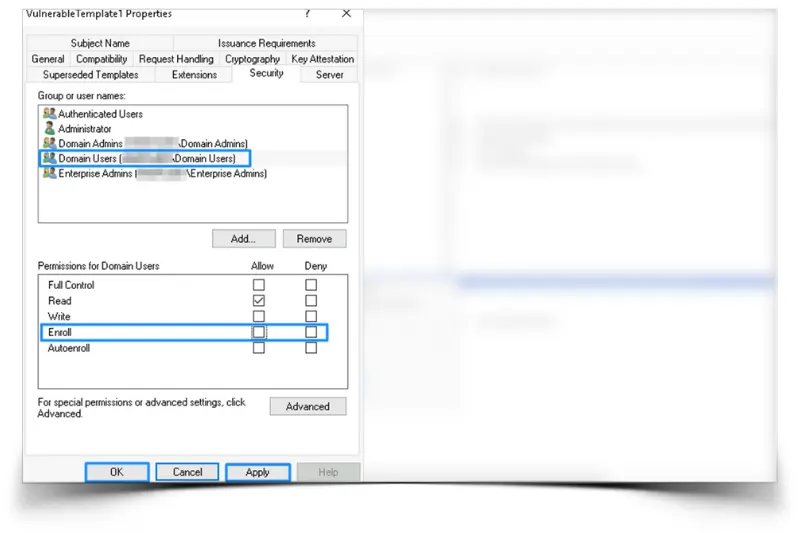
If there a certificate is vulnerable to ESC1, access the Certificate Authority console to Manage the Certificate Templates, as shown in the screenshots below:
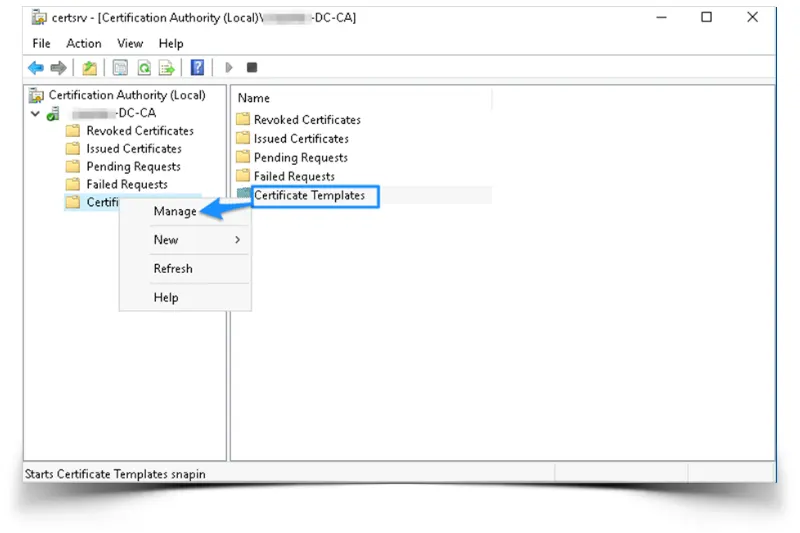
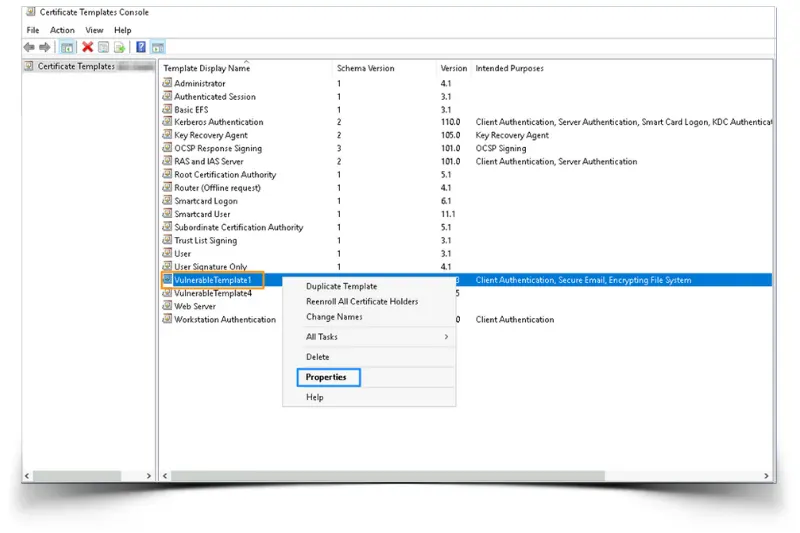
Right Click on the ‘misconfigured template’ (in our case 'VulnerableTemplate1') and access the properties:
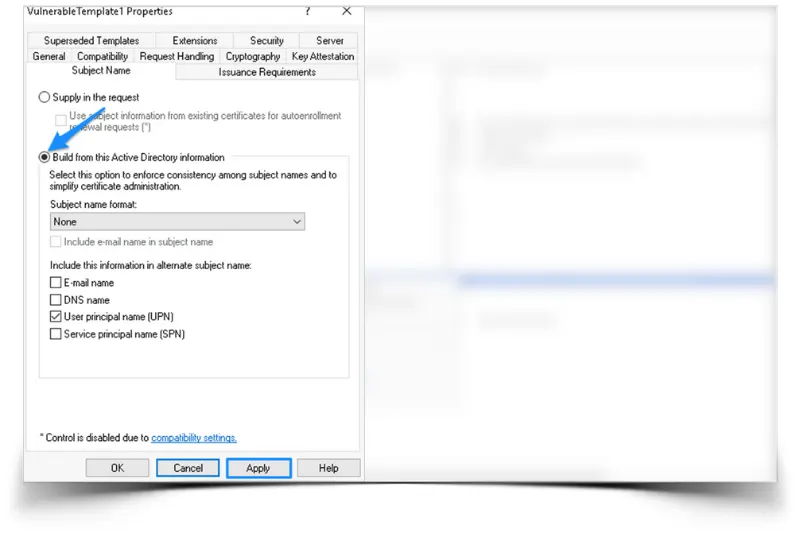
Remove the 'Supply in the request' option and change to 'Build from this Active Directory information':
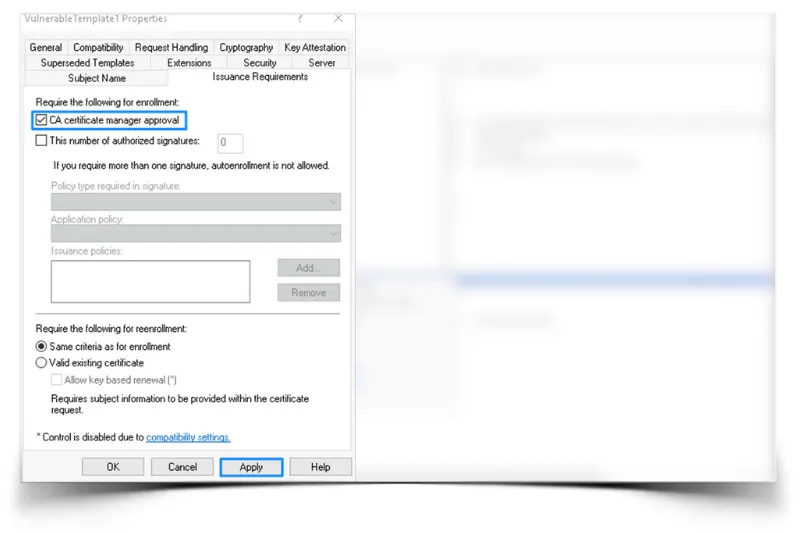
Access the 'Issuance Requirements' tab and check the 'CA certificate manager approval' to manually have CA Administrator approve certificates upon an enrollment request:
Finally, we can remove any overly permissive rights from the template that may not be necessary. In this case, we are removing Enrollment rights and only providing Read rights over the template:
Detecting ESC1 Attacks and protecting Identities and Identity Infrastructure with Identity Security Insights® from BeyondTrust
Identity Security Insights® is a product designed to proactively strengthen your identity security posture and build resilience against threats by uncovering identity vulnerabilities and hidden Paths to Privilege™. Combining BeyondTrust’s deep knowledge of privilege and access with cutting-edge security research, Identity Security Insights helps you find and protect privilege escalation pathways as well as detect active identity threats with rich context.
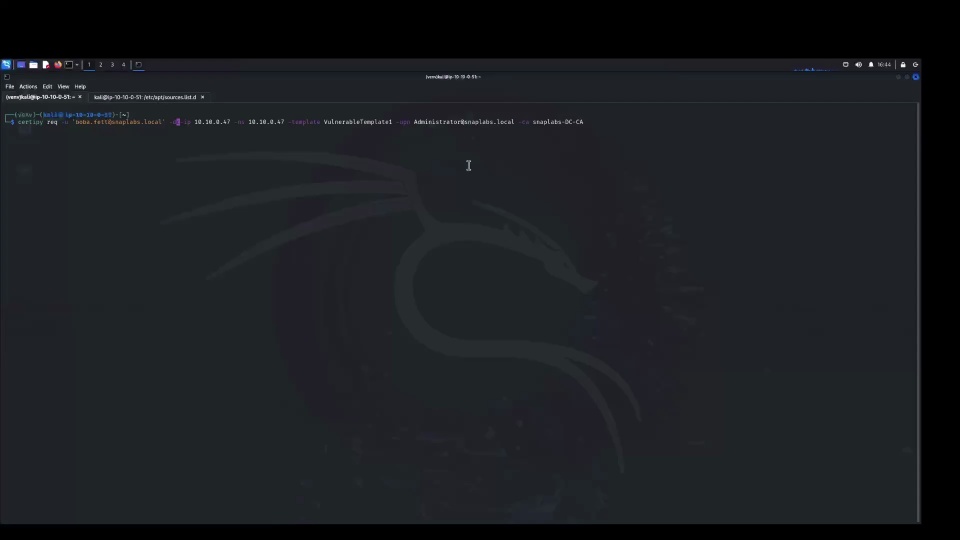
The BeyondTrust’s research and detection engineering teams are continuously evolving Identity Security Insights’ capabilities in response to new threat techniques. By dissecting various AD CS escalation paths and providing out-of-the-box detections and recommendations, the team is helping Identity Security Insights customers mitigate these escalation paths. To highlight how this works, we have included a demo the detections that empower organizations to detect and respond to ESC1 attacks.
If you are interested in gaining holistic visibility of identities, accounts, and privileges across your environment; improving your identity security posture; and detecting privilege abuse, visit beyondtrust.com/insights to find out more. Even better, try it for yourself with a complimentary 30 day trail that gets you up and running in less than an hour and provides actionable insights within a day.
The AD CS Threat Series
This blog series will explore in detail the most common AD CS attacks, vulnerabilities, and misconfigurations. Read the full series to learn how to defend all the access pathways within your domains and detect their active exploitation.
Next in the series: AD CS Threat Series Part 2 - ESC4 attacks
And learn more about AD CS threats in our webinar: IAM Leaders and AD Admins: Are ADCS Misconfigurations and Similar Issues Giving Every User a Path to Your Domain Admin?
Glossary of Key Terminology Related to AD CS
To better understand Active Directory Certificate Services, we must first understand the key components and their acronyms, which will be discussed across this blog series:
Public Key Infrastructure (PKI): A framework used to manage the creation, distribution, and revocation of digital certificates.
Certificate Authority (CA): The main component responsible for issuing, renewing, and revoking digital certificates.
Certificate Enrollment Web Service and Certificate Enrollment Policy Web Service: Allow users and devices to enroll and renew certificates. This is especially useful for non-domain joined devices.
Network Device Enrollment Service (NDES): Enables network devices, such as routers and switches, to obtain certificates.
Certificate Template: A pre-defined configuration or custom template issued by the CA that dictates the content and usage of certificates.
Enterprise CA: A Certificate Authority containing certificate templates.
Online Responder: Responds to individual client requests for information about the status of a certificate.
CSR (Certificate Signing Request): A request sent to the Enterprise CA with the client’s public key details to have a certificate issued.
EKU (Extended Key Usage): Specifies a purpose for which a certificate can be used. Some examples include encryption, authentication, and code signing.