Alert icon Keyboard navigation enabled.
Alert icon TAB or Shift+TAB to navigate across. Down ↓ to open menu. ESC to close menu.
Alert icon Down ↓ to select section. Right → to activate. Up ↑ / Down ↓ / Tab to traverse all. ESC to exit.
BeyondTrust
Skip to content Use space or enter to skip.

What can we help you find today?

Instant Results
  • Website Results
  • Technical Documentation

Filter Options

Focus your search

Filtering by

Your recent searches:

Contact Us Chat with Sales Get Support
  • English
  • Deutsch
  • français
  • español
  • 한국어
  • português
  • Home
  • Resources
  • Blog
  • Cloud Integration: Okta + PowerBroker for Unix & Linux for Authorization and Command Control current page
Link copied

Cloud Integration: Okta + PowerBroker for Unix & Linux for Authorization and Command Control

Aug 2, 2018
Author:
Michel Bluteau
Michel Bluteau
Technology Alliances Integrations Architect
Blog banner default
Cloud Integration: Okta + PowerBroker for Unix & Linux for Authorization and Command Control
Michel Bluteau
Michel Bluteau
Technology Alliances Integrations Architect

blog-cloud-integration-okta-pbul.jpg

PowerBroker for Unix & Linux (PBUL), BeyondTrust’s gold-standard solution for Unix/Linux privilege management, comes with a very powerful and flexible Policy Engine that enables organizations to satisfy even the most complex privileged access requirements. In this blog, I will explain how that Policy Engine leverages an API for third-party solutions, such as cloud applications and DevOps tools, to enable full orchestration across an environment, in this case – Okta.

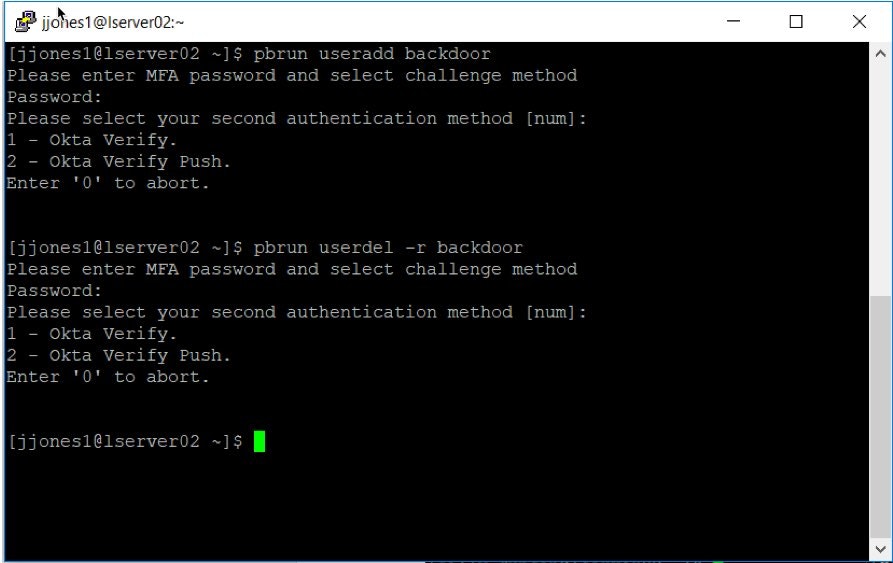
With PowerBroker, it’s possible to interface with Okta for both step-up authentication and to verify that users are properly authorized via a Role, Group, or a specific permission before allowing them to execute a specific command on a specific server.

If an administrator wants to issue a command to restart a server instance in a cloud or DevOps environment, the PBUL Policy Engine can first verify that the user is a member of the appropriate permission Group, and that the user is authorized for the specific server instance. Other conditions can also be included, like time of day, the day of the week, the user’s location, and any other third-party solution scripted through PBUL policy.

ss-cloud-integration-okta-pbul-.jpg

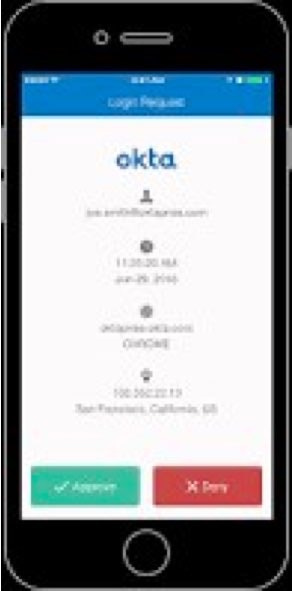
Step-up authentication for the useradd and userdel commands. 2- Okta Vrify Push is selected for bothss-cloud-integration-okta-pbul-b.jpg


Okta mobile application and Push Verify task to Approve.[/caption]

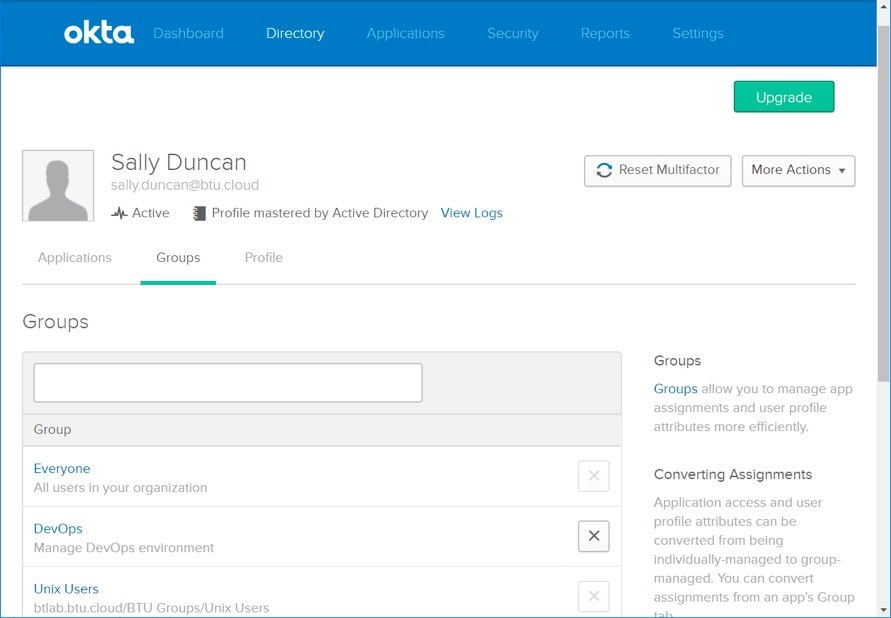
To see how this works, let’s look at the example below. First, we need to define a couple of sample groups in Okta. Our sample user, Sally Duncan, is a member of the DevOps Group. The groups are shown below (not her membership):

ss-cloud-integration-okta-pbul-c.jpg

Then, we use a simple test script (okta_test.sh) to our PowerBroker policy:

## The following user, sally.duncan, is used to test Okta query.
 if (user in { "sally.duncan" } && basename(command) in { "okta_test.sh","okta_test"}) {
 # do not allow these commands to be delegated
 print ("user called okta_test.sh");
 if (basename(command) in { "okta_test.sh","okta_test"}) {
print ("command is okta_test.sh");
include '/etc/pb/okta_functions.conf';
 RetrieveOkta_Group();
 #print("We are now using print in poc20 policy for Okta");
 #print(OktaDATA);
 DELIM=",";
 OktaFIELDS=split(OktaDATA,DELIM);
 print(OktaFIELDS);
COUNT=0;
COUNTER=0;
TEST=split(OktaDATA, "\n");
for Lines in TEST {
TEST2=split(Lines, ",");
COUNT=length(TEST2);
COUNT2=( COUNT -1);
 while ( COUNTER <= COUNT2 ) {
 #print(COUNTER);
 #print(TEST2[COUNTER]);
 if ( TEST2[COUNTER] == "DevOps" ) {
 print("Congratulations - you are a member of the DevOps Group in Okta, so you are authorized to execute this command");
 COUNTER++;
 }
 else
 {
 COUNTER++;
 }
 } # End while
COUNT=0;
COUNTER=0;
} # End for
}
 accept;
 #reject("This is a restricted command okta_test.sh -- '" + basename(command) + "'.");
 }

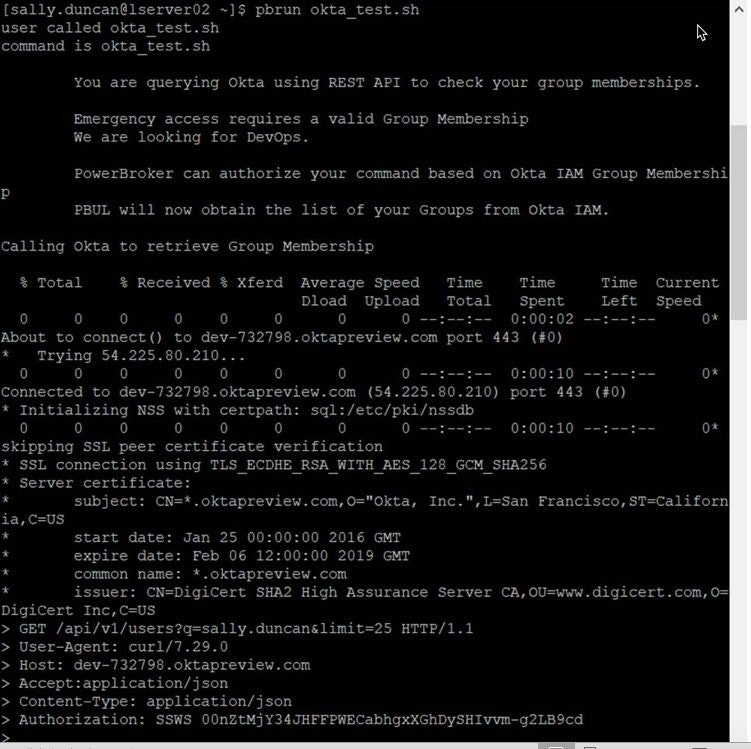
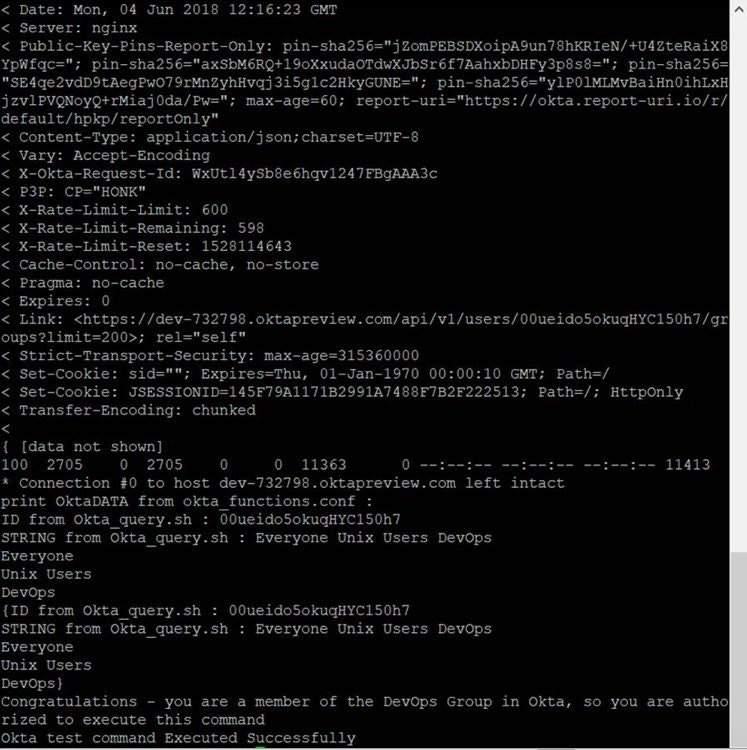
When you execute the script as a part of a “test” policy, you are able to determine the Okta group membership as shown below:

ss-cloud-integration-okta-pbul-d.jpgss-cloud-integration-okta-pbul-e.jpg

This is a simple example, but it demonstrates three very important things

  1. The power of the PowerBroker for Unix & Linux scripting language to integrate into third-party solutions.
  2. The integration from PowerBroker for Unix & Linux to support group membership of Okta users.
  3. The support of PowerBroker for Unix & Linux in DevOps and Cloud environments in support of next-generation technologies.

If you would like more information on how BeyondTrust can support Okta and next-generation initiatives, contact us today. You can also learn more about our technology partners.

Latest Posts
  • Hooked on Identity (Part 2): Abusing OAuth Trust Boundaries in Okta
    Jun 12, 2026 Hooked on Identity (Part 2): Abusing OAuth Trust Boundaries in Okta
    Blog
    7m
  • Hooked on Identity: Abusing SAML Assertion Inline Hooks in Okta
    Jun 9, 2026 Hooked on Identity: Abusing SAML Assertion Inline Hooks in Okta
    Blog
    6m
  • Joining Project Glasswing: Securing the Privilege Backbone of the AI Era
    Jun 8, 2026 Joining Project Glasswing: Securing the Privilege Backbone of the AI Era
    Blog
    5m
  • The Most Common & Most Dangerous Types of Shadow IT
    Jun 5, 2026 The Most Common & Most Dangerous Types of Shadow IT
    Blog
    19m
  • 14 Password Management Best Practices
    May 28, 2026 14 Password Management Best Practices
    Blog
    12m
Related
  • Compromised Contractor Credential Leads to Largest Cyberattack into the Systems of the US Government
    Jul 13, 2015 Compromised Contractor Credential Leads to Largest Cyberattack into the Systems of the US Government
    Blog
    1m
  • Modern PAM Defined: What It Is, and Why It’s Needed
    Jan 29, 2025 Modern PAM Defined: What It Is, and Why It’s Needed
    Blog
    8m
Share this Article
  • Link
Stay up to Date
Get the latest news, ideas, and tactics from BeyondTrust. You may unsubscribe at any time.

Keep up with BeyondTrust

Customer Support Get Started
  • LinkedIn
  • X
  • Facebook
  • Instagram
  • Add BeyondTrust as a preferred source on Google
  • Privacy
  • Security
  • Manage Cookies
  • Do Not Sell My Data
  • WEEE Compliance

Copyright © 2003 — 2026 BeyondTrust Corporation. All rights reserved. Other trademarks identified on this page are owned by their respective owners. BeyondTrust Corporation is not a chartered bank or trust company, or depository institution. It is not authorized to accept deposits or trust accounts and is not licensed or regulated by any state or federal banking authority.

Prefers reduced motion setting detected. Animations will now be reduced as a result.