"Starting with AD Bridge made all the difference in speeding up the execution of our zero trust strategy at Investec."
—Brandon Haberfeld, Global Head of Platform Security, Investec



Achieve streamlined identity management and access control by extending Microsoft AD authentication, SSO capabilities, and Group Policy configuration management to Unix and Linux systems.


"Starting with AD Bridge made all the difference in speeding up the execution of our zero trust strategy at Investec."
—Brandon Haberfeld, Global Head of Platform Security, Investec
“BeyondTrust enables us to rise to the occasion, meet regulatory standards of our customers and work towards true Zero Trust.”
—Mahmood Haq, CISO, MyVest

Reduce the risk and complexity of managing a heterogeneous environment.

Access Unix and Linux environments using Active Directory credentials, single sign-on, LDAP, and Smart Card Authentication.

Extend native group policy management capabilities to include specific group policy settings for Unix and Linux.

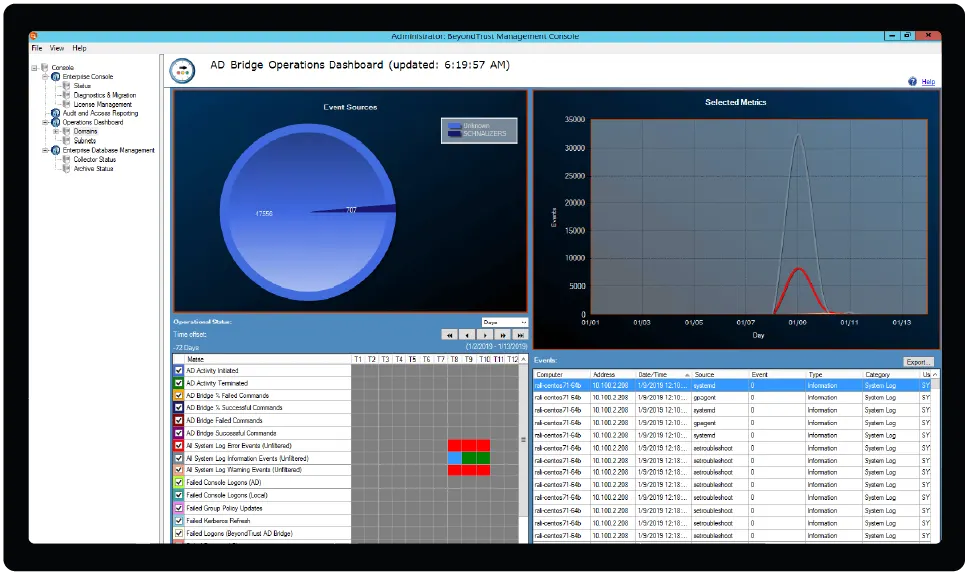
Audit events in real time and leverage a centralized and secure reporting module with many built-in, regulatory-specific reports.

Control access to non-Windows systems by defining which users are permitted to log on to which systems via Active Directory and policy.

Migrate from multiple authentication mechanisms, identities, and directories to a single AD-based infrastructure for all systems and users.

Provide a single point of control for managing employee, partner, and third-party authentication.

Enable a wide range of Unix and Linux systems, including RedHat, Solaris, Ubuntu and others, by connecting them with Active Directory.

Provide non-impact, schema-less deployment to enable cross-platform management of identity and access control.
Security administrators often struggle to enforce Zero Trust and other security policies consistently across the heterogeneous enterprise. AD Bridge simplifies the secure management of access and identities, and the path to implementing zero trust enterprise-wide. Automatically map policy settings and apply them to all systems—regardless of operating system or application.
With AD Bridge, organizations can attain consistent security policies and access controls across the enterprise, and seamlessly transition users from desktops to remote machines or between systems, without requiring credential reentry.
Extending native group policy management across non-Windows platforms enables centralized configuration management, reducing the risk and complexity of managing a heterogeneous environment.
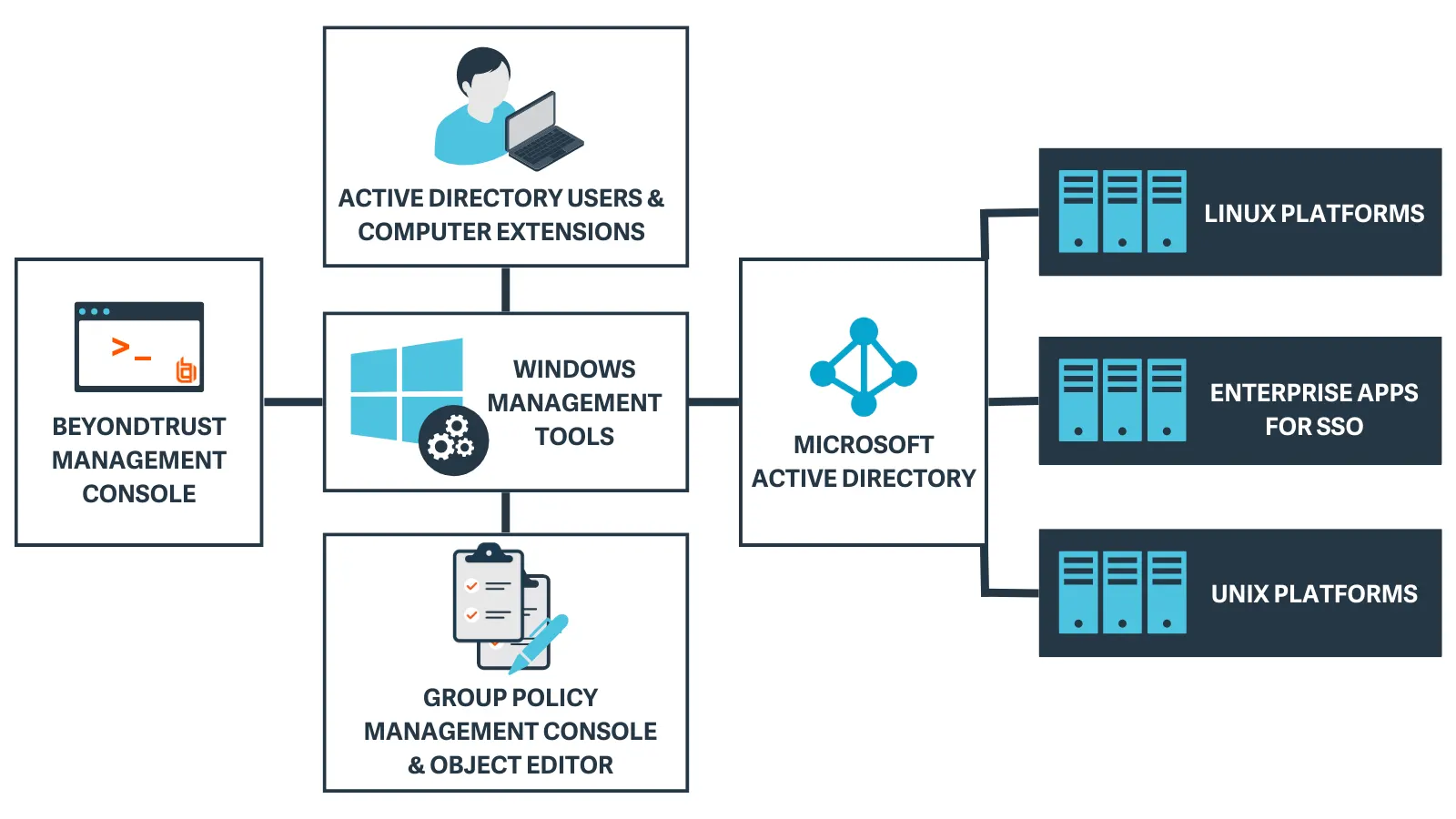
1) During installation of AD Bridge tools on a Windows system, set up guides users to configure the AD environment with plugins to AD Users and Computers (ADUC) and the Group Policy Object (GPO) Editor.
2) Within ADUC, a tab is added to the AD object properties to create identity mappings (Cells) for Unix/Linux endpoints.
3) AD Bridge is installed on Unix/Linux clients so they can join the domain. Group Policy and identity mapping are applied based on the computer object's location within AD.
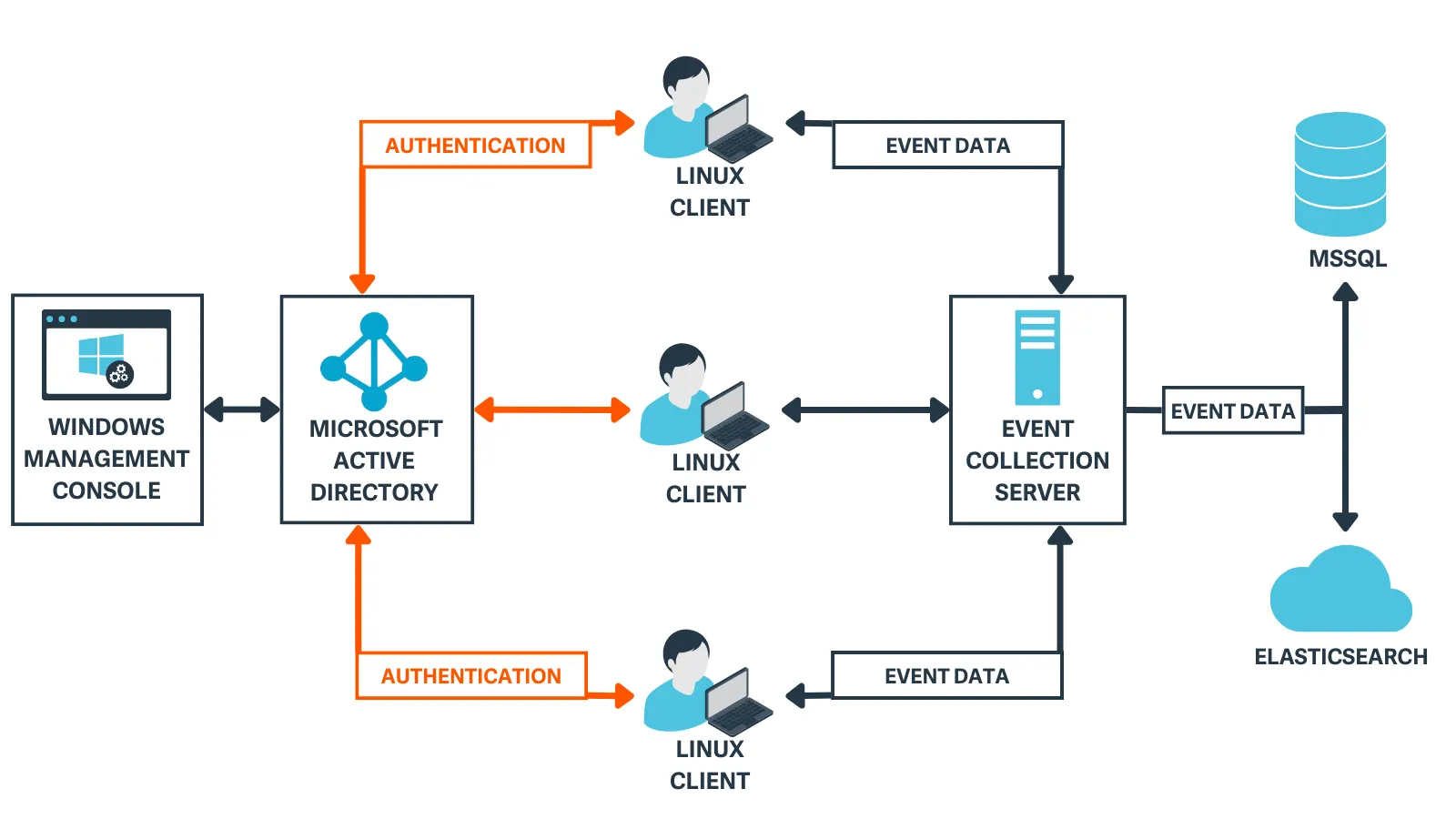
4) When a user authenticates on a Unix/Linux endpoint, AD Bridge searches for the account in AD using LDAP and authenticates with Kerberos, just as a Windows host would.
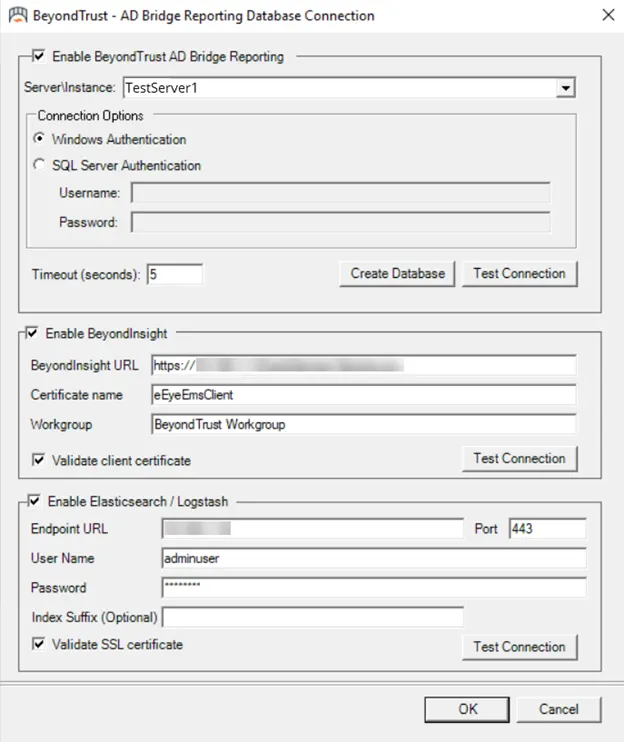
5) Event data is sent to a collection server and forwarded to a local SQL database or ElasticSearch cloud instance.
With easy-to-deploy, out-of-the-box integrations, Active Directory Bridge fits seamlessly into your existing solutions. Improve your overall security posture and workflows with comprehensive integrations that include Entra ID (formerly Azure Active Directory), Elastic search, Samba, Apache, Network File Sharing (NFS), and more.
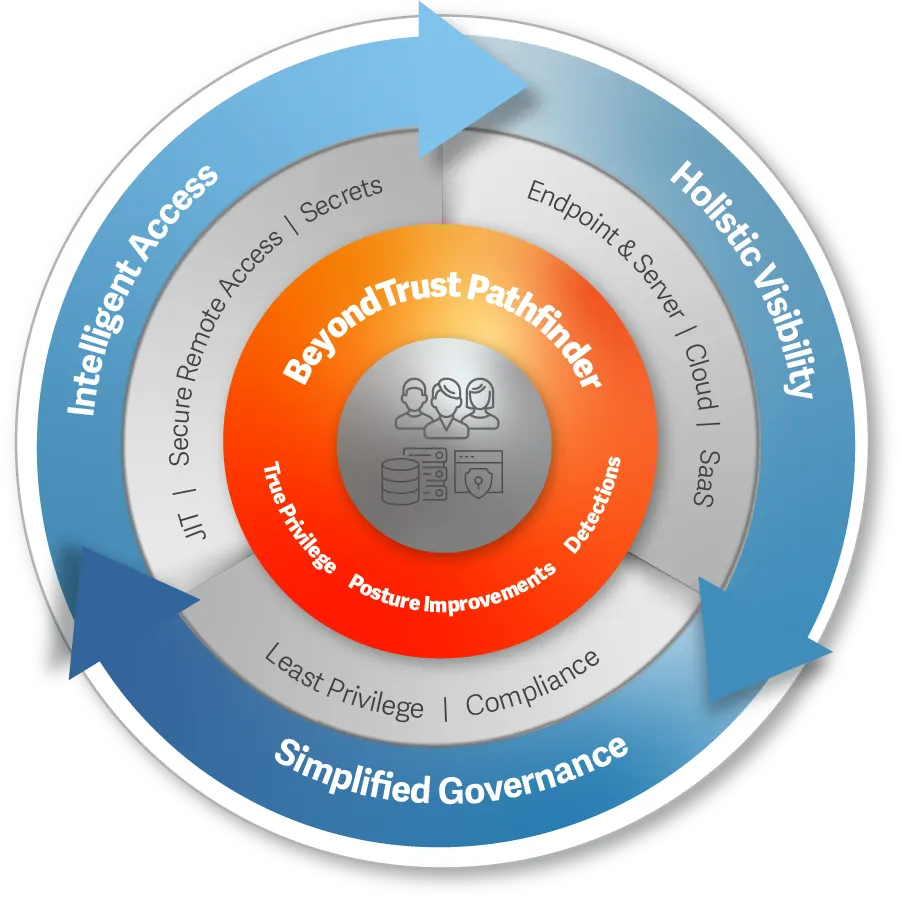
The BeyondTrust Pathfinder Platform unites our best of breed security solutions (including AD Bridge) under a single login, delivering a streamlined experience that enhances operational agility, while also bringing shared, intelligent context across all our products to unlock powerful synergies. With our integrated Pathfinder platform, customers can benefit from the broad and deep capabilities reflected in our multicategory identity security leadership, and leverage the fastest time-to-value via a unified approach to manage their entire identity attack surface.
Security administrators often struggle to enforce Zero Trust and other security policies consistently across the heterogeneous enterprise. AD Bridge simplifies the secure management of access and identities, and the path to implementing zero trust enterprise-wide. Automatically map policy settings and apply them to all systems—regardless of operating system or application.
With AD Bridge, organizations can attain consistent security policies and access controls across the enterprise, and seamlessly transition users from desktops to remote machines or between systems, without requiring credential reentry.
Extending native group policy management across non-Windows platforms enables centralized configuration management, reducing the risk and complexity of managing a heterogeneous environment.
1) During installation of AD Bridge tools on a Windows system, set up guides users to configure the AD environment with plugins to AD Users and Computers (ADUC) and the Group Policy Object (GPO) Editor.
2) Within ADUC, a tab is added to the AD object properties to create identity mappings (Cells) for Unix/Linux endpoints.
3) AD Bridge is installed on Unix/Linux clients so they can join the domain. Group Policy and identity mapping are applied based on the computer object's location within AD.
4) When a user authenticates on a Unix/Linux endpoint, AD Bridge searches for the account in AD using LDAP and authenticates with Kerberos, just as a Windows host would.
5) Event data is sent to a collection server and forwarded to a local SQL database or ElasticSearch cloud instance.
With easy-to-deploy, out-of-the-box integrations, Active Directory Bridge fits seamlessly into your existing solutions. Improve your overall security posture and workflows with comprehensive integrations that include Entra ID (formerly Azure Active Directory), Elastic search, Samba, Apache, Network File Sharing (NFS), and more.
The BeyondTrust Pathfinder Platform unites our best of breed security solutions (including AD Bridge) under a single login, delivering a streamlined experience that enhances operational agility, while also bringing shared, intelligent context across all our products to unlock powerful synergies. With our integrated Pathfinder platform, customers can benefit from the broad and deep capabilities reflected in our multicategory identity security leadership, and leverage the fastest time-to-value via a unified approach to manage their entire identity attack surface.
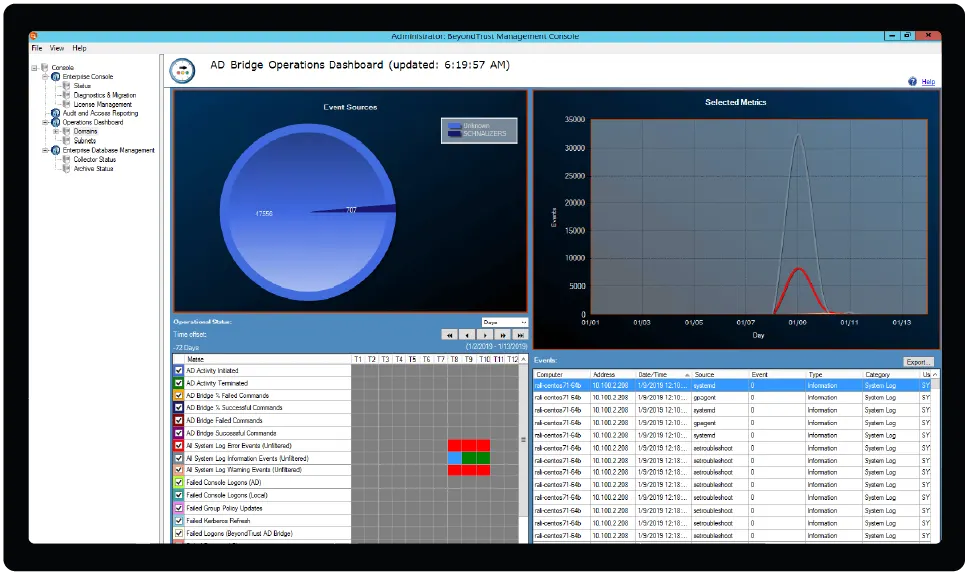
Learn how to extend Active Directory authentication, single sign-on capabilities, and Group Policy configuration management to Unix, Linux, and Mac systems.
The existing infrastructure for AD Bridge 22.3 and later versions provides native support for Entra ID, which means customers won't have to change their infrastructure.
Use AD Bridge's command shell interface to access command lines for network troubleshooting, system diagnostics, or network device support. Learn more about collector configuration and command shell here.
AD Bridge is designed to scale efficiently, handling environments ranging from a few systems to thousands. Its architecture ensures that it can accommodate the growth of your organization without compromising performance or security.
You can find a complete features list, user guides, product release notes, and other technical documentation here.