Identity Attack & Defense: Lessons in Okta Security


Identity Attack & Defense: Lessons in Okta Security
Once again, attacks against privileged users are hitting the headlines with some high-profile breaches—and a warning from Okta that a threat actor is using social engineering to attain access to highly privileged “super admin” roles in Okta customer tenants. While attacks against privileged users are a tale as old as tech, there are important lessons to learn about how modern attacks against identities and identity infrastructure work and, more importantly, how they can be mitigated.
Let’s start by breaking down some of the common Tactics, Techniques, and Procedures (TTPs) that have been observed in recent attacks by threat actors, such as ALPHV, Scattered Spider, LAPSUS$, and others.
Breaking Down the Okta Attack Flow
In recent weeks, there have been multiple reports of coordinated attacks against Okta customers. Here’s how that attack flow works.
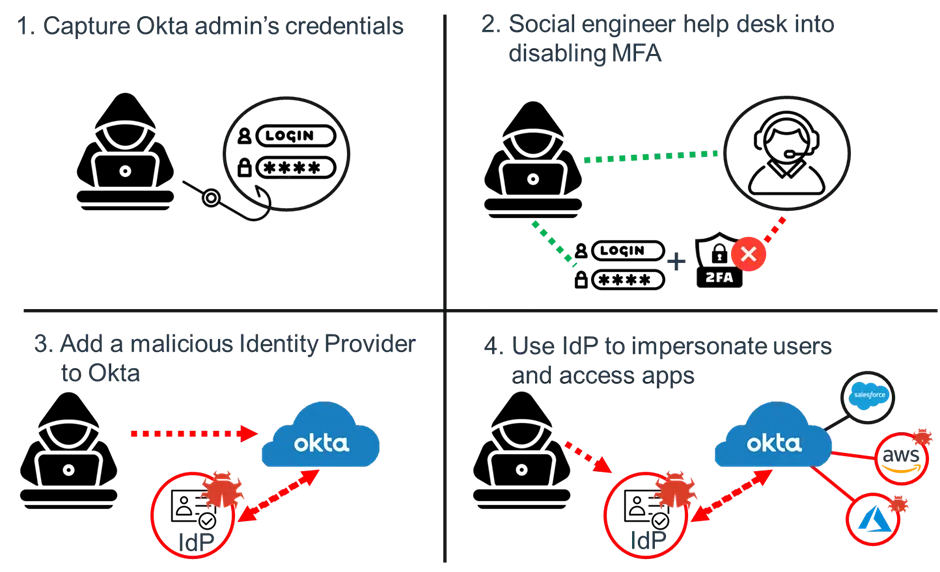
1. Target Super Admins
Attackers leveraging the Okta attack flow generally begin by targeting user accounts with high levels of privilege—specifically, the Super Administrator permissions. The attackers were able to gain the passwords of the privileged user accounts, likely via phishing or device compromise. However, passwords alone are generally not enough to authenticate into the accounts when Multi-Factor Authentication (MFA) is implemented.
2. Socially Engineer the Help Desk
In response to a rising tide of identity attacks, organizations have become much better at protecting accounts using MFA. However, this alone does not stop a determined attacker. Weaker forms of MFA can be phished, subjected to MFA fatigue / MFA bombing, or even to SIM swapping attacks, leaving organizations vulnerable.
Even when stronger phishing resistant MFA, such as FIDO2, are used, attackers are now turning to help desk technicians, who can be socially engineered into resetting authentication on an account. This exploitation of the account recovery process means an attacker armed with some basic information about a user can request the account MFA be reset.
Once the help desk resets the account, the attacker can bypass MFA entirely or enroll a device that is under the attacker’s control as the second factor. In extreme cases, an attacker might even be able to get both the password and the MFA reset by literally talking their way around your security defenses. Threat actors such as LAPSUS$ have successfully used this technique against a range of organizations and accounts.
3. Abuse Identity Federation
Now that the attacker has gained access to a Super Administrator, Org Administrator, or a Custom Admin Role with sufficient privilege, they want to move laterally, elevate privileges, and maintain persistence by establishing their own backdoor into the environment. To achieve this, they abuse identity federation, such as in Okta, by adding in their own malicious identity provider (IdP).
The intent of inbound federation provided by Okta and other vendors is to quickly allow users to sign into apps using the IdP that a part of the business already uses, reducing the friction of having to create and manage new accounts. While this feature makes it easier for organizations to bring together multiple subsidiary companies who might all use different IdPs, but need to access common business apps, it also opens up a wealth of access to an attacker who is able to add their own IdP. This is why the ability to add a new IdP is restricted to the highly privileged super admin accounts targeted in these attacks.
4. Impersonate, Access, and Impact
With an IdP under the attacker’s control now added to Okta using a super admin account, the attackers can impersonate users and gain access to applications downstream in Okta. This is done by configuring their malicious IdP to act as an “impersonation app,” allowing an attacker-controlled account to impersonate any legitimate user account. This allows the attacker to single sign-on (SSO) into applications by posing as any legitimate account.
Because the attacker has compromised the identity infrastructure using inbound federation trust relationships (also known as “Org2Org”), many common breach responses will be ineffective. For example, if you suspect a legitimate user has been compromised and reset their credentials, this will not prevent the attacker from continuing to impersonate them. This is why the ability to identify these types of identity infrastructure risks and attacks as early as possible is critical.
Additional Identity-Based Attack Techniques Observed
Below are a few of the additional identity attack techniques threat actors have recently leveraged.
Use of anonymizing proxy services
As part of recent campaigns, attackers have used residential proxy services. These allow an attacker to anonymize their actual IP address and location by routing traffic through a network that can make them appear to be in a different location. This allows the attackers connections to appear as if they are originating from a location that is close to the user whose account they are targeting.
This tactic allows them to blend in as much as possible and reduces the likelihood of triggering impossible travel or other IP geolocation controls that might prevent or detect their malicious login attempts. In the recent Okta attacks, IP addresses and devices not previously associated with an account were observed in the logs associated with attacker activity.
Cloud Connectors
While this technique has not been called out as widely in the coverage of recent attacks, the abuse of on-prem connector agents for Okta and Azure is another point in the identity infrastructure that has become a key target. Some alleged threat actors involved in recent high-profile attacks have specifically referenced targeting Okta Sync agents.
Okta agents are used to sync account information, including passwords, between Active Directory on-prem and cloud apps. This minimizes user friction, but it also makes the agents a tempting target for attackers seeking to compromise them and capture credentials in bulk.
In a previous blog on how hybrid threats are exploiting digital identities, we discussed how the nation-state threat actors known as Mercury or Mango Sandstorm hunt for Azure Connector agents installed on-prem to extract highly privileged Azure credentials that allow them to take over an entire Azure tenant. This goes to show the impact local administrator privileges can have in helping an attacker move laterally on-prem and exploit endpoints—as well as the agents running on them.
Are these New Threat Techniques?
These kinds of attacks are not new, but they are on the increase. If we look back to the SolarWinds attack of 2020, we can see how the attackers used a similar approach. In that case, the attackers modified trust domains in Azure AD (now known as Microsoft Entra ID) so they could add a new federated Identity Provider (IdP) that was under their control. This enabled them to create a backdoor into Azure that allowed for widespread access.
In other cases, we observed the SolarWinds attackers compromising the credentials of high-privilege on-premise accounts that were synced to Microsoft 365. From there, they were able to exploit cloud apps by adding their own rogue credentials that could be used to exploit legitimate permissions assigned to the cloud app. If you want to learn more about that later technique, our blog on hybrid threats has more information.
Overall, these techniques are very powerful, not only because they can be hard to detect, but also because they can allow the attacker to effectively bypass the multi-factor authentication controls in place. The classic organizational playbooks of resetting passwords and enforcing MFA can’t remediate against compromised identity infrastructure, so it is vitally important to be aware of these techniques and gain visibility around where you may be vulnerable to them.
How can we protect against these identity-based attacks?
Let’s explore the best defenses and mitigation strategies you can set up against the modern identity attacker.
Factor in phishing resistance
Using phishing resistant authentication, such as FIDO2, is highly recommended, especially on any type of privileged account. Remember, not all forms of MFA (Multi Factor Authentication) are equal.
We have seen phone-based MFA present little-to-no defense against threat actors in recent attacks. Even time-based, one-time passwords (OTPs) can be targeted by modern phishing kits or token hijacking attacks.
Sign-in policies and conditional access policies should be in place to ensure that users must re-authenticate from the right device, location, or network to conduct privileged activities.
Implement and Enforce Least privilege
Understand where privileged roles exist and try to limit privileges to just those who absolutely need them. As probably the biggest example of this, does your help desk absolutely need the ability to reset the passwords of a limited number of super admins in Okta?
Often, accounts are granted privileges for a one-time task, such as “adding a new HR app” in Okta, but after the task is completed the privileges are never reviewed or removed. Privilege creep represents a real risk to the business while providing no real value, so review, reduce, and remove privileged access where possible.
Remember, this isn’t just specific to Okta; it is important to have visibility and understanding of privileges across your estate in to proactively reduce risk.
Perform Privilege Audits to Ensure Access is Right-Sized
Help the help desk - review your internal processes and consider “who, why, and how” for processes involving account password or MFA resets that an attacker could exploit. Pay extra attention to accounts with high levels of privilege. These could be technically privileged accounts, like an Okta Super Admin, or privileged accounts in the context of the business, such as the members of the management team.
Often, privileges can be quite subtle, and it will often be assumed that certain roles just need a level of privilege or need to be members of a group, which in turn grants privileges and access to system. It is important to minimize assumptions and ensure that you understand what you are granting and why it is absolutely needed.
Once this is in place it is important to continuously monitor and assess changes in privilege and access to ensure that there isn’t privilege creep, misuse or abuse by an attacker. For example, you might want to know if an Okta Super Admin account is used to create a new privileged account to verify if that is expected legitimate activity or a sign of compromise.
How can BeyondTrust help address identity security threats?
BeyondTrust Identity Security Insights® is built to help you gain a centralized view of identities, accounts, entitlements, and privileged access across your IT estate. The solution helps you proactively reduce risk and detect potential or in-progress threats resulting from compromised identities and privileged access misuse.
When it comes to these specific identity attack vectors, we have multiple detections and recommendations in place that automatically provide you with insights into the techniques being used in these recent attacks.
Here are a few examples of the detections and recommendations Identity Security Insights provides:
Detection - New Okta sync agent registered
Detection - Okta user changed critical identity infrastructure configuration immediately after suspicious MFA manipulation on their account
Detection - An MFA factor was added and then removed within 6 months to this account
Detection - A new identity provider was enrolled within your Okta environment
Detection - An admin Okta account has multiple phone numbers or physical devices that are active MFA factors for the account
Detection - An account had all of its MFA factors reset from an anomalous IP/country
Detection - An admin Okta account had all of its MFA factors reset
Detection - Okta user performed administrative action using a proxy
Detection - An Okta admin login from an account without MFA
Detection - Attacker may have brute forced the password for an Okta user
Detection - Okta user self-reported suspicious activity
Detection - Okta session hijacking
Detection - Identified an Okta Password Spray including a successful auth
Detection - Okta user with some level of admin access uses MFA vulnerable to SIM swapping
Detection - Okta admin privileges were assigned to an entire group
Detection - Okta admin privileges were granted to a user
Recommendation - This user has multiple phone numbers or physical devices that are active MFA factors for the account
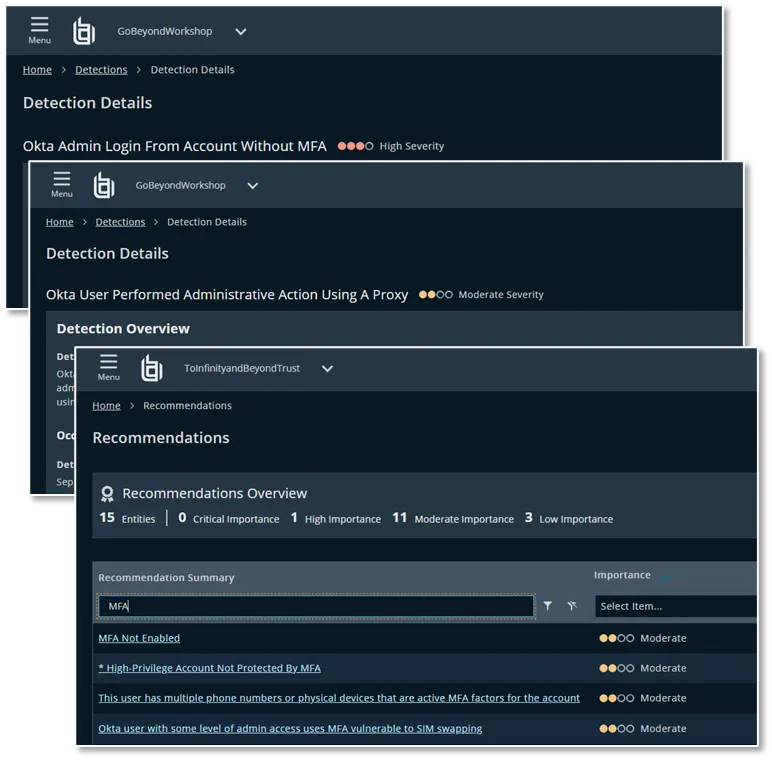
These detections and recommendations allow you to detect active risks such as admin users having MFA removed or new IdPs being added into Okta as well as proactive recommendations of when accounts are vulnerable to attack techniques due to weak MFA or misconfigurations.
In addition to this, Identity Security Insights provides you with visibility into other accounts and privileges associated with a digital identity. This allows you to understand where risk exists and provide greater visibility into weaknesses or attacks on other accounts associated with that identity that might indicate an attacker is targeting a user on multiple fronts.
Poising your organization to withstand identity-based threats
With a rising number of identity security attacks that exploit the gaps in visibility between Identity Access Management tools and traditional security tooling, it is vital to start thinking about how you to protect your organization. Identities, especially those with significant privileges, are at the heart of modern attacks as attackers turn to identities and social engineering rather than exploits and malware.
Navigating the rising challenges of identity security not only requires tools that can help you gain visibility and control of identities and privileges, reduce risk, and detect threats; it also requires an organizational shift to bridge the worlds of identity, access, and security. Super Admins in Okta may be hitting the headlines today, but they are only one part of a broader ecosystem we need to protect.
If you have any questions about what you have read in this blog, or just want to understand more about the world of Identity Security, get in touch today.