

Using Unified Endpoint Management (UEM) & Endpoint Security to lay the Groundwork for Digital Transformation


Using Unified Endpoint Management (UEM) & Endpoint Security to lay the Groundwork for Digital Transformation
Come winter, COVID lockdowns, or digital transformations, business must still manage and secure their multitude and varied assortment of enterprise devices. In my recent webcast: Pathways to Unified Endpoint Management (UEM), I suggest a strategy for choosing from a menu of controls to best meet the requirements.
BYOD and WFH Security Challenges
Let’s start by perusing some common challenges in the current IT environment that are driving most companies’ requirements, and probably should influence yours:
Most users, or at least most information workers, are working from home (WFH)
The endpoint environment contains Windows, Macs, iOS, and Android devices, at the very least. Security planners may also be required to look for synergies between client device, server workloads, and other endpoint management or security solutions
The number of users working in the bring your own device (BYOD) is increasing
Many users’ WFH environments have security deficiencies, such as all-in-the-family device sharing, password sharing, insecure WIFI connections, and more
Displaced and disconnected from secure corporate networks, users are forced to learn new tools and technologies
The IT service desk becomes over-burdened in trying to support so many devices and scenarios
Due to the increase in BYOD and other endpoint support challenges, more PC users are over-provisioned with local admin privileges
Unified Endpoint Management and Security Requirements
To solve the security challenges discussed above, businesses need tools that meet the following requirements:
Facilitate a low-friction, least privilege user experience
Offer or integrate with digital workspace tools via Virtual Desktop Interface (VDI) images and provisioning required applications
Manage mobile devices through native IOS and Android controls, and provide modern PC management via the latest Windows, Mac, and Chrome OS APIs
Collect or aggregate events and report analytics from users, apps, and devices
Simplify compliance and audit reporting
Control costs
Integrate with endpoint protection platform (EPP), endpoint detection and response (EDR), and other security tools to better facilitate incident response, backup, and recovery
Endpoint and Network Security Interdependencies
Network security tools such as Extended Detection and Response (XDR) can help security teams plug visibility gaps by reporting suspicious or anomalous behavior on guest devices or BYOD devices, which lack agents for directly monitoring the endpoint.
Network security solutions can also team up with identity management systems and provide zero trust authentication to protect against any compromise of the endpoints. Zero trust authentication should be risk-based and continuous. For that purpose, network and identity-based security systems need to obtain device context, or health assessments, from endpoint security systems.
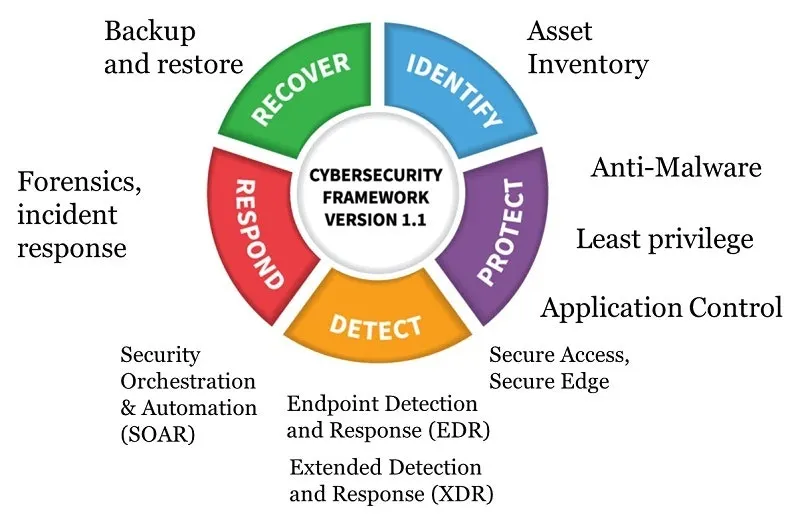
As shown in the figure above mapping the NIST Cybersecurity Framework (CSF) model to endpoint security, we have defensive opportunities in all 5 of NIST’s control categories. In practice, however, businesses tend to emphasize (i.e., spend money on) one category over others. Often, that category is “Detect.” But a detective emphasis for endpoint security risks ultimately becomes too reactive. It may be too late to stop a breach.
The Preventative Versus Detective Tradeoff
Organizations under security pressure must control the threats and risks to endpoints. If they lack effective preventative controls, they will need to invest more into tools to detect, respond, and recover from cyberattacks. Because they experience many more incidents and alerts without effective preventative controls, they will also need more staff to operate tools like EDR systems. And they’ll probably need a larger security operations center (SOC).
Removing Admin Rights
In their Guide To Endpoint Privilege Management, BeyondTrust points out that the majority of Windows vulnerabilities could be rendered harmless by removing local admin privileges for users. However, absent enterprise-grade endpoint privilege management software, trying to accomplish this may imperil productivity, especially in the WFH environment. What if a user of company-provided device needs to install a printer, reset the time, or save a file on a USB stick for business reasons?
Anecdotal experience suggests that about 1/3 of the organizations we run into have successfully removed local admin rights from company-provided devices, another 1/3 would like to, but haven’t been able to complete the process, and the final 1/3 won’t or can’t remove the privileges.
Fortunately, endpoint privilege management software makes it easier than you might think to remove blanket PC admin privileges, while still providing a way to temporarily and selectively enable the user to perform individual admin tasks, like changing the time, when needed.
Foundational Security for Digital Transformation, BYOD, & WFH
At the end of the day, endpoint security teams must scope out their use cases and define specific requirements. In your strategy planning:
Consider a UEM solution that is strong on managing both PCs and mobile devices, so as to get a good breadth of coverage
Make the case for Preventative Controls from endpoint privilege management solutions, like least privilege administration and application control wherever possible. This approach has the rare quality of combining risk and cost-reduction
Deploy EDR or managed detection and response (MDR) solutions as required to deal with any threats that cannot be proactively prevented
Cover remaining endpoint security visibility gaps through network security solutions, and be aware of the interdependencies between network security, endpoint security, and identity management in zero trust, as well as secure access, and secure edge (SASE) architectures.
For a deeper dive on this topic, check out my on-demand webinar: Pathways to Unified Endpoint Management (UEM).