Applying Access Control Lists in the Cloud


Applying Access Control Lists in the Cloud
What is an Access Control List?
An Access Control List (ACL) provides a security mechanism to define who or what has access to your assets, buckets, network, storage, file, etc. ACLs represent a permissions model for the object to allow, block, and conditionally grey list access to an asset.
Organizations apply access control lists across their networked infrastructure—both on-premise and in the cloud. This blog will focus on how to use ACLs in the cloud to apply the principle of least privilege and segmentation. They are also an important tool for enabling a zero trust security posture for cloud, hybrid, and on premise installations.
How to use Access Control Lists to Enforce Least Privilege in the Cloud
In the cloud, an ACL consists of one or more entries that explicitly allows or denies access based on a specific account, IP address, port, or other attribute. An entry gives a specified entity the ability to perform specific actions and even govern basic communications.
Each entry consists of two pieces of information:
Permission: which defines what actions can be performed (for example, read, write, create, delete).
Scope: which defines what can perform the specified actions (for example, a specific IP address or account).
As an example, suppose you have an AWS S3 storage bucket for which you need to restrict access. For the S3 bucket to operate correctly, your business needs multiple identities with various levels of security for appropriate access. While one identity may be granted read access, another may only have maintenance functions. For such a scenario, your ACL would potentially consist of two entries:
Entry 1 gets “Read” permission to a scope of authorized accounts that can view the data.
Entry 2 gets “Write” and/or “Delete” permissions to the scope of accounts responsible for maintenance. The files themselves would not be available to open, just maintain.
This process results in a list of ACLs used to restrict access on a “need to know” basis for the data contained in the storage bucket. While my above example is simplistic for an enterprise cloud-based application, it sets the foundation for our discussion around ACLs, the protection of assets in the cloud, and application intercommunications.
Cloud Security Benefits of ACLs
Consider the sample network architecture below for a multi-tier enterprise web application:
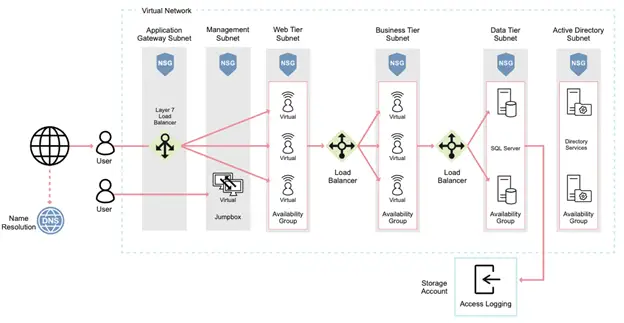
In every connection between tiers, and within every Availability Group, Access Control Lists should be present to prevent inappropriate network and access communications. This includes ACLs for preventing:
Network traffic from jumping over tiers, without communicating through the appropriate assets
Connections from the Internet from directly communicating with any layer directly, besides the load balancer
Inappropriate nations or known hostile IP addresses from accessing the application by adding geolocation (IP and geolocation services) ACLs to the load balancer itself
Inappropriate communications within a tier to prevent lateral movement or inappropriate application-to-application access.
Communications from any layer attempting to communicate with the virtual environment management resources or virtual network.
With these in mind, all network traffic should always follow a predictable route. Cloud operations teams and security professionals should monitor any inappropriate activity via alerts, logs, and events for potential indicators of compromise. If any asset is compromised, a threat actor will typically attempt to deviate from the established architecture and acceptable network traffic to compromise the cloud environment. However, sometimes flaws in the web application itself are responsible for disclosing or leaking data that must be remediated.
Comparing ACLs vs RBAC
While this discussion primarily focuses on Access Control Lists, Role-Based Access Controls (RBAC) often create confusion during a typical implementation. Conceptually, ACLs and RBACs are similar, but there are fundamental differences important to understand.
RBAC is an approach to restricting system access to authorized users based on an identity, account, or groups of accounts--typically represented together as a role. This approach applies policy-neutral access-control, defined around roles and privileges.
The components of RBAC, such as role-permissions, account-role, and role-role relationships, make it easier to perform identity assignments in comparison to ACL’s, which might be assigned access based on something granular, like an IP address or a single account.
When to use RBAC versus ACLs?
Any well-developed cloud application needs both ACLs and RBAC. ACLs will help protect and define appropriate intercommunications, whereas RBAC can define identity access to the system and its data. To employ a simple analogy, one is the plumbing (ACLs) and the RBAC represents the user experience (shower faucet). However, let’s look at the difference in specific use cases for each.
Identities and applications are instantiated at a conceptually higher level than ACLs. Thus, access control lists are primarily indexed at the asset, trait, setting, and attribute layer. An ACL is usually associated with a single entry—not groups. When access and network traffic should always follow a predefined route and originate only from specific sources, access control lists are your first and best security tool for restricting access in the cloud. If you consider the cloud has no true perimeter, only certain TCP/IP addresses are exposed to the Internet, and traditional network architectures are virtualized, ACLs help maintain these conceptual boundaries and allow complex architectures far beyond what was ever possible on-premise to maintain security.
Organizations typically rely on RBACs to implement access control when a group of identities and their associated accounts are the primary method of defining access. RBAC is therefore associated with support and maintenance teams, or even end users, when access is need at various levels in an architecture. As a security best practice, these should be ephemeral, monitored, and may just in time characteristics to adhere to the tenants of zero trust.